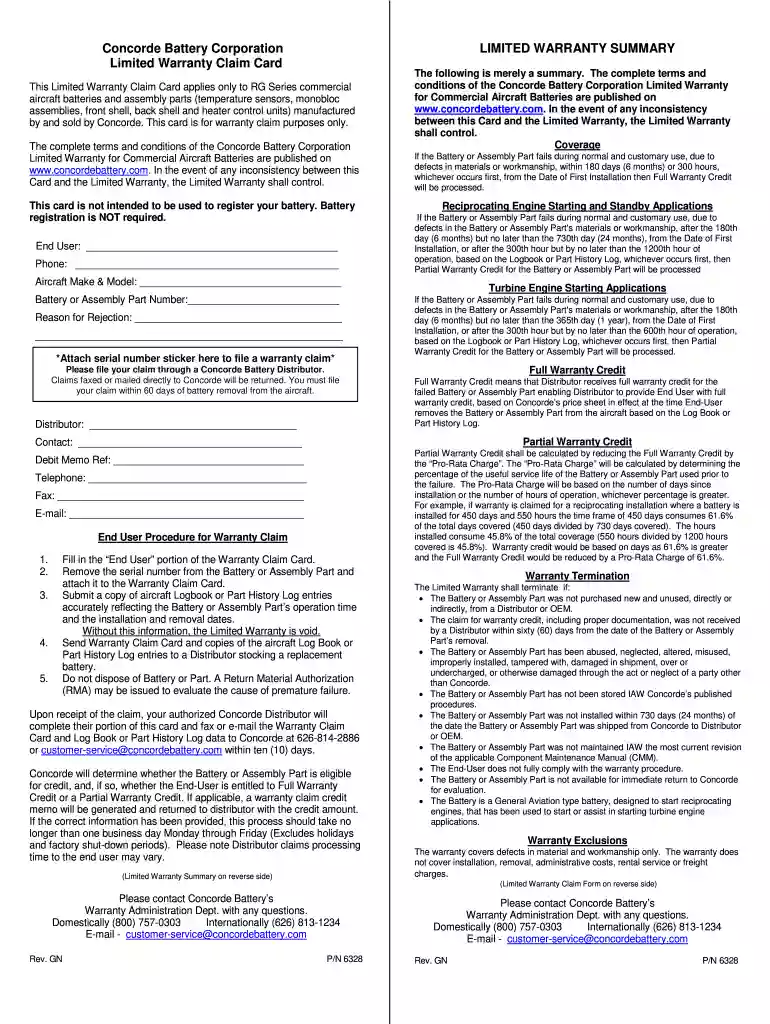
amaron battery warranty card download Preview on Page 1

Battery warranty card 2026

Here's how it works

  • 01. Edit your amaron battery warranty card download online

    Type text, add images, blackout confidential details, add comments, highlights and more.

  • 02. Sign it in a few clicks

    Draw your signature, type it, upload its image, or use your mobile device as a signature pad.

  • 03. Share your form with others

    Send amaron warranty card via email, link, or fax. You can also download it, export it or print it out.

How to use or fill out battery warranty card with our platform

Form edit decoration
9.5
Ease of Setup
DocHub User Ratings on G2
9.0
Ease of Use
DocHub User Ratings on G2
  1. Click ‘Get Form’ to open the battery warranty card in the editor.
  2. Begin by filling in the 'End User' section with your name and contact information. This is crucial for processing your claim.
  3. Attach the serial number sticker from the Battery or Assembly Part to the designated area on the card. This step is essential for validating your warranty claim.
  4. Provide details about your aircraft, including the Make & Model and Battery or Assembly Part Number. Accurate information here helps expedite your claim.
  5. In the 'Reason for Rejection' section, clearly state why you are filing a claim. This assists in determining eligibility for credit.
  6. Ensure you have a copy of your aircraft Logbook or Part History Log ready, as this documentation is necessary to support your claim.
  7. Once completed, submit the Warranty Claim Card along with all required documents to a Concorde Battery Distributor within 60 days of battery removal.

Start using our platform today to easily fill out and manage your battery warranty claims online for free!

be ready to get more

Complete this form in 5 minutes or less

Security and compliance

At DocHub, your data security is our priority. We follow HIPAA, SOC2, GDPR, and other standards, so you can work on your documents with confidence.

amaron battery warranty card image

WARRANTY ADMINISTRATION

Oct 2, 2024 Important: A copy of the battery test result printout and the job card must be returned with each battery requested by the Warranty Parts CenterRead more

Learn more
MILWAUKEE WARRANTY

The warranty period for V-technology V18 LITHIUM-ION Battery Pack (with the serial number prefix E95) is one (1) year. Warranty Registration is notRead more

Learn more
Warranty Troubleshooting

Oct 31, 2024 Home - Support - Activate Warranty in the menu. Serial Number: enter the number on your device. Product Name: select either the Delta ProRead more

Learn more
If you believe that this page should be taken down, please follow our DMCA take down process here