Sentinel benefits reimbursement claim form 2025

Get Form
household annual Preview on Page 1

Here's how it works

01. Edit your household annual online
Type text, add images, blackout confidential details, add comments, highlights and more.

02. Sign it in a few clicks
Draw your signature, type it, upload its image, or use your mobile device as a signature pad.

03. Share your form with others
Send income annual via email, link, or fax. You can also download it, export it or print it out.

How to use or fill out sentinel benefits reimbursement claim form with our platform

Form edit decoration
9.5
Ease of Setup
DocHub User Ratings on G2
9.0
Ease of Use
DocHub User Ratings on G2
  1. Click ‘Get Form’ to open the sentinel benefits reimbursement claim form in the editor.
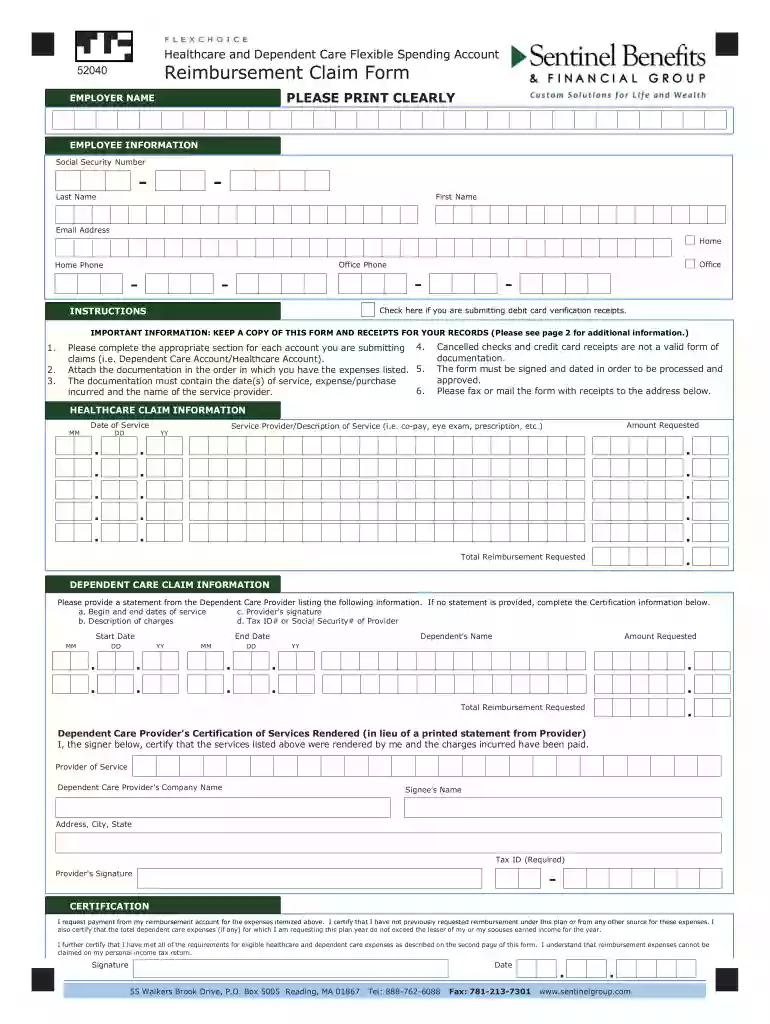
  2. Begin by filling in your employer name and employee information, including your Social Security Number, last name, first name, email address, and phone numbers. Ensure all details are printed clearly.
  3. If applicable, check the box for debit card verification receipts. This helps streamline your submission process.
  4. Complete the Healthcare Claim Information section by entering the date of service, amount requested, and a brief description of the service provided. Attach any required documentation in order.
  5. For Dependent Care Claim Information, provide a statement from your dependent care provider or complete the certification section if no statement is available. Include necessary details such as start and end dates of service.
  6. Finally, sign and date the form to certify that all information is accurate before submitting it via fax or mail to the specified address.

Start using our platform today for free to simplify your document editing and claims process!

be ready to get more

Complete this form in 5 minutes or less

Get form

Got questions?

We have answers to the most popular questions from our customers. If you can't find an answer to your question, please contact us.
Contact us
Ans: To claim reimbursement under your health insurance policy, you need to first inform your insurance company about the hospitalization within the specified timeframe and pay the hospital bills out-of-pocket at the time of discharge.
Follow the steps given below to file a reimbursement health insurance claim: Step 1: Inform the Insurance Company. Step 2: Obtain Treatment. Step 3: Pay the Hospital Bill. Step 4: Collect All Your Documents. Step 5: Fill up the Claim Form. Step 6: Submit All Documents to the Insurance Company.
For the business to verify that the expense was actually work-related, its important to include all essential information about the expense on your reimbursement form: Name of product or service. Individual item or line cost. Total cost. Payment method (i.e., cash, credit card, etc.) Date purchased. Explanation of purchase.
Sentinel Contact Information (Reimbursement Accounts) Sentinel Service Center: (888) 762-6088 - open Monday-Friday, 8:00am 6:00pm EST. Participant Web Portal. Visit .sentinelgroup.com. Select I am an Individual on the left side of the page. From the Login drop-down menu choose FSA, HSA, HRA, Commuter Accounts
What Is Reimbursement Claim in Health Insurance? Reimbursement claims are insurance claims wherein you pay for your hospital bills after your treatment and then submit the relevant documents to your insurance provider for a pay out as per the policy coverage.
be ready to get more

Complete this form in 5 minutes or less

Get form

People also ask

How to submit reimbursement claims? STEP 1: Notify us in advance of your upcoming claim. STEP 2: Upload your documents online. STEP 3: Await confirmation on completeness of documents. STEP 4: Send hard copies of your claim documents.

sentinel benefits