Sarah pyle intensity 2026

Get Form
sarah pyle academy Preview on Page 1

Here's how it works

01. Edit your sarah pyle academy online
Type text, add images, blackout confidential details, add comments, highlights and more.
02. Sign it in a few clicks
Draw your signature, type it, upload its image, or use your mobile device as a signature pad.
03. Share your form with others
Send it via email, link, or fax. You can also download it, export it or print it out.

How to use or fill out sarah pyle intensity with our platform

Form edit decoration
9.5
Ease of Setup
DocHub User Ratings on G2
9.0
Ease of Use
DocHub User Ratings on G2
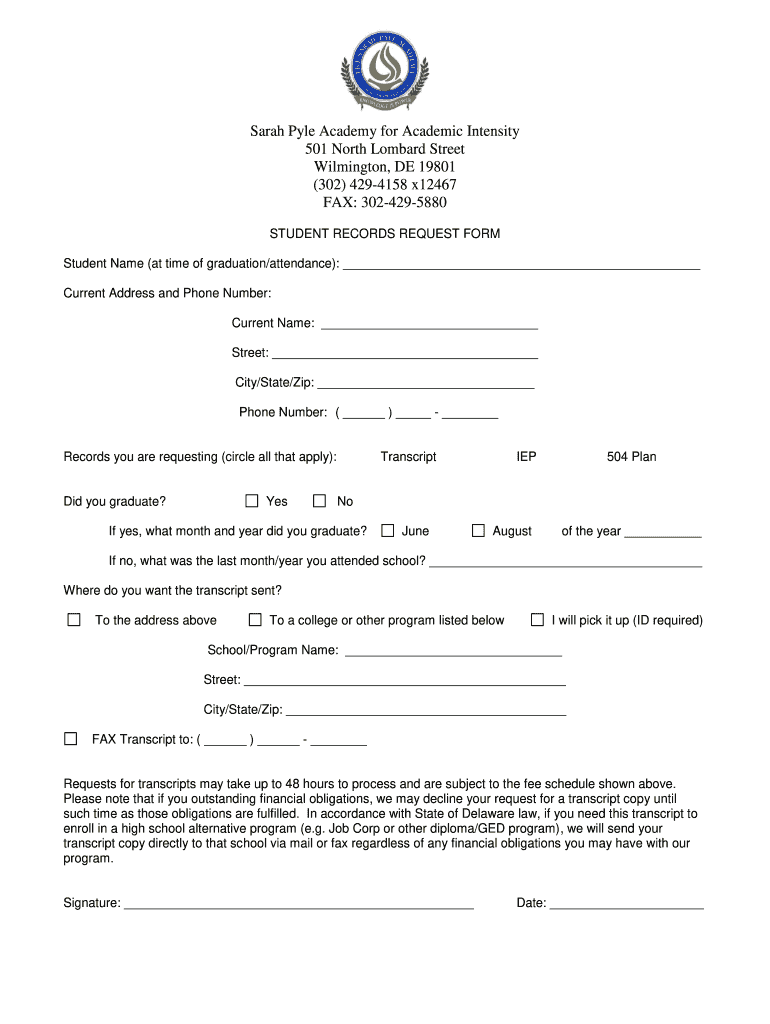
  1. Click ‘Get Form’ to open the sarah pyle intensity document in the editor.
  2. Begin by entering your name at the time of graduation or attendance in the designated field.
  3. Fill in your current address and phone number, ensuring all details are accurate for effective communication.
  4. Indicate your current name and circle the records you are requesting, such as transcripts or IEPs.
  5. If you graduated, specify the month and year; if not, provide the last month and year you attended school.
  6. Choose where you want your transcript sent by selecting one of the options provided, including mailing it to a college or picking it up in person.
  7. Complete any additional fields required for sending your transcript, such as school/program name and fax number if applicable.
  8. Finally, sign and date the form to validate your request before submitting it through our platform.

Start using our platform today to streamline your document editing and form completion process for free!

be ready to get more

Complete this form in 5 minutes or less

Get form

Got questions?

We have answers to the most popular questions from our customers. If you can't find an answer to your question, please contact us.
Contact us

Yes, you can use DocHub for signing any business and private paperwork, including your sarah pyle intensity. All electronic signatures you generate with our tool are legally binding and court-admissible, as DocHub complies with standards required by ESIGN and UETA. Save your accomplished paperwork with a detailed Audit Trail if necessary.

If you are using Chrome, there are two straightforward methods to modify your sarah pyle intensity online. First, go to the DocHub site, add your document, and modify it using our toolbar. You can also set up our Chrome extension and modify any document by dragging and dropping it in your web browser tab.

Security and compliance

At DocHub, your data security is our priority. We follow HIPAA, SOC2, GDPR, and other standards, so you can work on your documents with confidence.

Learn more
ccpa2
pci-dss
gdpr-compliance
hipaa
soc-compliance
be ready to get more

Complete this form in 5 minutes or less

Get form