Wageworks salary redirection form 2026

Get Form
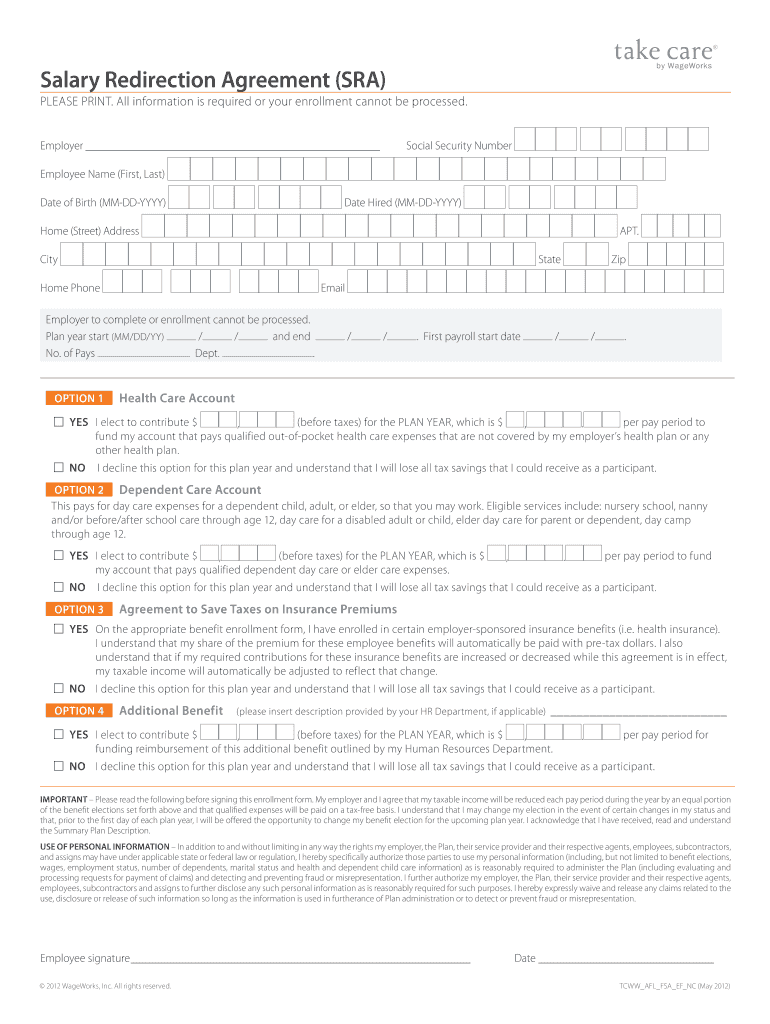
wageworks salary redirection form Preview on Page 1

Here's how it works

01. Edit your form online
Type text, add images, blackout confidential details, add comments, highlights and more.
02. Sign it in a few clicks
Draw your signature, type it, upload its image, or use your mobile device as a signature pad.
03. Share your form with others
Send it via email, link, or fax. You can also download it, export it or print it out.

How to use or fill out wageworks salary redirection form with our platform

Form edit decoration
9.5
Ease of Setup
DocHub User Ratings on G2
9.0
Ease of Use
DocHub User Ratings on G2
  1. Click ‘Get Form’ to open the wageworks salary redirection form in the editor.
  2. Begin by entering your employer's name and your Social Security Number. Fill in your full name, date of birth, and date hired to ensure accurate identification.
  3. Provide your home address, including street, apartment number (if applicable), city, state, and zip code. This information is crucial for correspondence.
  4. Indicate the plan year start and end dates along with the number of pays. This section helps define the duration of your salary redirection.
  5. For each option (Health Care Account, Dependent Care Account, Insurance Premiums), select 'YES' or 'NO' based on your election. If you choose 'YES', specify the contribution amounts before taxes for both the plan year and per pay period.
  6. Read through the important information regarding tax savings and personal information usage before signing. Ensure you understand all terms outlined in this section.
  7. Finally, sign and date the form to complete your submission. Make sure all required fields are filled out to avoid processing delays.

Start using our platform today to easily fill out your wageworks salary redirection form for free!

be ready to get more

Complete this form in 5 minutes or less

Get form

Got questions?

We have answers to the most popular questions from our customers. If you can't find an answer to your question, please contact us.
Contact us
If you havent registered online yet, please do so today To register, just visit .wageworks.com and click Log in / Register and select Employee Registration. Youll need to answer a few simple questions and create a username and password.
(NASDAQ: HQY) (HealthEquity or the Company) today completed its acquisition of WageWorks, Inc. , (NYSE: WAGE) (WageWorks), to become a leading administrator of health savings accounts (HSAs) and complementary consumer-directed benefits (CDBs), including flexible spending and health reimbursement arrangements
Member online account access: a. Go to .wageworks.com, click Log In/Register, Employee Log In, Click register at the top of the box. The employees last 4 digits of their SSN# is the ID code.
Visit .wageworks.com Log In/Register at the top rightEmployee Registration. Verify your personal information and create a username and password. (Your ID Code will be the last four digits of your Employee ID.) Once registered, you will have access to your account 24 hours a day, seven days a week.
Salary Redirection Agreement means an agreement between the Participant and the Employer under which the Participant agrees to reduce his Compensation or to forego all or part of the increases in such Compensation and to have such amounts contributed by the Employer to the Plan on the Participants behalf.
be ready to get more

Complete this form in 5 minutes or less

Get form