Type text, add images, blackout confidential details, add comments, highlights and more.
02. Sign it in a few clicks
Draw your signature, type it, upload its image, or use your mobile device as a signature pad.
03. Share your form with others
Send acog full form via email, link, or fax. You can also download it, export it or print it out.
How to use or fill out acog form with our platform
Ease of Setup
DocHub User Ratings on G2
Ease of Use
DocHub User Ratings on G2
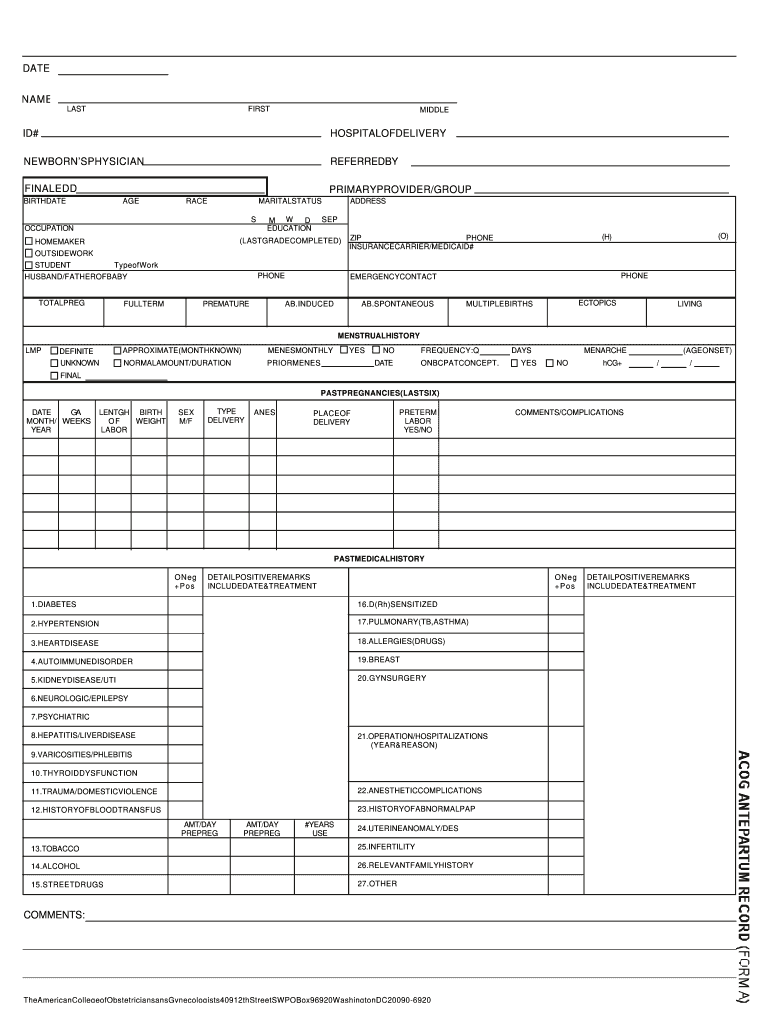
Click ‘Get Form’ to open the acog form in the editor.
Begin by entering the date at the top of the form. This is essential for record-keeping.
Fill in your personal information, including your name, ID number, and hospital of delivery. Ensure accuracy as this data is crucial for medical records.
Complete the sections regarding your newborn's physician and any referrals. This helps streamline communication between healthcare providers.
Provide details about your pregnancy history, including total pregnancies and any complications. Use checkboxes where applicable for clarity.
In the medical history section, indicate any past conditions or treatments. This information is vital for your healthcare team.
Review all entries for completeness and accuracy before submitting. Our platform allows you to save progress and return later if needed.
Start using our platform today to fill out your acog form easily and efficiently!
ACOG Form pdfAcog obstetric medical history formACOG Guidelines free downloadACOG prenatal record pdfList of ACOG Practice BulletinsACOG loginWhat is ACOG in pregnancyACOG journal
Security and compliance
At DocHub, your data security is our priority. We follow HIPAA, SOC2, GDPR, and other standards, so you can work on your documents with confidence.
ABSTRACT: Accurate dating of pregnancy is important to improve outcomes and is a research and public health imperative. As soon as data from the lastRead more
Cookie consent notice
This site uses cookies to enhance site navigation and personalize your experience.
By using this site you agree to our use of cookies as described in our Privacy Notice.
You can modify your selections by visiting our Cookie and Advertising Notice.