the repa scotton printable Preview on Page 1

The repa scotton printable 2026

Here's how it works

  • 01. Edit your form online

    Type text, add images, blackout confidential details, add comments, highlights and more.

  • 02. Sign it in a few clicks

    Draw your signature, type it, upload its image, or use your mobile device as a signature pad.

  • 03. Share your form with others

    Send it via email, link, or fax. You can also download it, export it or print it out.

How to use or fill out the repa scotton printable with our platform

Form edit decoration
9.5
Ease of Setup
DocHub User Ratings on G2
9.0
Ease of Use
DocHub User Ratings on G2
  1. Click ‘Get Form’ to open the repa scotton printable in the editor.
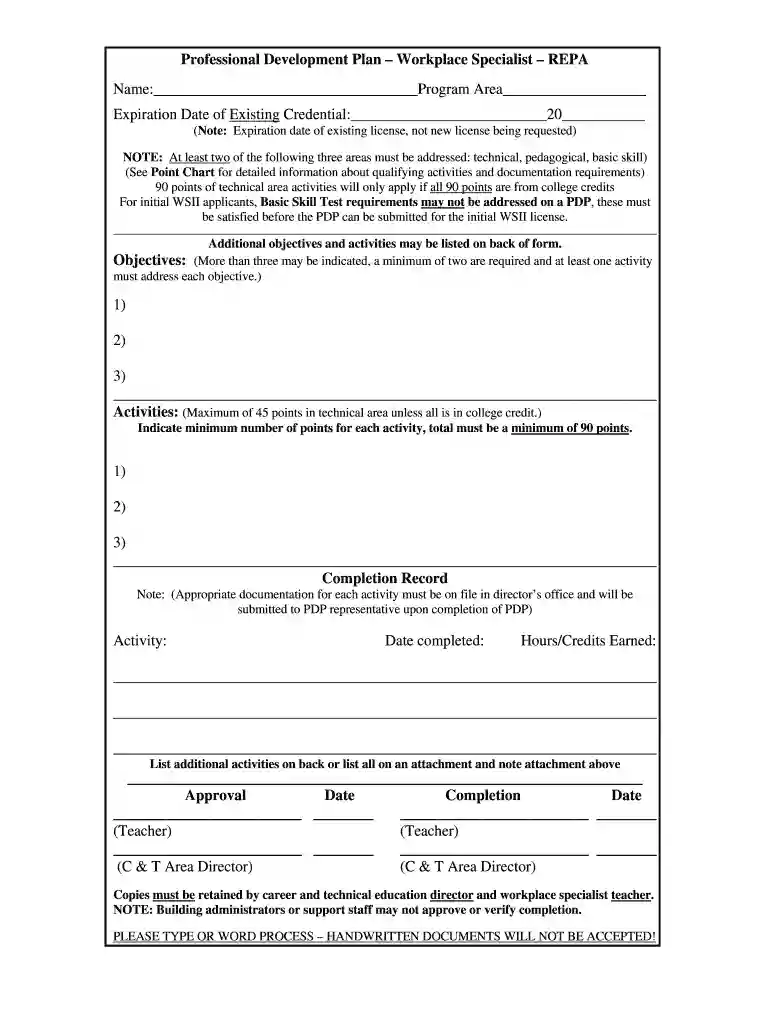
  2. Begin by entering your name and program area at the top of the form. Ensure that all information is accurate as it will be used for official purposes.
  3. Fill in the expiration date of your existing credential. Remember, this should reflect your current license's expiration, not the new one you are requesting.
  4. Address at least two of the three required areas: technical, pedagogical, and basic skill. Refer to the Point Chart for guidance on qualifying activities and documentation requirements.
  5. List your objectives in the designated section. You must indicate a minimum of two objectives, ensuring that at least one activity corresponds to each objective.
  6. In the activities section, specify each activity along with its corresponding points. Ensure that you meet the minimum requirement of 90 points total.
  7. Complete the Completion Record by documenting each activity's completion date and hours/credits earned. Make sure appropriate documentation is filed as noted.
  8. Finally, ensure all signatures are obtained in the Approval section before submitting your completed form.

Start using our platform today to easily fill out your repa scotton printable for free!

be ready to get more

Complete this form in 5 minutes or less

Got questions?

We have answers to the most popular questions from our customers. If you can't find an answer to your question, please contact us.

Sure, you’ll find numerous applications for this on the web. However, if you need to eSign your the repa scotton printable without installing additional software, DocHub is the optimum choice you can make. This robust editor works on mobile devices just as on desktops. Open our editor in your preferred internet browser, register or log in to your account, and start managing your paperwork.

You can complete and sign your the repa scotton printable online, even on a tight deadline. All you need to access top-notch editing instruments on any device is a DocHub account, which you can register within a few moments. After you sign up, add your file or find what you are looking for in our catalog, complete it utilizing the editing instruments you want, and put your electronic signature on it at the end.

Security and compliance

At DocHub, your data security is our priority. We follow HIPAA, SOC2, GDPR, and other standards, so you can work on your documents with confidence.

Related links

3D Printing of Scaffolds for Tissue Regeneration Applications

by AV Do 2015 Cited by 1171 In this review, we discuss the criteria for printing viable and functional scaffolds, scaffolding materials, and 3DP technologies used to print scaffolds forRead more

Learn more
Class Knox

that is printable. Please keep in touch! Class Correspondent: David Bates said Carol Scotton, associate professor of economics and business and management.Read more

Learn more
If you believe that this page should be taken down, please follow our DMCA take down process here