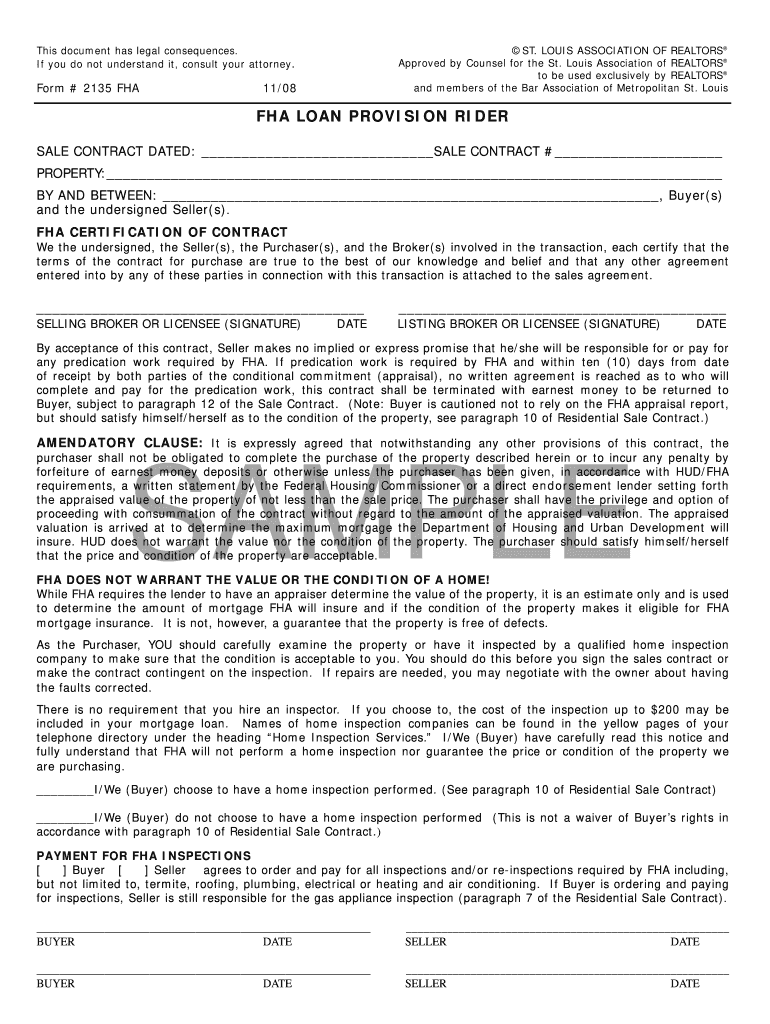
Form 2135-2026

Get Form
form 2135 Preview on Page 1

Here's how it works

01. Edit your form 2135 online
Type text, add images, blackout confidential details, add comments, highlights and more.
02. Sign it in a few clicks
Draw your signature, type it, upload its image, or use your mobile device as a signature pad.
03. Share your form with others
Send it via email, link, or fax. You can also download it, export it or print it out.

How to use or fill out form 2135 with our platform

Form edit decoration
9.5
Ease of Setup
DocHub User Ratings on G2
9.0
Ease of Use
DocHub User Ratings on G2
  1. Click ‘Get Form’ to open it in the editor.
  2. Begin by entering the sale contract date and number in the designated fields at the top of the form.
  3. Fill in the property details, ensuring accuracy for a smooth transaction.
  4. In the 'By and Between' section, input the names of all buyers and sellers involved in the transaction.
  5. Both buyers and sellers must certify their agreement by signing in the appropriate signature fields, along with dates.
  6. Review the amendatory clause carefully. Ensure you understand your rights regarding appraised value before proceeding.
  7. Decide on home inspection preferences by checking either option provided and sign accordingly.
  8. Lastly, confirm who will pay for FHA inspections by marking either Buyer or Seller and signing with dates.

Start using our platform today to fill out form 2135 easily and for free!

be ready to get more

Complete this form in 5 minutes or less

Get form

Got questions?

We have answers to the most popular questions from our customers. If you can't find an answer to your question, please contact us.
Contact us

Yes, you can utilize DocHub for signing any business and personal documentation, including your form 2135. All electronic signatures you generate with our service are legally binding and court-admissible, as DocHub complies with standards required by ESIGN and UETA. Save your accomplished document with a detailed Audit Trail if necessary.

If you use Chrome, there are two straightforward methods to modify your form 2135 online. First, go to the DocHub website, add your document, and modify it using our toolbar. You may also set up our Chrome extension and modify any document by dragging and dropping it in your web browser tab.

Information provided on application forms "Security screening involves the collection of personal information from individuals, with their informed consent, and information from law enforcement and intelligence sources and other sources and methods to assess an individual's reliability and loyalty to Canada."
Security eligibility Be a Canadian citizen; Have 10 years of verifiable information; Demonstrate suitability and reliability throughout the assessment process; and, Not participate in illegal activities.
The standard on security screening requires that applicants submit specific types of documentary evidence of identity. The purpose is to provide greater assurance of an individual's unique identity. The CSO or ACSO must obtain 2 pieces of identification (1 of which must contain a photo) from the employee.

Security and compliance

At DocHub, your data security is our priority. We follow HIPAA, SOC2, GDPR, and other standards, so you can work on your documents with confidence.

Learn more
ccpa2
pci-dss
gdpr-compliance
hipaa
soc-compliance
be ready to get more

Complete this form in 5 minutes or less

Get form

People also ask

Successful applicants are enrolled as cadets and attend the Training Academy for a 26-week training program.
Security Clearances are done by Public Works and Government Services Canada. There are 5 levels of Security Clearances: Reliability, Confidential, Secret, Nato Secret and Top Secret.
There are four levels of security clearances, each of which requires an assessment by CSIS in order to obtain: Site Access, Secret (Level II), Top Secret (Level III), Enhanced Top Secret (Level III)
Paper Fingerprinting for Background Checks Outside Canada The C-216c form is the standard Canadian form used for fingerprinting. This is a form that we have by default in our system in electronic format. We will take your digital fingerprints, which will be placed on the C-126c form automatically.
Application process Step One: Get the ball rolling: Submit an online application. ... Step Two: Learn more about a career in policing: Attend a career presentation and complete the RCMP online entrance assessment. ... Step Three: All that paperwork: Submit the required forms and documents.

Related links