Type text, add images, blackout confidential details, add comments, highlights and more.
02. Sign it in a few clicks
Draw your signature, type it, upload its image, or use your mobile device as a signature pad.
03. Share your form with others
Send it via email, link, or fax. You can also download it, export it or print it out.
How to use or fill out bellbrook backflow with our platform
Ease of Setup
DocHub User Ratings on G2
Ease of Use
DocHub User Ratings on G2
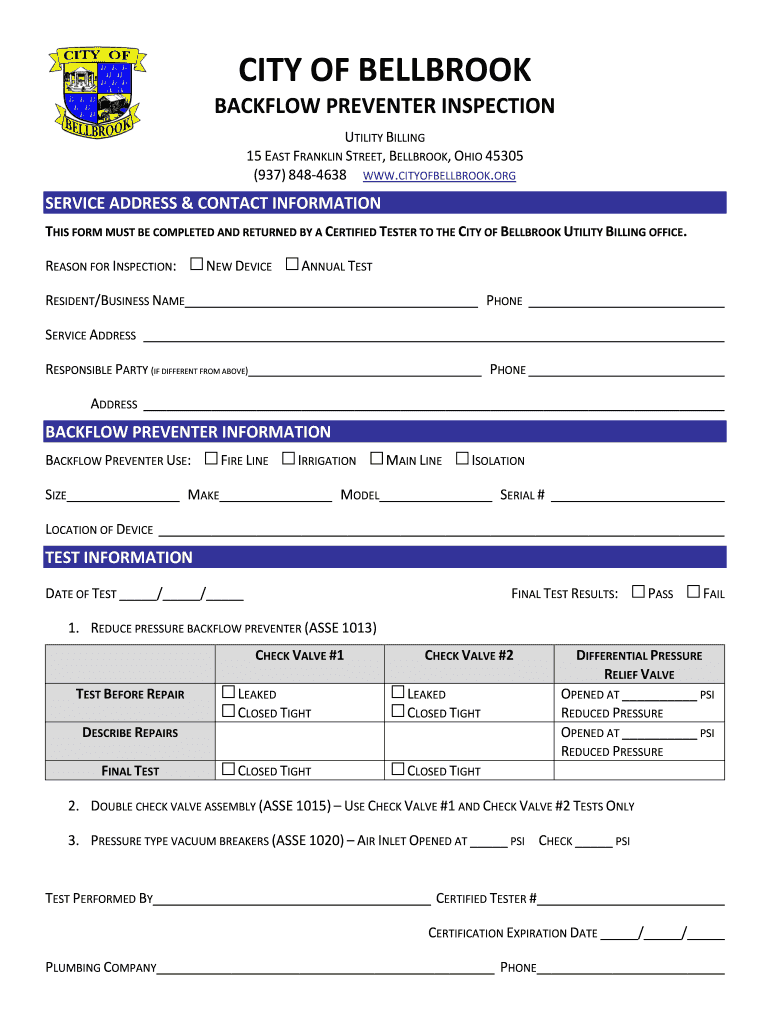
Click ‘Get Form’ to open the bellbrook backflow inspection form in the editor.
Begin by entering your service address and contact information. Ensure that the resident/business name and phone number are accurate for effective communication.
Select the reason for inspection from the options provided: 'New Device' or 'Annual Test'. This helps categorize your request appropriately.
In the backflow preventer information section, specify the use of the device (e.g., Fire Line, Irrigation) and fill in details such as size, make, model, and serial number.
Record the date of the test and provide final test results by selecting either 'Pass' or 'Fail'.
Complete the testing details for each check valve, including any repairs made. Document differential pressure readings as required.
Finally, ensure that a certified tester fills out their information at the bottom of the form, including certification expiration date and plumbing company details.
Start filling out your bellbrook backflow inspection form online for free today!
Bellbrook UtilitiesBellbrook websiteCity of Bellbrook waterBellbrook Fire DepartmentBellbrook water hardnessBellbrook Police ReportsBellbrook ohio Trick-or TreatCity of Bellbrook jobs
Security and compliance
At DocHub, your data security is our priority. We follow HIPAA, SOC2, GDPR, and other standards, so you can work on your documents with confidence.
The Ohio Plumbing Code requires that each backflow prevention device be tested annually. A Certified Backflow Tester must test each backflow prevention device.Read more
City of Bellbrook Community‐ Willshire. During the year RCAP completed a backflow and cross connection plan; and facilitated distributing a brochure to all.Read more
Cookie consent notice
This site uses cookies to enhance site navigation and personalize your experience.
By using this site you agree to our use of cookies as described in our Privacy Notice.
You can modify your selections by visiting our Cookie and Advertising Notice.