Type text, add images, blackout confidential details, add comments, highlights and more.
02. Sign it in a few clicks
Draw your signature, type it, upload its image, or use your mobile device as a signature pad.
03. Share your form with others
Send n263 form via email, link, or fax. You can also download it, export it or print it out.
How to use or fill out form n263 with our platform
Ease of Setup
DocHub User Ratings on G2
Ease of Use
DocHub User Ratings on G2
Click ‘Get Form’ to open it in the editor.
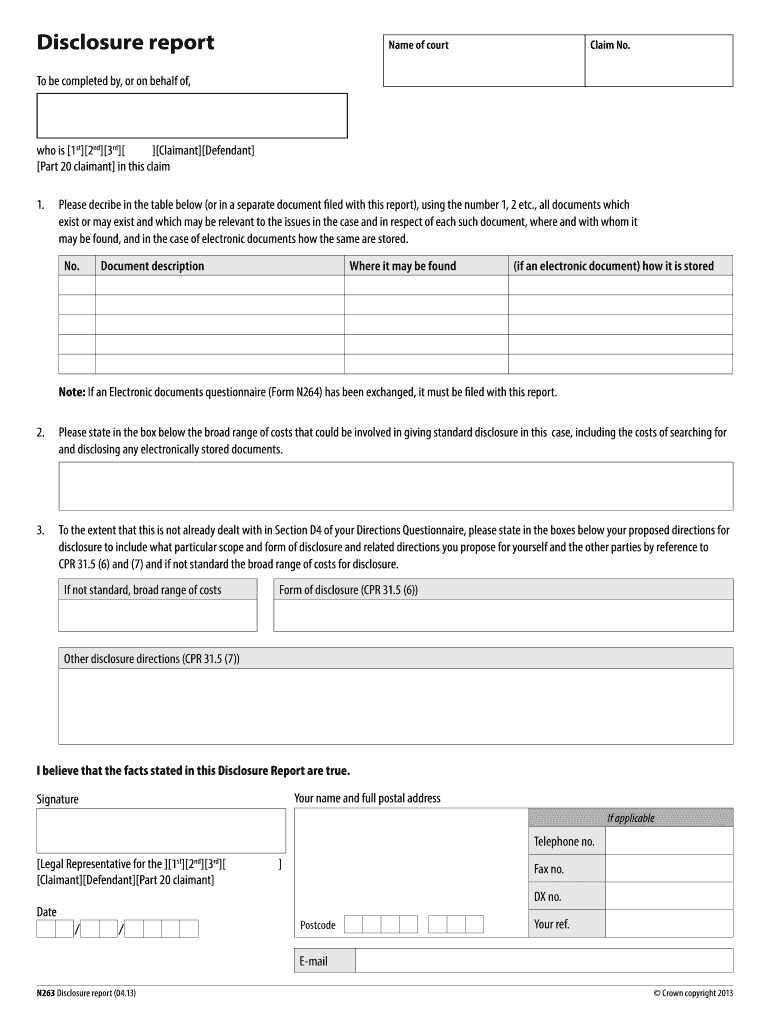
Begin by entering the name of the court and the claim number at the top of the form.
In the section labeled 'To be completed by, or on behalf of,' select whether you are the Claimant, Defendant, or Part 20 claimant.
Describe all relevant documents in the provided table. Use numbers to list each document, detailing its description, location, and storage method if electronic.
State the broad range of costs for standard disclosure in the designated box, including any costs related to electronically stored documents.
Propose directions for disclosure in accordance with CPR 31.5 (6) and (7), specifying any non-standard requirements and associated costs.
Complete your personal information at the bottom, including your name, address, signature, and contact details.
Start using our platform today to easily fill out form n263 for free!
Form N264Form n265Disclosure report form N263Disclosure report CPRForm N181When does a disclosure report need to be filedElectronic documents questionnaireCpr 31.5 7
Security and compliance
At DocHub, your data security is our priority. We follow HIPAA, SOC2, GDPR, and other standards, so you can work on your documents with confidence.
To test these predictions, college students (N = 263) completed measures assessing attachment representations, student-instructor relationships and test anxietyRead more
Cookie consent notice
This site uses cookies to enhance site navigation and personalize your experience.
By using this site you agree to our use of cookies as described in our Privacy Notice.
You can modify your selections by visiting our Cookie and Advertising Notice.