Self cert form printable 2026

Get Form
care plan format pdf Preview on Page 1

Here's how it works

01. Edit your care plan format pdf online
Type text, add images, blackout confidential details, add comments, highlights and more.
02. Sign it in a few clicks
Draw your signature, type it, upload its image, or use your mobile device as a signature pad.
03. Share your form with others
Send pharmaceutical care plan pdf via email, link, or fax. You can also download it, export it or print it out.

How to use or fill out self cert form printable with our platform

Form edit decoration
9.5
Ease of Setup
DocHub User Ratings on G2
9.0
Ease of Use
DocHub User Ratings on G2
  1. Click ‘Get Form’ to open the self cert form printable in the editor.
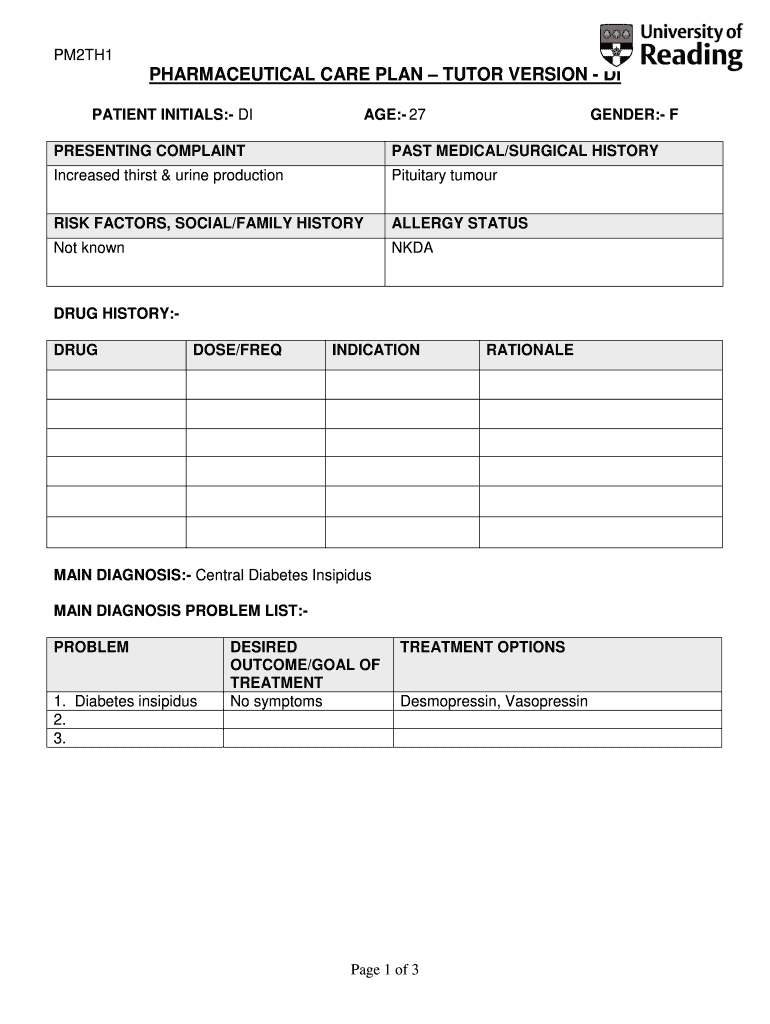
  2. Begin by entering the patient initials in the designated field. This helps identify the individual associated with the care plan.
  3. Fill in the age and gender sections accurately to ensure proper documentation of patient demographics.
  4. In the 'Presenting Complaint' section, describe any symptoms such as increased thirst and urine production, providing a clear overview of the patient's condition.
  5. Document past medical and surgical history, including any relevant conditions like pituitary tumors, to give context to current health issues.
  6. Complete the risk factors and social/family history fields to provide a comprehensive view of potential influences on health.
  7. List any allergies in the allergy status section, ensuring that NKDA (No Known Drug Allergies) is noted if applicable.
  8. Detail drug history by specifying drug names, doses, frequency, indications, and rationale for treatment options provided.

Start using our platform today for free to streamline your document editing and form completion!

be ready to get more

Complete this form in 5 minutes or less

Get form

Got questions?

We have answers to the most popular questions from our customers. If you can't find an answer to your question, please contact us.
Contact us
You can complete a Self-Certification form yourself. Many employers have their own self-certification forms. If your employer doesnt have its own form you can download the Self Certification Form. Please print it, fill it in and hand it in to your employer.
Self-certification when off sick for 7 days or less If someone is off sick for 7 calendar days or less (including weekends), they do not need a fit note. They can tell their employer theyre not well enough to work. They do not need to provide medical evidence. This is called self-docHubing their sick leave.
What is the Self-Certification Declaration Log in to the Causes Portal. Select Certification in the left-hand side menu. Select the button labeled Create New Self-Certification Declaration. Complete the 13 declarations. Enter your contact information. Select Submit.
An example of a resume self-certification form clause Heres how a resume self-certification form clause might appear in a hiring agreement or job application: By signing this form, I docHub that the information provided in my resume and job application is true, complete, and accurate to the best of my knowledge.
be ready to get more

Complete this form in 5 minutes or less

Get form