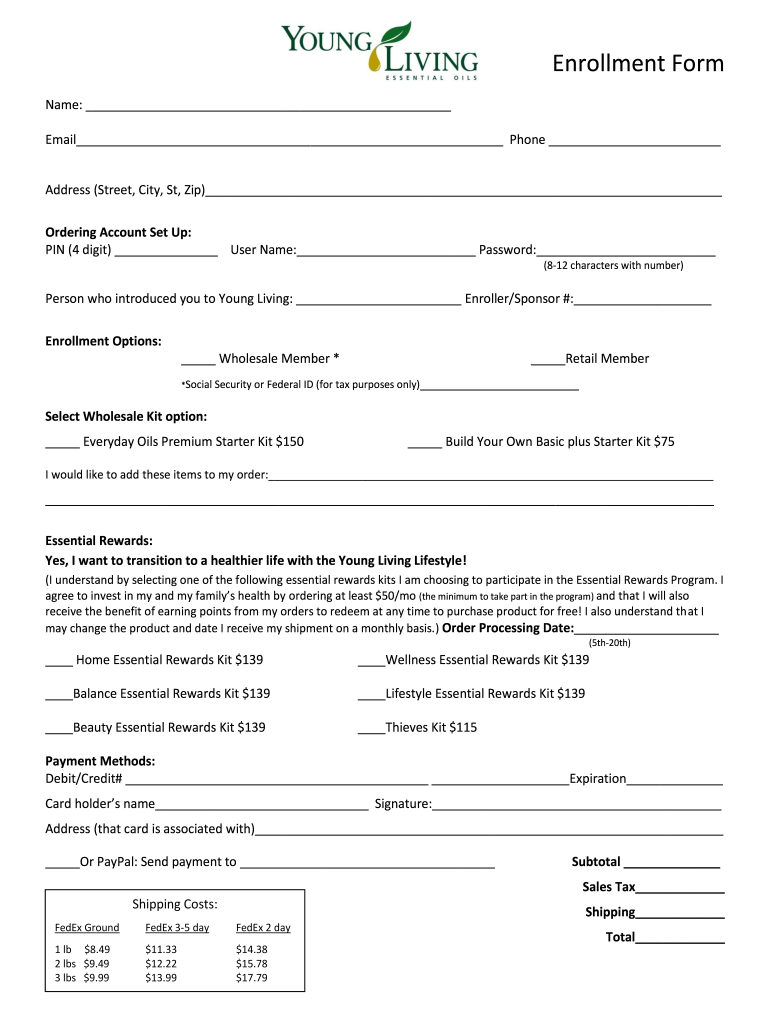
Young living essential form 2026

Get Form
young living virtual office Preview on Page 1

Here's how it works

01. Edit your young living virtual office online
Type text, add images, blackout confidential details, add comments, highlights and more.
02. Sign it in a few clicks
Draw your signature, type it, upload its image, or use your mobile device as a signature pad.
03. Share your form with others
Send young living virtual office login via email, link, or fax. You can also download it, export it or print it out.

How to use or fill out young living essential form with our platform

Form edit decoration
9.5
Ease of Setup
DocHub User Ratings on G2
9.0
Ease of Use
DocHub User Ratings on G2
  1. Click ‘Get Form’ to open the Young Living Essential Form in the editor.
  2. Begin by entering your personal information in the designated fields: Name, Email, and Phone. Ensure accuracy for effective communication.
  3. Fill in your Address, including Street, City, State, and Zip Code. This is crucial for shipping purposes.
  4. Set up your Ordering Account by creating a 4-digit PIN, User Name, and Password (8-12 characters with a number).
  5. Identify the person who introduced you to Young Living and provide their Enroller/Sponsor Number.
  6. Choose your Enrollment Option: Wholesale Member or Retail Member. If selecting Wholesale, provide your Social Security or Federal ID for tax purposes.
  7. Select a Wholesale Kit option that suits you best from the available choices.
  8. If desired, add additional items to your order in the provided space.
  9. Indicate if you want to join the Essential Rewards Program by selecting one of the kits and providing an Order Processing Date (5th-20th).
  10. Complete the Payment Methods section with your Debit/Credit Card details or PayPal information as applicable.
  11. Review all entries for accuracy before finalizing your submission.

Start filling out your Young Living Essential Form today using our platform for free!

be ready to get more

Complete this form in 5 minutes or less

Get form

Security and compliance

At DocHub, your data security is our priority. We follow HIPAA, SOC2, GDPR, and other standards, so you can work on your documents with confidence.

Learn more
ccpa2
pci-dss
gdpr-compliance
hipaa
soc-compliance
be ready to get more

Complete this form in 5 minutes or less

Get form