Type text, add images, blackout confidential details, add comments, highlights and more.
02. Sign it in a few clicks
Draw your signature, type it, upload its image, or use your mobile device as a signature pad.
03. Share your form with others
Send aoc cr 300 via email, link, or fax. You can also download it, export it or print it out.
How to use or fill out AOC-CR-300 - The North Carolina Court System - nccourts with Our Platform
Ease of Setup
DocHub User Ratings on G2
Ease of Use
DocHub User Ratings on G2
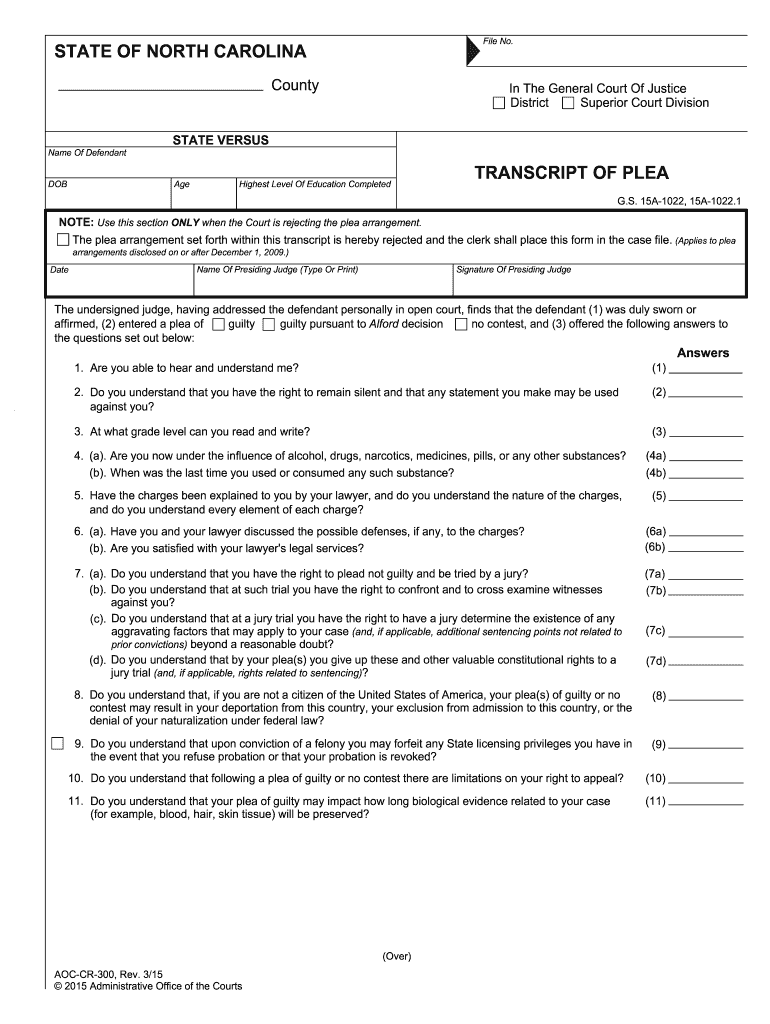
Click ‘Get Form’ to open the AOC-CR-300 in the editor.
Begin by entering the 'File No.' and 'County' at the top of the form. This information is essential for identifying your case.
Fill in the 'Name of Defendant' and 'DOB' fields accurately, ensuring that all personal details are correct.
In the section labeled 'Transcript of Plea', indicate whether the plea arrangement is being accepted or rejected. If rejected, ensure to check the appropriate box.
Proceed to answer each question regarding understanding rights and charges. Use our platform's text fields to provide clear responses.
For each charge listed, specify if you plead guilty, no contest, or Alford plea. Ensure that you detail any maximum punishments associated with these charges.
Finally, review all entries for accuracy before signing. Utilize our platform’s features to save and share your completed document securely.
Start using our platform today for free to complete your AOC-CR-300 form efficiently!
Fill out AOC-CR-300 - The North Carolina Court System - nccourts online It's free
Jul 18, 2018 By North Carolina Judicial Branch. AOC-CR-300 , Criminal Forms (CR). Transcript Of Plea. Files. Transcript Of Plea. PDF, 290 KB. TranscripcinRead more
Cookie consent notice
This site uses cookies to enhance site navigation and personalize your experience.
By using this site you agree to our use of cookies as described in our Privacy Notice.
You can modify your selections by visiting our Cookie and Advertising Notice.