Type text, add images, blackout confidential details, add comments, highlights and more.
02. Sign it in a few clicks
Draw your signature, type it, upload its image, or use your mobile device as a signature pad.
03. Share your form with others
Send sheriff ride along via email, link, or fax. You can also download it, export it or print it out.
How to use or fill out sdpd ride along with our platform
Ease of Setup
DocHub User Ratings on G2
Ease of Use
DocHub User Ratings on G2
Click ‘Get Form’ to open the sdpd ride along request form in the editor.
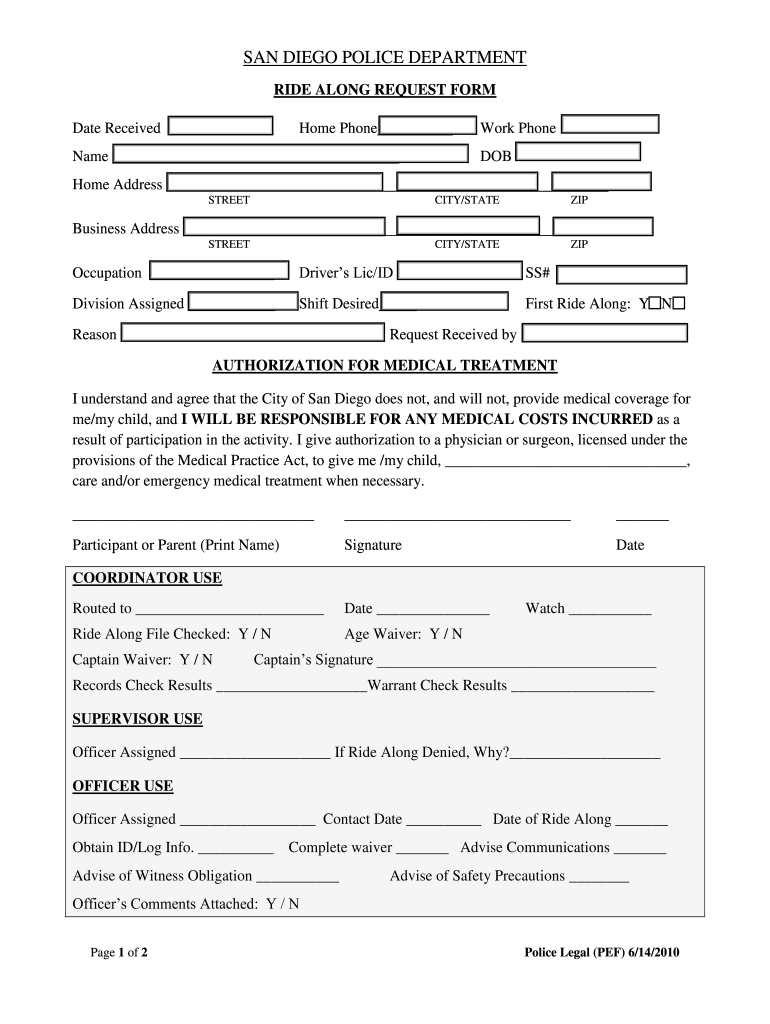
Begin by entering your personal information, including your name, date of birth, and contact details. Ensure that all fields are filled accurately to avoid any delays.
Provide your home and business addresses, along with your occupation. This information helps the department understand who is participating in the ride along.
Indicate whether this is your first ride along by selecting 'Y' or 'N'. Additionally, provide a brief reason for your request in the designated field.
Review the authorization for medical treatment section carefully. Sign and date it to confirm your understanding of medical responsibilities during the ride along.
Complete any additional sections required by coordinators or supervisors, ensuring all necessary signatures are obtained before submission.
Start filling out your sdpd ride along request form today for free using our platform!
San Diego Police DepartmentPolice ride-along near meSan Diego Police activity NowChula Vista pd ride-alongOceanside Police ride-alongSDPD Records DivisionSan Diego Police phone numberSan Diego Police Department Records phone number
Security and compliance
At DocHub, your data security is our priority. We follow HIPAA, SOC2, GDPR, and other standards, so you can work on your documents with confidence.
Ride-Along Request | City of San Diego Official Website
The San Diego Police Department offers community members the opportunity to ride with an SDPD officer to learn firsthand what it takes to be a policeRead more
Cookie consent notice
This site uses cookies to enhance site navigation and personalize your experience.
By using this site you agree to our use of cookies as described in our Privacy Notice.
You can modify your selections by visiting our Cookie and Advertising Notice.