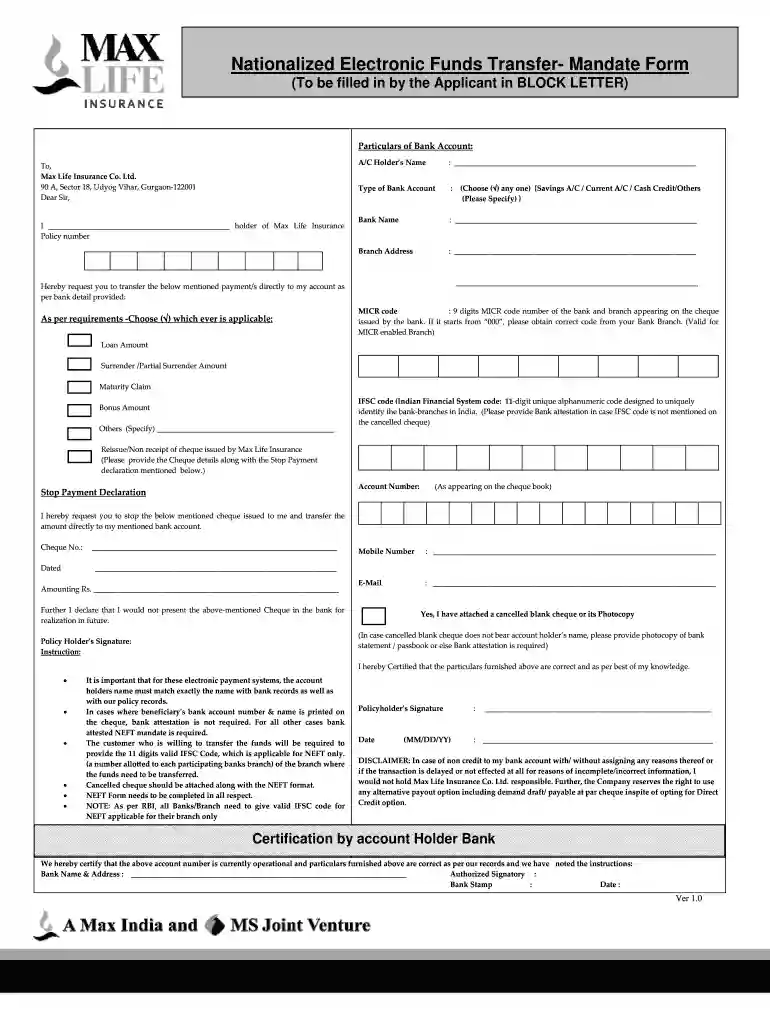
How to use or fill out max life neft form with our platform
- Click ‘Get Form’ to open the max life NEFT form in the editor.
- Begin by filling in your personal details, including your name as the account holder and your Max Life Insurance policy number. Ensure that all information is entered in BLOCK LETTERS for clarity.
- In the 'Particulars of Bank Account' section, specify your bank account type by selecting one option (Savings, Current, Cash Credit, etc.). Fill in your bank's name and branch address accurately.
- Indicate the payment type you are requesting by checking the appropriate box (Loan Amount, Surrender Amount, Maturity Claim, etc.). If applicable, provide additional details under 'Others'.
- Complete the Stop Payment Declaration if necessary. Include cheque details such as cheque number and amount.
- Attach a cancelled cheque or its photocopy as required. Ensure that all fields are filled correctly before submitting.
Start using our platform today to fill out your max life NEFT form easily and for free!
Fill out max life neft form online
It's free
It's free
Got questions?
We have answers to the most popular questions from our customers. If you can't find an answer to your question, please contact us.
Contact us
What is NEFT life insurance?
The payment under your policy/ies will be to be credited, directly to your Bank account through electronic mode of payment only. For this purpose, we require your bank details for making the policy payment through NEFT (National Electronic Fund Transfer).
What is an example of NEFT?
NEFT transactions are processed in half-hourly batches. For example, a NEFT transfer initiated at 11:02 AM will be settled by 11:30 AM, while one requested at 11:25 AM will also be processed by 11:30 AM.
What is the point of NEFT form?
You can initiate fund transfers via NEFT by directly going to your nearest bank branch. Ask for an NEFT transfer form and fill in the necessary details. Then, submit this form and your payment (cash or cheque) to initiate a transfer. This mode is ideal for anyone unfamiliar with mobile or internet banking.
How to update NEFT details in Max Life Insurance?
Please print and fill out the NEFT form and submit it along with a KYC proof as well as a cancelled cheque (with your name and account details pre-printed) at any Axis Max Life branch or by email at service.helpdesk@maxlifeinsurance.com from your registered email ID.
How to fill a check for NEFT?
What is the mandatory information required to make an RTGS NEFT payment? Amount to be remitted. Remitting customers account number which is to be debited. Name of the beneficiary bank. Name of the beneficiary. Account number of the beneficiary. Sender to receiver information, if any.
Security and compliance
At DocHub, your data security is our priority. We follow HIPAA, SOC2, GDPR, and other standards, so you can work on your documents with confidence.
Learn morePeople also ask
How to make a NEFT transaction?
To remit funds to the Inter Bank Payee through RTGS / NEFT select the Other Bank Transfer link in the Payments/Transfers tab. Select the Transaction Type - RTGS or NEFT. The list of beneficiary accounts added is displayed. Enter the Amount and select the beneficiary to be credited from the list.
How do I fill the NEFT form?
Step 1: Obtain the NEFT/RTGS Form PDF Name: Write your full name as it appears on your bank account. Account Number: Accurately enter your bank account number to ensure the money is credited to the correct account. Account Type: Select the type of account you hold, such as savings or current.