Type text, add images, blackout confidential details, add comments, highlights and more.
02. Sign it in a few clicks
Draw your signature, type it, upload its image, or use your mobile device as a signature pad.
03. Share your form with others
Send vrt 17 form via email, link, or fax. You can also download it, export it or print it out.
How to use or fill out vrt 17 with our platform
Ease of Setup
DocHub User Ratings on G2
Ease of Use
DocHub User Ratings on G2
Click ‘Get Form’ to open the vrt 17 in the editor.
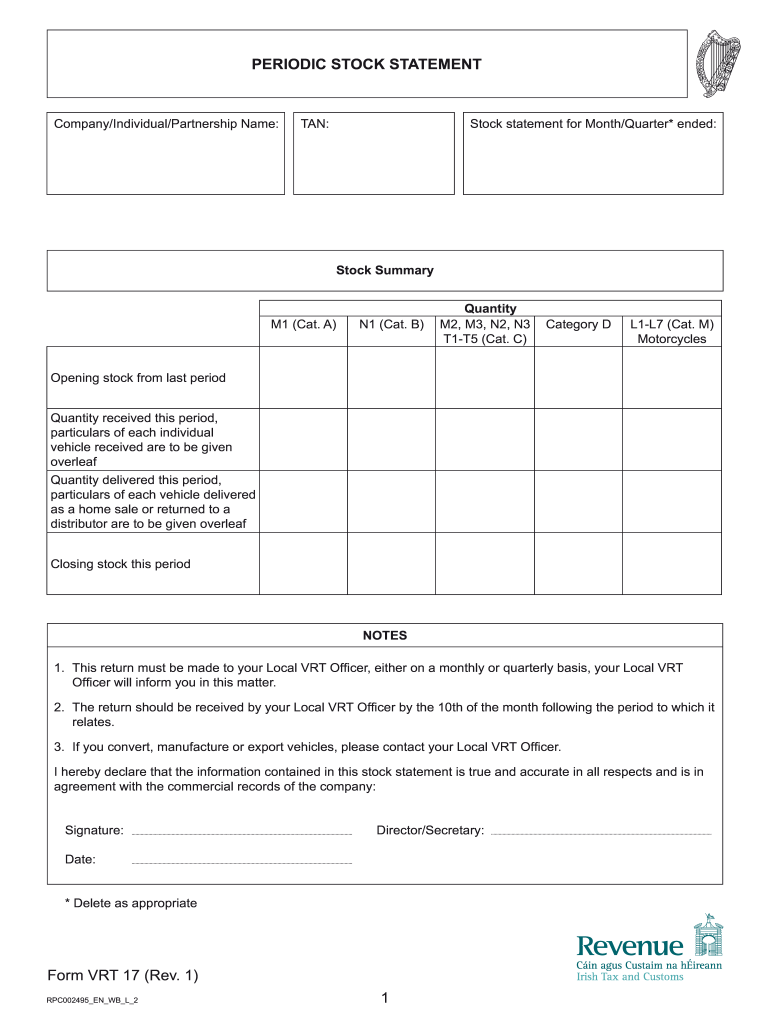
Begin by entering your Company/Individual/Partnership Name and TAN at the top of the form. This information is essential for identification purposes.
Specify the Stock statement for the Month/Quarter ended by filling in the appropriate date.
In the Stock Summary section, accurately input quantities for each category (M1, N1, T1-T5, etc.) based on your records from the previous period.
Detail the Opening stock, Quantity received this period, and Quantity delivered this period. Ensure to provide particulars of each vehicle as required.
Complete the Closing stock section with accurate figures reflecting your current inventory status.
Finally, sign and date the declaration at the bottom of the form to confirm that all information is true and accurate.
Start using our platform today to streamline your vrt 17 completion process for free!
Attorney General Coleman Announces First Jury Verdict
Jacob Burnett, 42, was found guilty by a Jefferson County jury on Tuesday on one count of Assault Third Degree (Class D Felony) and being a Persistent FelonyRead more
This page is a reference showing the sources of the data used in the Defaults Files. For example, if you are wondering what list is used by the ChristmasRead more
Cookie consent notice
This site uses cookies to enhance site navigation and personalize your experience.
By using this site you agree to our use of cookies as described in our Privacy Notice.
You can modify your selections by visiting our Cookie and Advertising Notice.