




Here's how it works

01. Edit your construction draw request template excel online
Type text, add images, blackout confidential details, add comments, highlights and more.

02. Sign it in a few clicks
Draw your signature, type it, upload its image, or use your mobile device as a signature pad.

03. Share your form with others
Send free draw request form via email, link, or fax. You can also download it, export it or print it out.
How to use or fill out construction draw request template excel with our platform

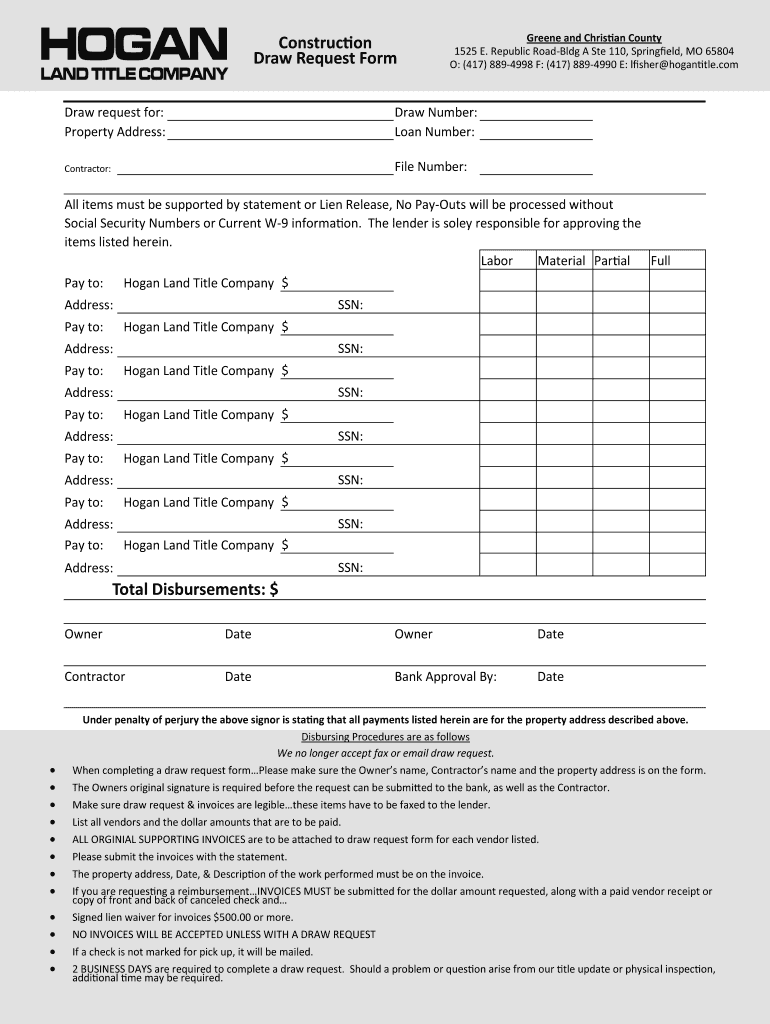
- Click ‘Get Form’ to open the construction draw request template in the editor.
- Begin by entering the property address, draw number, and loan number at the top of the form. This information is crucial for identifying your request.
- Fill in the contractor's name and file number. Ensure accuracy as this will be used for processing your request.
- List all items requiring payment under 'Labor' and 'Material'. Specify whether each item is a partial or full payment.
- For each vendor listed, provide their payee information, including Social Security Numbers (SSN) and addresses. Remember that no payouts will be processed without this information.
- Attach all original supporting invoices to the draw request form. Ensure that invoices include the property address, date, and description of work performed.
- Finally, obtain signatures from both the owner and contractor before submitting your completed form to ensure compliance with disbursing procedures.
Start using our platform today to streamline your document editing and submission process for free!
Fill out construction draw request template excel online
It's free
It's free
Got questions?
We have answers to the most popular questions from our customers. If you can't find an answer to your question, please contact us.
Contact us
How do you make a simple construction schedule?
Once youve got these basics in hand, here are 5 simple construction scheduling steps you can follow. Step 1: List out all your construction tasks and milestones. Step 2: Schedule work onto your construction timeline. Step 3: Add dependencies between related tasks. Step 4: Assign resources to the scheduled work.
What is a drawing schedule in construction?
A construction draw schedule is a financial roadmap, outlining the payment plan for a project. These plans are normally broken down by progress milestones. When funds are needed from the lender, the owner will submit a draw request, which facilitates the movement of funds from their construction loan.
How to make a construction draw schedule?
Creating a Construction Draw Schedule Determine the total contract amount. Create a schedule of values. Distribute the project balance over the project schedule. Establish if retainage is factored into the construction draw schedule.
What is the best Excel template for construction schedule?
Gantt Chart Template Pro is designed to make creating dependent tasks easier and to allow you to use either calendar days or work days to define a task duration. But with a few Excel formulas, you can add some advanced functionality to even this simple construction schedule template.
Who creates the construction schedule?
Project planning: Construction schedulers work closely with project managers, architects, engineers, and other stakeholders to understand the project scope, objectives, and requirements. They use this information to develop a comprehensive project schedule.
Security and compliance
At DocHub, your data security is our priority. We follow HIPAA, SOC2, GDPR, and other standards, so you can work on your documents with confidence.
Learn more


People also ask
How do I create a construction program in Excel?
How to Create a Construction Schedule in Excel Enter Details for Your Project. List Activities in the Construction Schedule Excel Template. Add Dates to the Task Rows and Calculate Duration. Show Completed and Future Work in the Gantt Chart. Customize the Schedule.
How do you create a construction draw schedule?
How to Create a Residential Construction Draw Schedule Determine the Total Project Budget. Create a Schedule of Values (SOV) Spread the SOV Over the Project Schedule. Review and Update the Draw Schedule as Needed.


