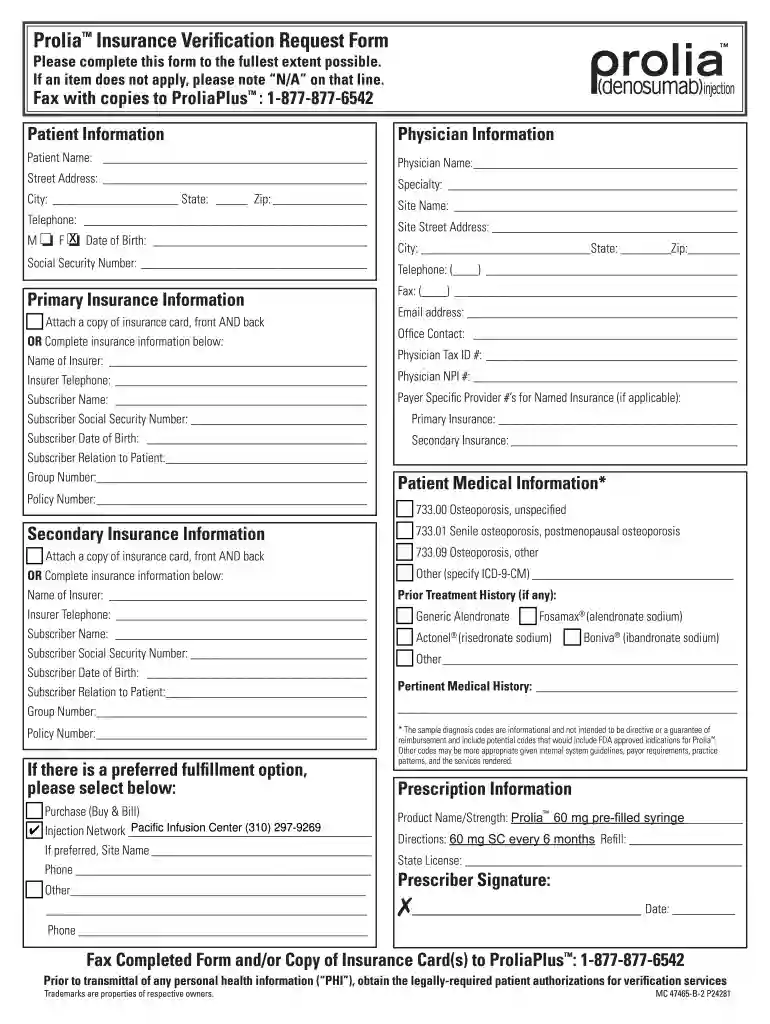
Prolia insurance verification form 2026

Get Form
prolia insurance verification form Preview on Page 1

Here's how it works

01. Edit your prolia insurance verification form online
Type text, add images, blackout confidential details, add comments, highlights and more.

02. Sign it in a few clicks
Draw your signature, type it, upload its image, or use your mobile device as a signature pad.

03. Share your form with others
Send prolia order form via email, link, or fax. You can also download it, export it or print it out.

How to use or fill out Prolia Insurance Verification Form with our platform

Form edit decoration
9.5
Ease of Setup
DocHub User Ratings on G2
9.0
Ease of Use
DocHub User Ratings on G2
  1. Click ‘Get Form’ to open the Prolia Insurance Verification Request Form in the editor.
  2. Begin by filling out the Patient Information section. Enter the patient's name, date of birth, and social security number. If any item does not apply, write 'N/A'.
  3. Next, complete the Physician Information section with the physician's name, address, telephone number, and other relevant details.
  4. In the Primary Insurance Information section, either attach a copy of the insurance card or fill in all required fields including insurer name, subscriber information, and policy numbers.
  5. Repeat step 4 for Secondary Insurance Information if applicable.
  6. Select your preferred fulfillment option from the choices provided and fill in any additional site information as needed.
  7. Complete the Patient Medical Information and Prescription Information sections with accurate details regarding medical history and prescription instructions.
  8. Finally, ensure that all fields are filled correctly before signing and dating the form at the bottom.

Start using our platform today to streamline your Prolia insurance verification process for free!

be ready to get more

Complete this form in 5 minutes or less

Get form

Got questions?

We have answers to the most popular questions from our customers. If you can't find an answer to your question, please contact us.
Contact us

Of course, it is possible with DocHub. This trustworthy and compliant online service features a phone-based signing option. Once you log in to your DocHub account and add your amgen assist prolia form to our editor, complete all necessary fields and utilize the Sign tool on the upper barf. Click on Create your signature and choose Phone from the available options. Here, you scan a QR code using your smartphone and draw your signature on your phone display, as you normally do when approving hard copies. If you access DocHub right from your mobile device, you can electronically sign your paperwork by drawing your eSignature, adding its image, or simply with a typed name.

Using a swift editing system like DocHub, you do not need anything but a web browser and connection to the internet to modify your amgen prolia form on the internet quickly. Add your file or find the appropriate form in DocHub’s catalog, open our editor with a single click, and complete it electronically. To edit your forms at any time, register a free profile with DocHub.

Prior authorization is recommended for medical benefit coverage of Prolia. Coverage is recommended for those who meet the conditions of coverage in the Criteria, Dosing, Initial/Extended Approval, Duration of Therapy, and Labs/Diagnostics for the diagnosis provided.
This includes their full name, date of birth, address, contact details, insurance provider details, policy number and group number. It is possible that employer details and the patients social security number may be asked in some cases. Accuracy is essential too.
This can be done through various means including a phone call to the insurance company, using an online portal, or through electronic health record (EHR) systems that may have integrated insurance verification features. 3. Verify Policy Status: Check if the insurance policy is active at the time of the service.

Security and compliance

At DocHub, your data security is our priority. We follow HIPAA, SOC2, GDPR, and other standards, so you can work on your documents with confidence.

Learn more
ccpa2
pci-dss
gdpr-compliance
hipaa
soc-compliance
be ready to get more

Complete this form in 5 minutes or less

Get form

People also ask

Insurance eligibility verification ensures that a patients insurance coverage and insurance benefits are active before services are provided. Prior authorization secures approval from insurance payors for specific procedures or treatments.
Documentation Requirements: Patients age and sex. Documentation supporting the diagnosis of osteoporosis. Previous treatment of osteoporosis, agents used, outcomes and adverse reactions if any. History of previous fractures, including type of fracture, cause and time since occurrence.
In any context in which an insurance plan must be verified by an employer, regulatory body, legal representative, a business associate, or a client, a COI is the final proof. A COI is not a contract, but it is evidence that an insurance contract exists, between the named insured and the insurance carrier.
How to fill out the Insurance Verification Form Guidelines and Tips? Enter the patients name and date of birth. Fill in the primary insureds information and insurance details. Complete all necessary fields regarding coverage and co-payments. Review the form for any missing information.

icd 10 prolia injection