Type text, add images, blackout confidential details, add comments, highlights and more.
02. Sign it in a few clicks
Draw your signature, type it, upload its image, or use your mobile device as a signature pad.
03. Share your form with others
Send it via email, link, or fax. You can also download it, export it or print it out.
How to use or fill out vtr 305 a with our platform
Ease of Setup
DocHub User Ratings on G2
Ease of Use
DocHub User Ratings on G2
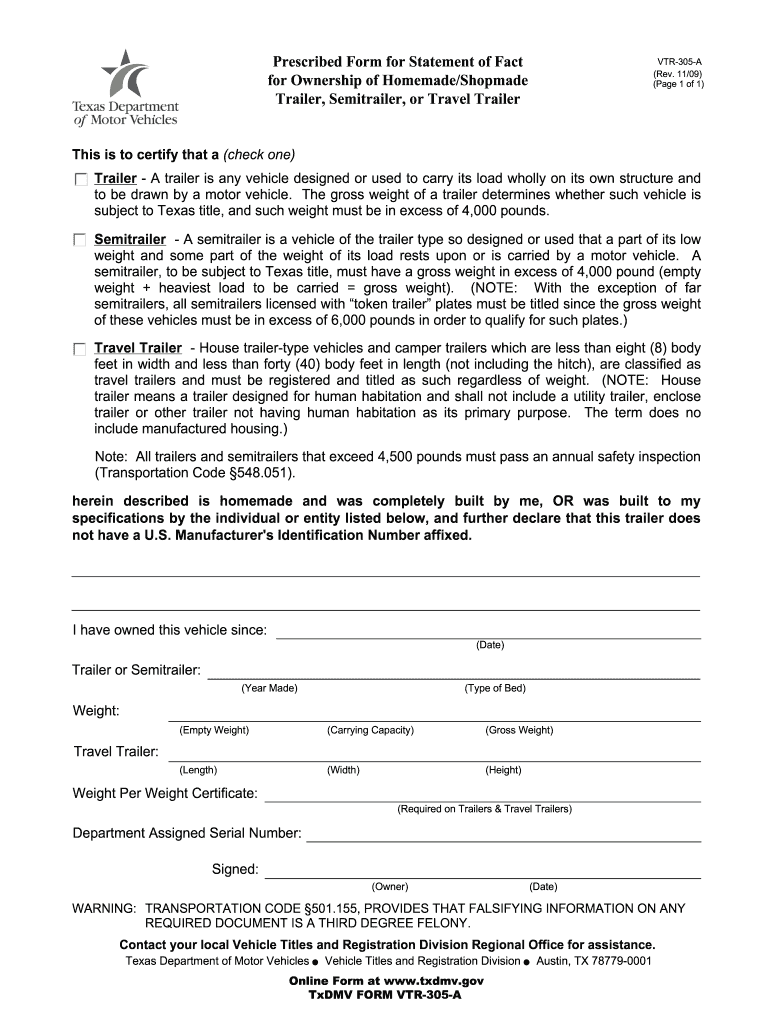
Click ‘Get Form’ to open the VTR-305-A in the editor.
Begin by selecting whether your vehicle is a Trailer, Semitrailer, or Travel Trailer. Check the appropriate box to certify its type.
Fill in the ownership details, including how long you have owned the vehicle by entering the date in the designated field.
For Trailers and Semitrailers, provide information such as Year Made, Type of Bed, Empty Weight, Carrying Capacity, Gross Weight, Length, Width, and Height in their respective fields.
If it's a Travel Trailer, ensure to enter the Weight Per Weight Certificate as required.
Complete the form by entering your Department Assigned Serial Number and signing it with your name and date.
Start using our platform today for free to easily complete your VTR-305-A form!
General Information Covering Vehicle Identification Numbers
Apr 6, 2026 9). * Prescribed Form for Affidavit of Ownership for Homemade Trailer, Semitrailer, or Travel Trailer, Form VTR-305-A (Fig. 13), executed byRead more
Cookie consent notice
This site uses cookies to enhance site navigation and personalize your experience.
By using this site you agree to our use of cookies as described in our Privacy Notice.
You can modify your selections by visiting our Cookie and Advertising Notice.