




Here's how it works



How to use or fill out ctu shirt order with our platform

- Click ‘Get Form’ to open the ctu shirt order in the editor.
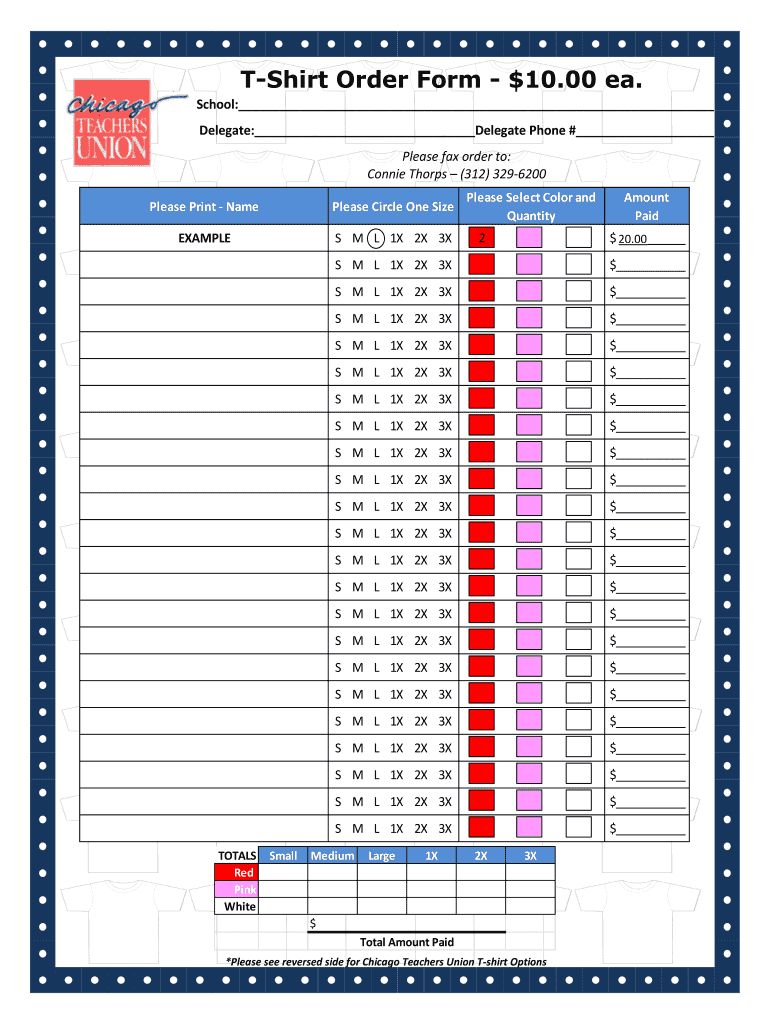
- Begin by entering your school name in the designated field at the top of the form.
- Fill in your delegate's name and phone number to ensure proper communication regarding your order.
- Select the size for each t-shirt by circling one option from Small (S) to 3X. Make sure to do this for every shirt you wish to order.
- Choose your preferred color and indicate the quantity next to it. Repeat this for each size and color combination you want.
- Calculate the total amount due based on your selections, ensuring that you include all sizes and colors ordered.
- Review all entries for accuracy before finalizing your order. Once confirmed, print or save the document as needed.
Start filling out your ctu shirt order today using our platform for a seamless experience!
It's free
Got questions?
How can I eSign my ctu apparel in Word?
Microsoft Word doesn’t have signing tools to create legitimate eSignatures and enforceable paperwork. Fortunately, DocHub is an online eSignature-compliant editor that supports different file formats, including .doc files. Log in to your account and import the Word edition of your ctu apparel from your device and cloud, or URL - our editor will automatically transform it into an editable PDF. Make all required changes in your document and click Sign to create your own legally-binding eSignature. You will find four signing methods from which to choose.
How do you create an e-signature for the ctu online login on iOS?
Apart from an extensive toolset for editing PDFs on mobile phones, DocHub enables you to sign your ctu online login along the way. Open our editor in your browser, make modifications using DocHub’s toolset, and finish your editing by eSigning the finished form.
How Long was the Chicago strike?
Why did CTU go on strike?
What does CTU stand for in Chicago?
Security and compliance
At DocHub, your data security is our priority. We follow HIPAA, SOC2, GDPR, and other standards, so you can work on your documents with confidence.
Learn more


