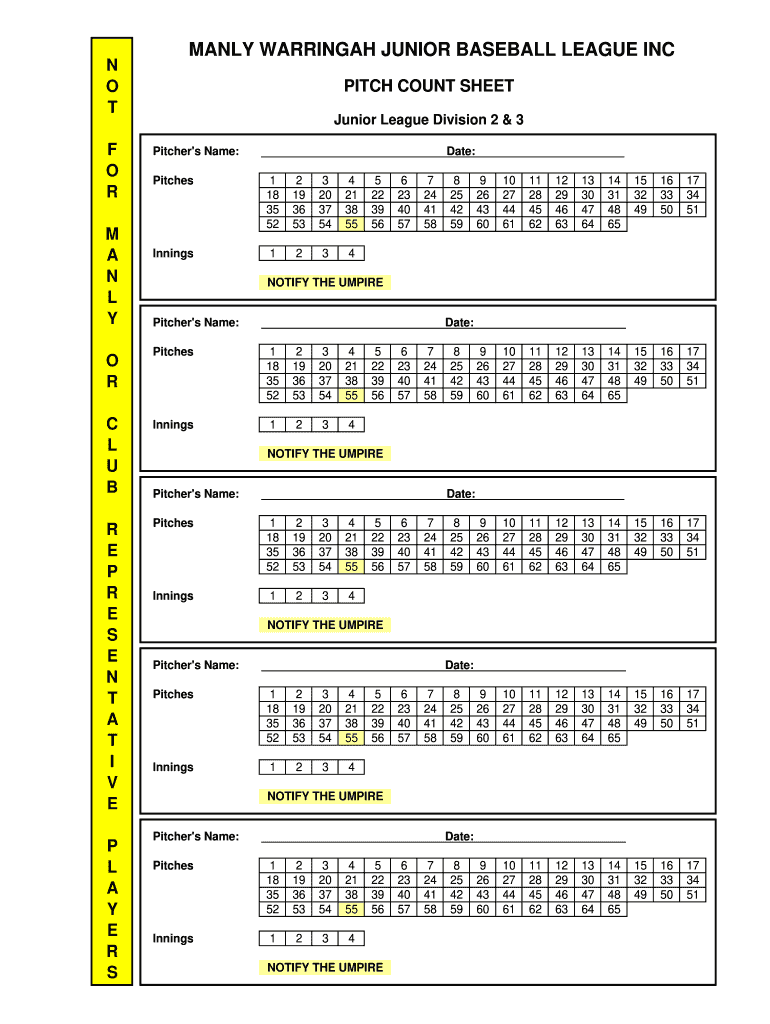
Warringah league count division 2 2026

Get Form
mwba draw Preview on Page 1

Here's how it works

01. Edit your mwba draw online
Type text, add images, blackout confidential details, add comments, highlights and more.
02. Sign it in a few clicks
Draw your signature, type it, upload its image, or use your mobile device as a signature pad.
03. Share your form with others
Send it via email, link, or fax. You can also download it, export it or print it out.

How to use or fill out warringah league count division 2 with our platform

Form edit decoration
9.5
Ease of Setup
DocHub User Ratings on G2
9.0
Ease of Use
DocHub User Ratings on G2
  1. Click ‘Get Form’ to open the warringah league count division 2 in the editor.
  2. Begin by entering the Pitcher's Name at the top of the form. This is essential for identifying who is pitching during the game.
  3. Next, input the Date of the game. This helps in tracking performance over time.
  4. In the Pitches section, record each pitch thrown by selecting from the numbered options provided. Ensure you fill this out for each inning.
  5. For each inning, mark down the number of pitches thrown in the corresponding boxes. This will help maintain accurate pitch counts.
  6. If necessary, notify the umpire by filling out that section as well, ensuring all relevant parties are informed.

Start using our platform today to streamline your document editing and form completion for free!

be ready to get more

Complete this form in 5 minutes or less

Get form

Got questions?

We have answers to the most popular questions from our customers. If you can't find an answer to your question, please contact us.
Contact us

With DocHub, you can rapidly approve your warringah league count division 2 or any other paperwork on iOS, even without installing additional programs. You can access your DocHub account from any internet-connected browser and complete and sign your form in any preferred method with just a couple of clicks.

When you edit your warringah league count division 2 with DocHub, you merely need a stable internet connection and virtually any browser installed on your device. No need to set up any third-party software or research tutorials. Simply open a tab with DocHub, drag and drop your file, and modify it on the spot.

be ready to get more

Complete this form in 5 minutes or less

Get form