Site www DocHub com 2026

Get Form
site www DocHub com Preview on Page 1

Here's how it works

01. Edit your form online
Type text, add images, blackout confidential details, add comments, highlights and more.
02. Sign it in a few clicks
Draw your signature, type it, upload its image, or use your mobile device as a signature pad.
03. Share your form with others
Send it via email, link, or fax. You can also download it, export it or print it out.

How to Use or Fill Out Site www.DocHub.com

Form edit decoration
9.5
Ease of Setup
DocHub User Ratings on G2
9.0
Ease of Use
DocHub User Ratings on G2
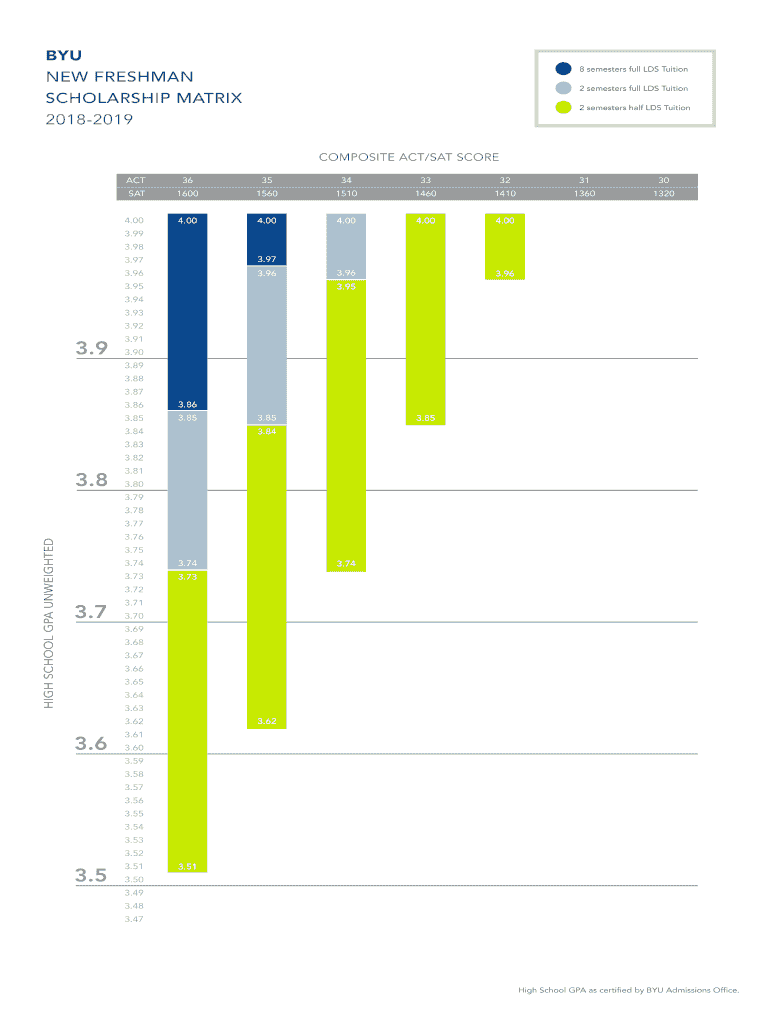
  1. Click ‘Get Form’ to open the scholarship matrix document in our editor.
  2. Review the scholarship tiers based on your ACT/SAT scores and high school GPA. Identify which category you fall into for eligibility.
  3. Use the text fields provided to enter your ACT or SAT score, ensuring accuracy as this will determine your scholarship amount.
  4. Next, input your unweighted high school GPA in the designated field. Make sure it matches the certification from BYU Admissions Office.
  5. Once all information is filled out, review your entries for any errors before proceeding to save or share your completed form.

Start using our platform today to streamline your document editing and signing process for free!

be ready to get more

Complete this form in 5 minutes or less

Get form

Got questions?

We have answers to the most popular questions from our customers. If you can't find an answer to your question, please contact us.
Contact us
Once DocHub has been connected to your Google Drive you can right-click a file and choose Open with DocHub - View, Edit Sign PDFs. DocHub will be automatically set as the default app for opening files in Google Drive where all you have to do is double-click a file to open it in DocHub.
When you sign up for DocHub, youll start off as a free account with the ability to edit, sign, and share PDF documents without paying anything.
Go to . On the home page, click Sign up or click Create free account. Enter your email address. Add a password (at least 8 characters) in the fields listed, check the box next to Im not a robot, and then click Sign up.
0:00 1:16 Account. Open it in the editor. Use the toolbar at the top to make any. Changes type anywhere on aMoreAccount. Open it in the editor. Use the toolbar at the top to make any. Changes type anywhere on a document highlight important text or strike out text to remove. White out unnecessary.
Sign PDF or document files, create forms and edit PDFs online for free! Apply legally binding eSignatures, send (or receive) faxes, create reusable templates and more.

Security and compliance

At DocHub, your data security is our priority. We follow HIPAA, SOC2, GDPR, and other standards, so you can work on your documents with confidence.

Learn more
ccpa2
pci-dss
gdpr-compliance
hipaa
soc-compliance
be ready to get more

Complete this form in 5 minutes or less

Get form