Type text, add images, blackout confidential details, add comments, highlights and more.
02. Sign it in a few clicks
Draw your signature, type it, upload its image, or use your mobile device as a signature pad.
03. Share your form with others
Send cimor log in via email, link, or fax. You can also download it, export it or print it out.
How to use or fill out cimor emt with our platform
Ease of Setup
DocHub User Ratings on G2
Ease of Use
DocHub User Ratings on G2
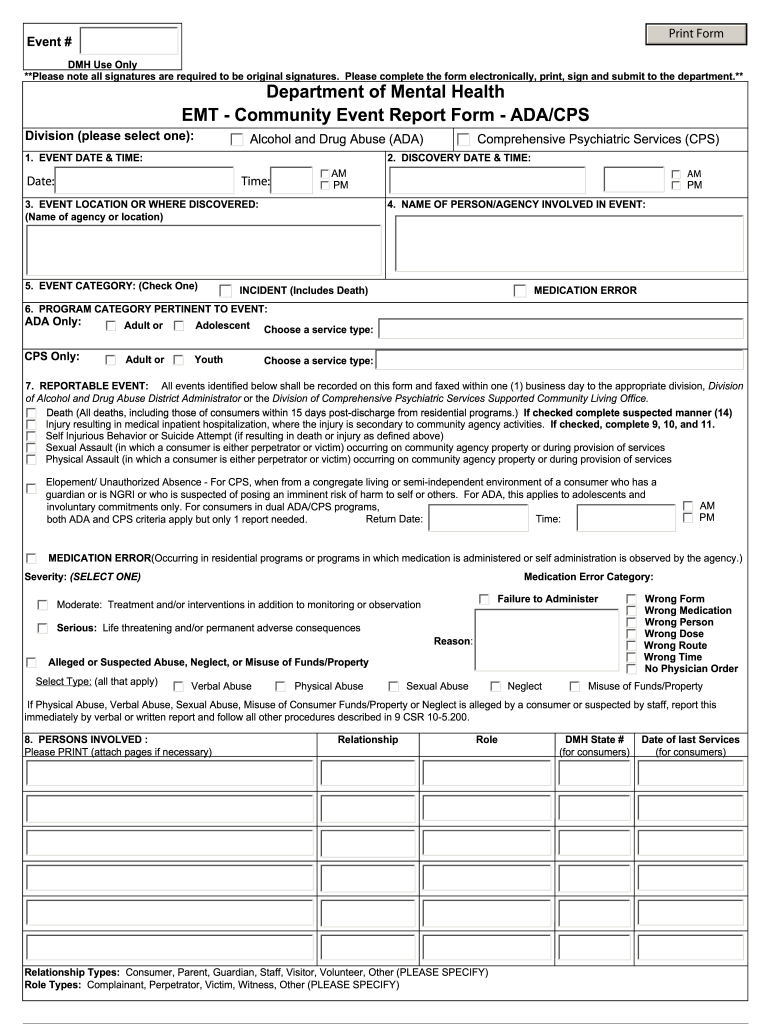
Click ‘Get Form’ to open the cimor emt in the editor.
Begin by selecting the appropriate division for your event from the dropdown menu, either Alcohol and Drug Abuse (ADA) or Comprehensive Psychiatric Services (CPS).
Fill in the event date and time, ensuring you specify AM or PM. This is crucial for accurate record-keeping.
Provide the location of the event or where it was discovered, including the name of the agency.
Select an event category by checking one of the options provided, such as Incident or Medication Error.
Complete all relevant sections regarding reportable events, ensuring to check all applicable boxes and provide detailed descriptions where necessary.
Once all fields are filled out, review your entries for accuracy before printing. Remember that original signatures are required.
Start using our platform today to streamline your form completion process for free!
9 CSR 10-5.206 - Report of Events | State Regulations
(D) Customer Information Management, Outcomes, and Reporting, Event Management and Tracking (CIMOR-EMT), system used by the department to collect and analyzeRead more
Who do I send my EMT reports to? Adult Community Operations Staff Childrens Community Operations Staff. Mental Illness. About Us How Where to Get HelpRead more
Cookie consent notice
This site uses cookies to enhance site navigation and personalize your experience.
By using this site you agree to our use of cookies as described in our Privacy Notice.
You can modify your selections by visiting our Cookie and Advertising Notice.