




01. Edit your dvrs application online
Type text, add images, blackout confidential details, add comments, highlights and more.

Type text, add images, blackout confidential details, add comments, highlights and more.

Draw your signature, type it, upload its image, or use your mobile device as a signature pad.

Send dvrs referral form via email, link, or fax. You can also download it, export it or print it out.
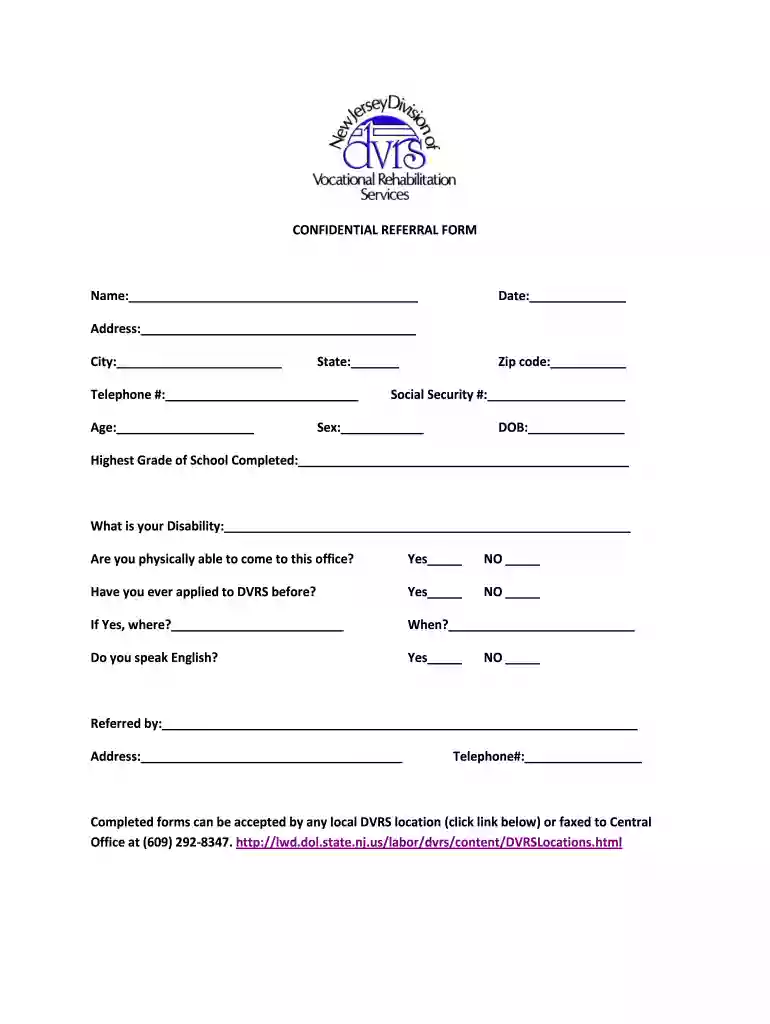
The DVRS referral form is a crucial document used by the Division of Vocational Rehabilitation Services (DVRS) in the United States. This form is designed for individuals seeking assistance and services related to vocational rehabilitation. The purpose of the form is to collect essential information about the individual’s background, including personal details, disability status, and previous application history. This data helps DVRS staff determine eligibility for services and develop an appropriate plan to assist individuals in achieving their vocational goals.
The DVRS referral form typically requires basic information such as the individual's name, address, age, and disability specifics. It may also ask about the individual’s previous interactions with DVRS and whether they have the ability to visit the nearest office. Additionally, language proficiency is often recorded to facilitate necessary communication and support. Overall, this form serves as an essential step in accessing vital rehabilitation services aimed at improving individuals' employability and independence.
Using the DVRS referral form is straightforward once you gather all necessary information. Follow these steps to ensure that the form is completed accurately and efficiently:
Gather Personal Information: Collect all required personal details including name, address, date of birth, phone number, and email address.
Document Disability Details: Provide information regarding the disability, including diagnosis and how it impacts the individual’s ability to work.
Complete Application History: Note any previous applications made to DVRS and any relevant outcomes.
Assess Office Accessibility: Indicate if the individual can visit their local DVRS office or if alternative arrangements will be necessary.
Language Proficiency: Fill in any details about language preferences to help facilitate communication with DVRS staff.
Once the form is fully filled out, it can be submitted in person at a local DVRS office or mailed to the Central Office for processing.
Completing the DVRS referral form involves several steps to ensure that all required information is accurately captured. Here is a step-by-step breakdown:
Read the Instructions: Before starting, familiarize yourself with any instructions provided with the form to understand what information is needed.
Fill Out Personal Details: Begin by inputting the personal information section carefully. Double-check names and addresses for accuracy.
Detail Your Disability: Describe the disability comprehensively. Include information about medical professionals involved in the diagnosis if applicable.
Previous Interactions: State any previous experiences with DVRS and whether the individual has received services in the past.
Local Office Attendance: Clearly identify if the individual is capable of attending appointments or needs virtual options.
Finalize and Review: Go over the completed form to ensure all sections are filled out and there are no omissions or errors.
Submission: Submit the form either in-person at a local DVRS location or send it via mail to the specified address. Keeping a copy for personal records is advisable.
The DVRS referral form contains several essential elements that ensure the document serves its purpose effectively. Key components include:
Understanding these elements ensures that those filling out the form have a clear grasp of what information is necessary for their application to be properly evaluated.
Familiarizing yourself with important terms related to the DVRS referral form can help in understanding the entire process. Key terms include:
Knowing these terms can simplify conversations with DVRS staff and enhance comprehension of the vocational rehabilitation process.
The legal implications surrounding the use of the DVRS referral form are significant. When completed accurately, the form serves as an official request for services and establishes a documented history that can protect both the individual’s rights and the agency fulfilling its obligations. Key legal aspects include:
Understanding these legal frameworks helps individuals navigate the application process effectively, reinforcing their rights when engaging with the DVRS.
The DVRS referral form is primarily utilized by various demographics, each seeking specific support tailored to their needs. Typical users include:
Recognizing these user profiles can help tailor the support and instructions provided during the completion of the DVRS referral form, ensuring that it meets the diverse needs of applicants.


Practical examples of using the DVRS referral form help clarify its application in real-world scenarios:
Job-Seeking Individuals: An unemployed individual with a disability completes the form to seek vocational training and job placement services from DVRS.
Students Transitioning to Employment: A high school student with a learning disability fills out the form to access resources and training that will prepare them for entering the workforce.
Caregivers Assisting Disabled Clients: A caregiver assists an elderly individual with mobility issues in completing the form to obtain necessary rehabilitation services aimed at enhancing independence.
These examples illustrate the diverse contexts in which the DVRS referral form is utilized, highlighting its importance in facilitating access to vital resources.
At DocHub, your data security is our priority. We follow HIPAA, SOC2, GDPR, and other standards, so you can work on your documents with confidence.
Make a referral. Complete the online referral form Pre-ETS Student Referral Form. Related topics. Deaf and Hard of Hearing Services Benefits CounselingRead more
I refer the student to the Department of Social and Health Services, Division of Vocational Rehabilitation (DVR) for the opportunity to participate inRead more
cameras into external web pages, check the Referrals checkbox and enter the IP address or host name of the computer that hosts the web pages with the includedRead more


