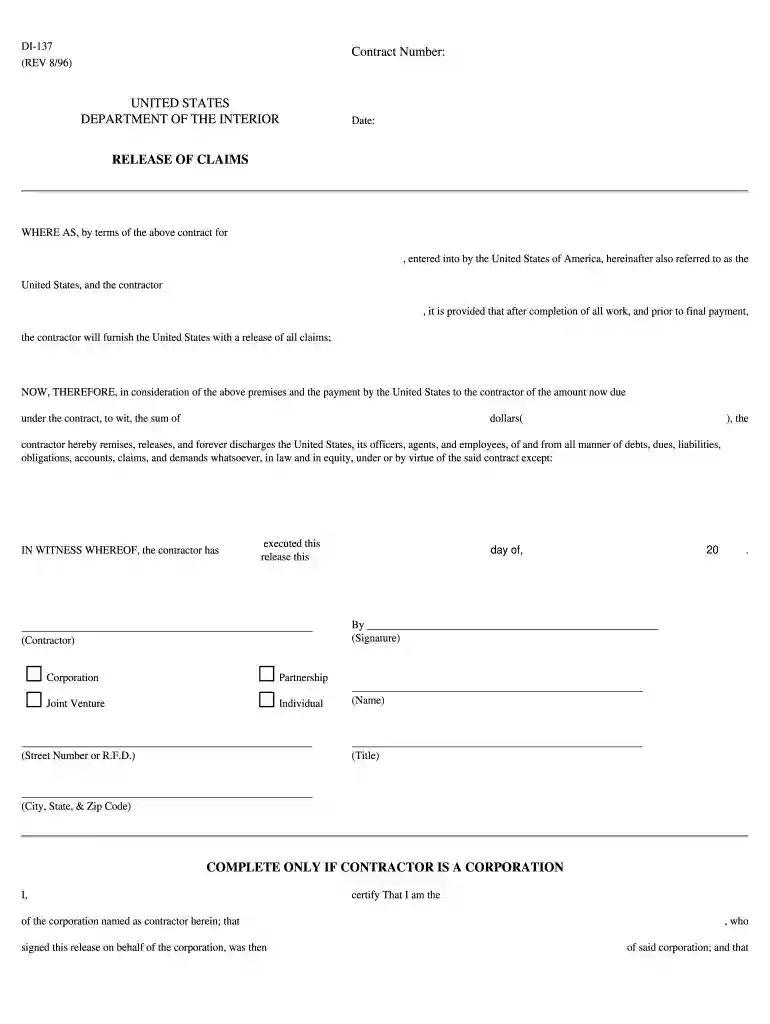
Di 137 2026

Get Form
form 137 sample Preview on Page 1

Here's how it works

01. Edit your form 137 sample online
Type text, add images, blackout confidential details, add comments, highlights and more.

02. Sign it in a few clicks
Draw your signature, type it, upload its image, or use your mobile device as a signature pad.

03. Share your form with others
Send form 137 via email, link, or fax. You can also download it, export it or print it out.

How to use or fill out di 137 with our platform

Form edit decoration
9.5
Ease of Setup
DocHub User Ratings on G2
9.0
Ease of Use
DocHub User Ratings on G2
  1. Click ‘Get Form’ to open the di 137 in the editor.
  2. Begin by entering the contract number at the top of the form. This is essential for identifying your specific agreement.
  3. Fill in the date of completion in the designated field, ensuring accuracy for record-keeping purposes.
  4. In the section labeled 'WHERE AS', specify the nature of the contract and include the contractor's name.
  5. Next, indicate the total amount due under the contract in dollars, ensuring that this matches your records.
  6. The contractor must then sign and print their name, title, and address in the appropriate fields to validate this release.
  7. If applicable, complete the corporate certification section by providing details about your position within the corporation and signing where indicated.

Start using our platform today to fill out di 137 easily and for free!

be ready to get more

Complete this form in 5 minutes or less

Get form

Got questions?

We have answers to the most popular questions from our customers. If you can't find an answer to your question, please contact us.
Contact us

With DocHub, it’s quite simple. The editor offers users an add-on called DocHub for Gmail, which you can locate in the Google Workspace Marketplace without being charged. Set it up and grant it access to your Google account. Open your email with your 137 form attached and click on the add-on button in the right-side panel. Log in to your DocHub account, and import the form to our editor, where you can fill it out and sign.

Document editing with DocHub is equally convenient on desktop and mobile devices. You just need an internet browser to edit your di 137 on Android. Open our site and sign in to access the tools you require. Add your file and introduce your intended modifications. Next, you can keep your form in your file storage or send it out immediately.

Hello, Anon! According to google, F137 is a permanent record that contains a students academic history from elementary to high school (Grades 7-12). F138, on the other hand, is a report card or a Student Report Card Completion for a specific school year or grade level, typically used for enrollment purposes.
Once signed, the party releasing the claims, usually known as the Releasor, forgoes the right to bring future legal action against the other party, the Releasee, in connection with the specific incident detailed in the form.
A written contract (or provision in a contract) in which one or more parties agree to give up legal causes of action against the other party in exchange for adequate consideration (that is, something of value to which the party releasing the legal claims is not already entitled).

Security and compliance

At DocHub, your data security is our priority. We follow HIPAA, SOC2, GDPR, and other standards, so you can work on your documents with confidence.

Learn more
ccpa2
pci-dss
gdpr-compliance
hipaa
soc-compliance

People also ask

Also known as a liability waiver form, the release of all claims form is signed when the defendant and plaintiff docHub a settlement in a lawsuit. It does three things, including: Resolving the issue between the two parties. Dismissing the plaintiffs claims. Releasing the defendant from liability.
It serves as a document that officially releases the parties from any further obligations related to the agreement. In short, it is a form of legal document that effectively ends the relationship between two parties.

Related links