Type text, add images, blackout confidential details, add comments, highlights and more.

02. Sign it in a few clicks
Draw your signature, type it, upload its image, or use your mobile device as a signature pad.

03. Share your form with others
Send it via email, link, or fax. You can also download it, export it or print it out.

How to use or fill out three bears application with our platform
Ease of Setup
DocHub User Ratings on G2
Ease of Use
DocHub User Ratings on G2
Click ‘Get Form’ to open the Three Bears application in the editor.
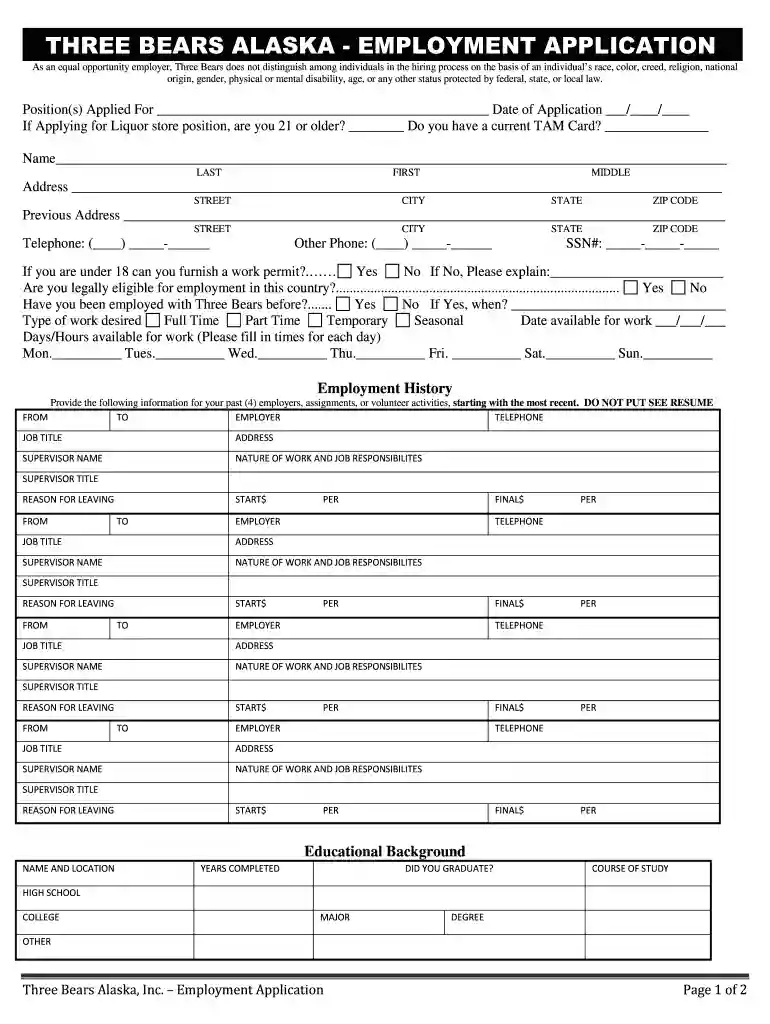
Begin by filling in the 'Position(s) Applied For' and 'Date of Application' fields. If applying for a liquor store position, indicate your age and whether you have a current TAM Card.
Enter your personal information, including your name, address, and contact numbers. Ensure accuracy as this information is crucial for communication.
Complete the employment history section by providing details of your past employers, including job titles, responsibilities, and reasons for leaving. Be thorough but concise.
In the educational background section, list your schools attended along with years completed and degrees obtained. This helps showcase your qualifications.
Finally, review all sections carefully before signing at the bottom to attest that all information is true and complete.
Start filling out your Three Bears application online for free today!
FNU uses a rolling admissions process versus a standard admissions process so applicants can learn the status of their application as soon as four to five weeksRead more
Jul 7, 2019 It has no practical application on parameters in the ranges of the. NIST systems, but it suggests a potential weakness in the field structure. *Read more
Cookie consent notice
This site uses cookies to enhance site navigation and personalize your experience.
By using this site you agree to our use of cookies as described in our Privacy Notice.
You can modify your selections by visiting our Cookie and Advertising Notice.