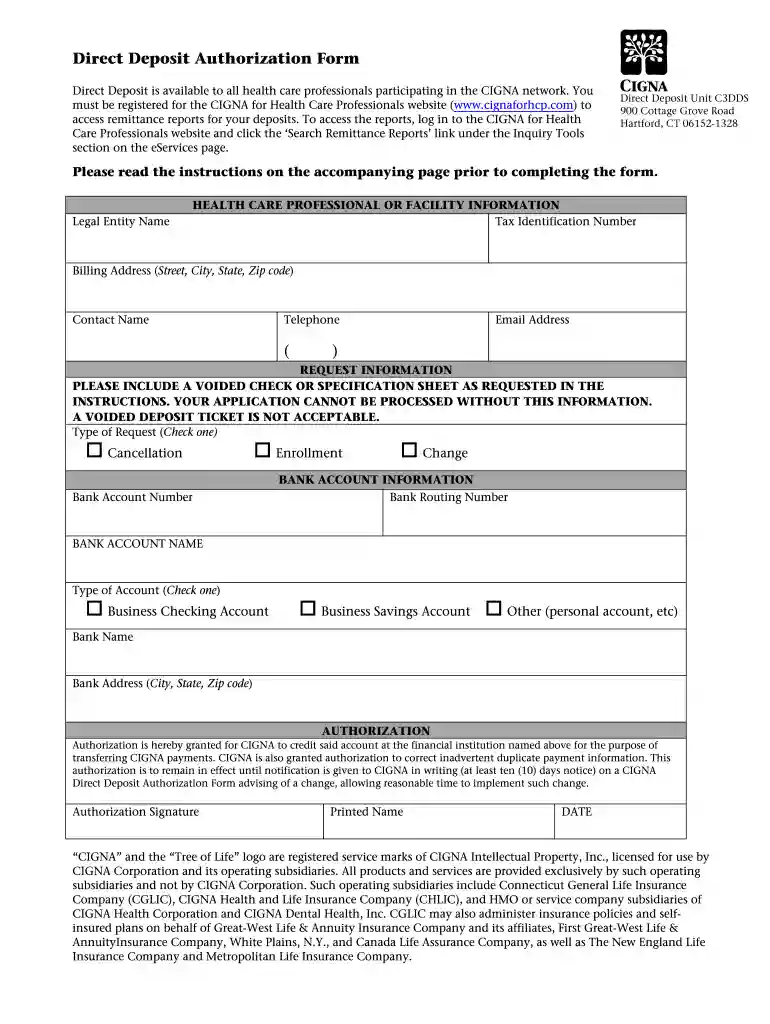
Cigna direct deposit form 2026

Get Form
hdic insurance Preview on Page 1

Here's how it works

01. Edit your hdic insurance online
Type text, add images, blackout confidential details, add comments, highlights and more.

02. Sign it in a few clicks
Draw your signature, type it, upload its image, or use your mobile device as a signature pad.

03. Share your form with others
Send hdic eft payment via email, link, or fax. You can also download it, export it or print it out.

How to use or fill out Cigna Direct Deposit Form with our platform

Form edit decoration
9.5
Ease of Setup
DocHub User Ratings on G2
9.0
Ease of Use
DocHub User Ratings on G2
  1. Click ‘Get Form’ to open the Cigna Direct Deposit Authorization Form in the editor.
  2. Begin by entering your Legal Entity Name, ensuring it matches the Tax Identification Number (TIN) associated with your practice.
  3. Fill in your Billing Address, including Street, City, State, and Zip Code. This information is crucial for accurate processing.
  4. Provide a Contact Name along with their Telephone number and Email Address for any follow-up regarding the form.
  5. Select the Type of Request by checking one of the options: Cancellation, Enrollment, or Change.
  6. Input your Bank Account Number and Bank Routing Number. Ensure these numbers are correct to avoid delays.
  7. Indicate the Type of Account by checking either Business Checking Account, Business Savings Account, or Other.
  8. Sign and date the form at the bottom to authorize Cigna to process your direct deposits.

Start using our platform today to complete your Cigna Direct Deposit Form easily and for free!

be ready to get more

Complete this form in 5 minutes or less

Get form

Got questions?

We have answers to the most popular questions from our customers. If you can't find an answer to your question, please contact us.
Contact us
Enrolling in EFT is simple! Enroll in EFT directly with Cigna by logging in to CignaforHCP.com Working with Cigna Enroll in Electronic Funds Transfer (EFT) Options. To check the status of your EFT application, log in to CignaforHCP.com Working with Cigna Manage EFT Settings.
Cigna Dental: Call +1 800 244 6224.
How do I set up direct deposit? Complete the direct deposit form. Deliver the form and a voided check to your employer. If youre eligible, your employer will deposit your paycheck directly into your account.
What Information Is Necessary to Include on the Authorization Form? Signature of the payer (accountholder of the bank account) Permission to the ACH payee to debit/credit the payers account. The amount (or range of amounts) debited or credited. Expected time that the transaction will occur (monthly, weekly, etc.)
In 2023, Cigna Corporation and Cigna Health and Life Insurance Company (Cigna) were sued in U.S. District Court following the release of a ProPublica report that they relied on PxDx algorithms to reject plan participant claims without review by Cigna doctors.

Security and compliance

At DocHub, your data security is our priority. We follow HIPAA, SOC2, GDPR, and other standards, so you can work on your documents with confidence.

Learn more
ccpa2
pci-dss
gdpr-compliance
hipaa
soc-compliance

People also ask

How do I enroll to receive EFTs? Log in to CignaforHCP.com. Select Working with Cigna. Select Enroll in Electronic Funds Transfer (EFT) Options. Complete the electronic enrollment form.
EFT, or direct deposit, electronically deposits claim fee-for-service and capitated payments directly into your bank account. Get paid faster. Enroll in Electronic Funds Transfer through CignaforHCP.com. Eliminate paper check mail delivery and handling.

cigna deposit please