







Definition & Meaning
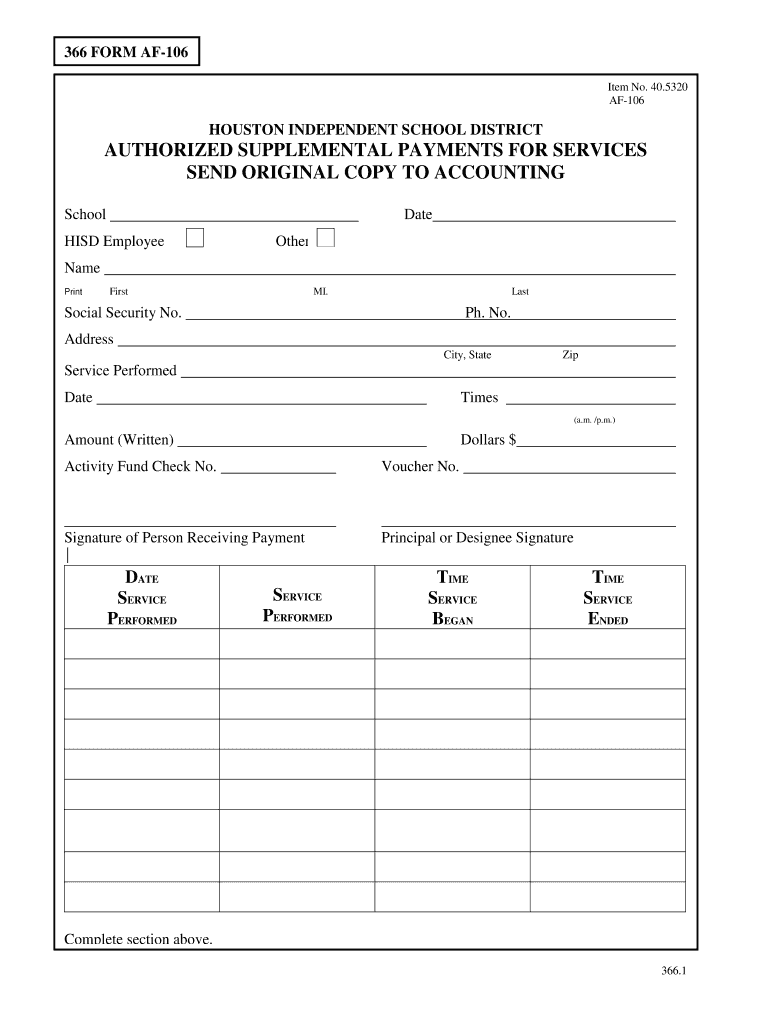
The HISD AF-106 Form, also known as the Authorized Supplemental Payments for Services form, is a document utilized within the Houston Independent School District (HISD). This form facilitates the documentation and processing of supplemental payments to HISD employees for services rendered beyond their regular operational duties. It serves as an essential tool in ensuring that additional work is recognized and compensated appropriately.
- Purpose: The primary function of the HISD AF-106 Form is to streamline the approval and accounting processes for supplemental payments, ensuring compliance with internal policies.
- Scope: This form is applicable to all HISD employees eligible for extra compensation for specific services or projects undertaken within the district.
How to Use the HISD AF-106 Form
To successfully utilize the HISD AF-106 Form, users must follow a specific set of procedures that align with HISD's guidelines. This section outlines the primary steps involved:
- Determine Eligibility: Confirm that the services rendered qualify for supplemental payment under HISD policies.
- Complete the Form: Fill out the relevant sections of the AF-106 Form with precise information, including employee details, nature of services, and payment particulars.
- Submit for Approval: Send the completed form to the designated department for review and approval to ensure compliance and accuracy.
Practical Scenarios
- Example 1: An HISD teacher who conducts extra-curricular workshops can record these services on the AF-106 Form.
- Example 2: An administrative employee supporting a special district project outside regular hours.
Steps to Complete the HISD AF-106 Form
Completing the HISD AF-106 Form requires careful attention to detail to ensure accuracy and compliance. Here’s a step-by-step guide:
- Gather Required Information: Collect all necessary data related to the employee, service dates, and payment details.
- Enter Employee Details: Input the full name, position, and employee identification number.
- Specify Services: Clearly describe the services provided, including dates and expected compensation.
- Review for Accuracy: Double-check all entries for precision before submission.
- Submit to Supervisor: The finalized form must be submitted to the appropriate supervisor or accounting department.
Common Errors to Avoid
- Incomplete Information: Ensure all fields are filled out comprehensively.
- Incorrect Payment Totals: Verify the calculated supplemental payment amounts.
Key Elements of the HISD AF-106 Form
The structure of the HISD AF-106 Form is designed to capture pertinent information needed for processing supplemental payments:
- Employee Details: Name, position, and ID number.
- Service Description: Details of the services rendered, including dates and nature.
- Payment Breakdown: Items showing the breakdown of payments, including rates and totals.
- Approval Signatures: Spaces for authorization from the necessary supervisory and accounting personnel.
Who Typically Uses the HISD AF-106 Form
The HISD AF-106 Form is primarily used by various personnel within the Houston Independent School District:
- Teachers and Educators: For documenting services beyond teaching duties.
- Administrative Staff: Engaged in additional project work or specialized district tasks.
- Supervisors and Approvers: Responsible for verifying and authorizing the supplemental payment requests.

Benefits for Users
- Efficient Tracking: Streamlines the tracking and processing of extra services.
- Ensures Fair Compensation: Facilitates the proper compensation of supplemental work.
How to Obtain the HISD AF-106 Form
Accessing the HISD AF-106 Form involves a straightforward process within the district:
- Internal Network: Available through HISD’s internal network or document management system.
- Human Resources Department: Employees can request the form through their respective departments.
- Online Portal: In some cases, the form may be accessed or submitted via an internal online portal.
Software Compatibility
The HISD AF-106 Form can be filled out digitally, which requires compatibility with certain software:
- PDF Readers/Editors: The form is often distributed in PDF, necessitating software like Adobe Acrobat for completion.
- Document Management Systems: Integration with the district’s document management platforms for seamless submission and tracking.
Recommended Applications
- DocHub: For digital editing and signing of the form.
- Adobe Acrobat: To ensure full PDF compatibility.
Important Terms Related to HISD AF-106 Form
Understanding key terminologies associated with the HISD AF-106 Form provides better insight into its utility and implementation:
- Supplemental Payment: Additional compensation for services rendered beyond regular duties.
- Authorization: Approval process required for payment processing.
- Service Details: Specific description of the tasks performed and time frames.
Contextual Definitions
- Service Period: The time during which the supplemental services were provided.
- Compensation Rate: The agreed payment per service hour or task rendered.




