




01. Edit your form online
Type text, add images, blackout confidential details, add comments, highlights and more.

Type text, add images, blackout confidential details, add comments, highlights and more.

Draw your signature, type it, upload its image, or use your mobile device as a signature pad.

Send it via email, link, or fax. You can also download it, export it or print it out.
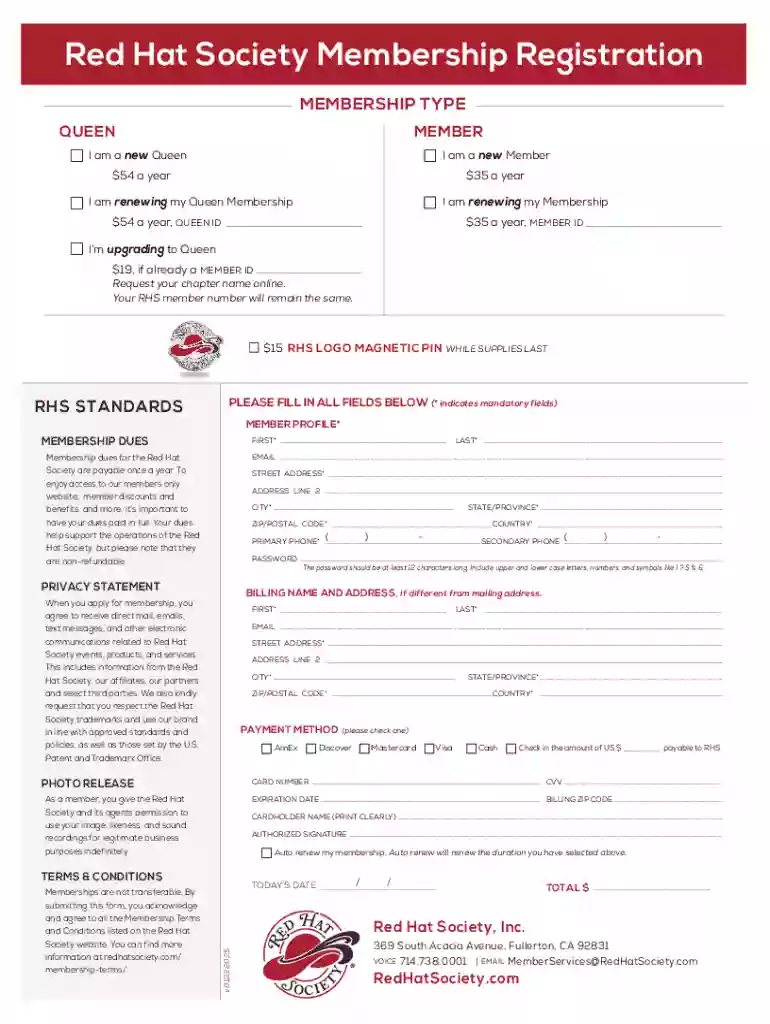
The "Red Hat Society Membership Registration Form" is a document used to facilitate joining or renewing membership in the Red Hat Society. This society is a social organization that focuses on connecting women, fostering friendships, and encouraging fun and positivity. The form serves to gather personal details, membership type preferences, and payment information to process memberships smoothly. It is used by both new members and those renewing their membership to formalize their involvement in the organization.
Determine Your Membership Type: Before filling out the form, decide if you are registering as a new member or renewing an existing membership. Options typically include becoming a "Queen" (the leader of a local chapter) or a general member.
Complete Personal Information: Provide your name, contact details, address, and other personal information requested on the form.
Select Membership Plan: Choose the appropriate membership category, such as a new or renewing "Queen" or general member, each with its annual fee.
Payment Details: Indicate your preferred payment method. Check if the form requires credit card information, checks, or other payment options.
Submit the Form: Depending on your preference, submit the form either online, via mail, or in person as per the instructions provided.
Personal Information Section: Captures essential details about the applicant, including full name, address, phone number, and email.
Membership Type Selection: Allows the applicant to specify whether they are joining as a new "Queen," a renewing member, or without a leadership role.
Annual Fee Structure: Details the cost associated with each type of membership, such as "$54 a year for Queens" or "$35 a year for regular members."
Payment Information: Section to include payment method, whether credit card details, checks, or alternative methods.
Agreement to Terms: Includes a statement agreeing to the society’s terms and conditions, ensuring that members understand their responsibilities and benefits.
Gather Required Information: Collect all necessary details, including personal and payment information, before you start.
Fill Out the Form Accurately: Enter all data carefully, paying attention to details such as email addresses and membership preferences.
Review Terms and Conditions: Ensure you understand and agree with the society's terms before submission.
Check for Completeness: Verify that all mandatory fields are filled out and payment information is correct to avoid processing delays.
Submit the Form: Follow the instructions for submission, choosing either an online platform, mailing method, or handing it in at a society event.
The form is primarily used by women over the age of 50 seeking community and companionship through participation in the Red Hat Society. It appeals to those interested in becoming local chapter leaders ("Queens") or regular members. Existing members looking to renew their memberships after their annual participation may also use this form.


This document operates under the legal framework of a membership agreement. Completing the form signifies agreement to abide by the society's bylaws, policies, and procedures. It also facilitates legal acknowledgment of membership status, which can be crucial for participating in society-related events and activities that may offer member-exclusive rights and privileges.
Membership regulations might vary based on state laws and non-profit stipulations. Some states might have specific requirements for non-profit memberships, such as additional reporting or filing for tax-exempt statuses. It is important for members to ensure they comply with any state-specific regulations that might affect their membership.
Red Hat Society members have flexible options for submitting their membership registration form. If an online submission is offered, it's typically the fastest and most convenient method. Mailing the form is another option, though it might take longer for processing. For those wishing to be more involved, attending a local chapter event and submitting the form in person can provide immediate feedback and engagement opportunities.
At DocHub, your data security is our priority. We follow HIPAA, SOC2, GDPR, and other standards, so you can work on your documents with confidence.


