




01. Edit your form online
Type text, add images, blackout confidential details, add comments, highlights and more.

Type text, add images, blackout confidential details, add comments, highlights and more.

Draw your signature, type it, upload its image, or use your mobile device as a signature pad.

Send it via email, link, or fax. You can also download it, export it or print it out.
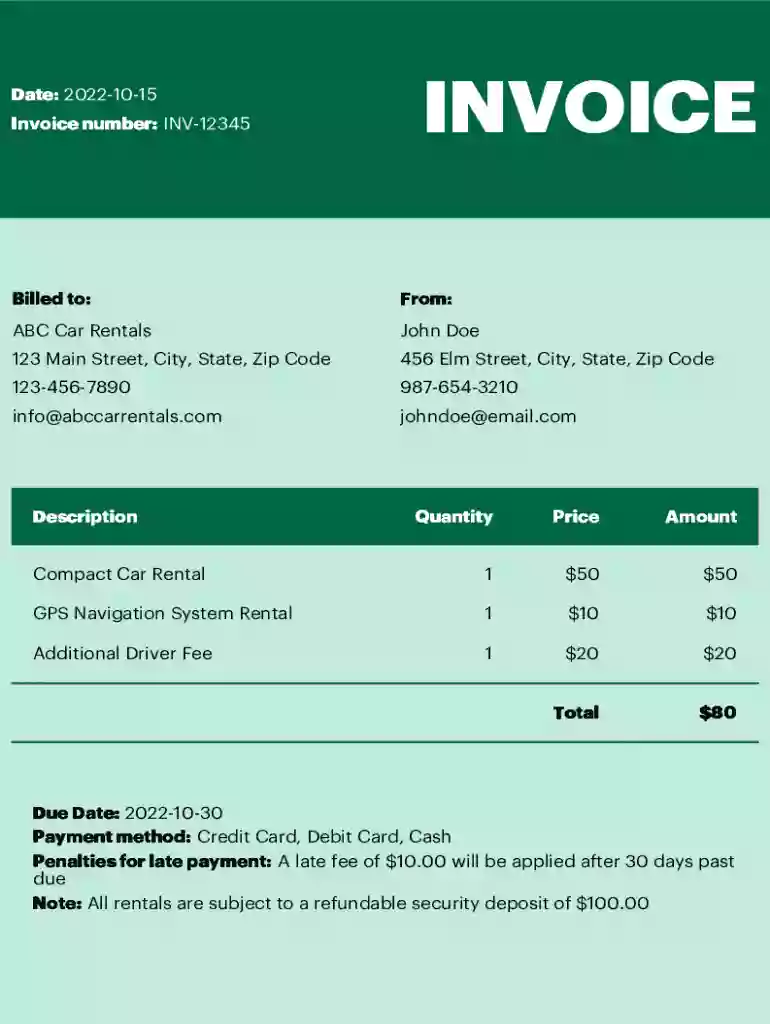
The "Car Rental Invoice Template" is a structured document used by car rental businesses to detail the transactions between them and their customers. It serves as a formal record of the rental agreement, providing a clear summary of charges, rental terms, and customer information. This template simplifies billing processes and ensures transparency in financial transactions.
In the United States, car rental invoice templates are essential for maintaining accurate financial records and can be used in accounting for both the rental company and the customer. These documents not only facilitate efficient invoicing but also ensure compliance with tax regulations by providing detailed transaction information.
Input Business Information: Enter the car rental company’s details such as name, address, contact email, and phone number. This information helps the customer identify the service provider and is crucial for legal documentation.
Add Customer Details: Insert the renter’s information, including full name, address, and contact details. This ensures that the invoice is issued correctly to the respective customer.
Detail Car Rental Information:
List Transaction Items:
Calculate Totals: Use the template’s automated features to sum the total rental amount, inclusive of all charges and taxes, to avoid manual calculation errors.
Finalize and Save: After reviewing the invoice for accuracy, use DocHub’s digital tools to finalize, sign, and save the invoice for both company records and customer distribution.
A car rental invoice might show a total rental fee of $300 for a three-day rental of a compact car, with additional charges for GPS at $15 per day and applicable taxes.
The primary users of the Car Rental Invoice Template are car rental businesses of various sizes, including:
This template helps these entities efficiently manage financial transactions with clients and maintain compliance with accounting standards.


By using a comprehensive invoice template like the one provided by DocHub, businesses can ensure that both parties are protected by clear documentation of the transaction.
Different states in the U.S. may have varying requirements for car rental transactions. For instance:
Businesses must customize their templates to reflect these state-specific requirements accurately.
DocHub’s Car Rental Invoice Templates are compatible with a variety of software solutions to streamline business processes:
This compatibility ensures that businesses can maintain efficient workflows, saving both time and resources while improving accuracy.
Case Study 1: A local New York agency uses the template to manage rentals during peak tourist season, significantly cutting down on processing time for invoices and improving customer satisfaction by providing clear, professional documentation.
Case Study 2: A Florida-based car rental company leverages the template to ensure compliance with state tourism taxes, automatically calculating and applying these fees within the invoice document.
These examples illustrate the effectiveness of using structured templates for achieving business efficiency and accuracy in customer transactions.
At DocHub, your data security is our priority. We follow HIPAA, SOC2, GDPR, and other standards, so you can work on your documents with confidence.


