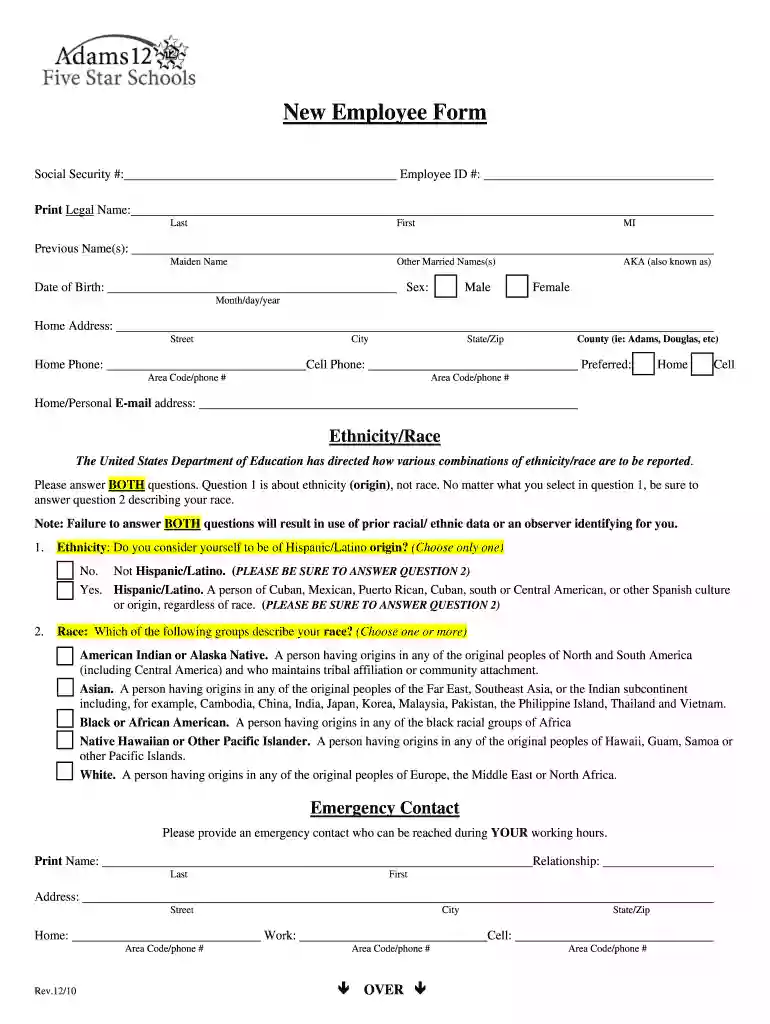
New Employee Form 2026

Get Form
New Employee Form Preview on Page 1

Here's how it works

01. Edit your form online
Type text, add images, blackout confidential details, add comments, highlights and more.

02. Sign it in a few clicks
Draw your signature, type it, upload its image, or use your mobile device as a signature pad.

03. Share your form with others
Send it via email, link, or fax. You can also download it, export it or print it out.

Definition and Meaning of the New Employee Form

The New Employee Form is a fundamental document in the hiring process, used primarily by employers in the United States. It serves to collect essential information from new employees, streamlining their integration into the company's payroll and human resources systems. This form often includes fields for personal identification details, tax information, and benefits enrollment, offering a comprehensive overview necessary for employment.

The documentation required in this form is pivotal in maintaining compliance with federal and state labor laws. By ensuring accurate data collection, organizations can mitigate legal risks and facilitate smooth administrative procedures.

Steps to Complete the New Employee Form

Effective completion of the New Employee Form involves several key steps designed to provide a thorough profile of the new hire. Here’s a comprehensive guide to navigating this process:

  1. Personal Identification Information

    • Enter full legal name exactly as it appears on official identification documents.
    • Include Social Security Number and Employee ID, if assigned.
  2. Tax Documentation

    • Complete relevant sections for federal and state tax withholdings, often referencing forms like the W-4.
    • Ensure accurate dependent information to guarantee precise tax calculations.
  3. Emergency Contact Details

    • Provide detailed information, including the name, relationship, and contact information of emergency contacts.
  4. Payment Method Selection

    • Designate a preferred payment method, choosing between direct deposit or mailed checks.
    • Attach voided checks or provide bank details for direct deposit setup.
  5. Benefits Enrollment

    • If applicable, initiate health insurance and retirement plan enrollments.
    • Clarify voluntary benefits, such as life insurance or flex spending accounts, based on eligibility.
  6. Confirmation and Signature

    • Review all provided data for precision and completeness.
    • Sign and date the form, understanding it acts as a legal confirmation of the provided information.

Key Elements of the New Employee Form

The New Employee Form contains several critical sections, each collecting essential data:

  • Employee Identification and Contact Information

    • Collects fundamental data like name, address, phone number, and email for employee records.
  • Employment Details

    • Documents the start date, position, and department, establishing the context of employment within the organization.
  • Compensation and Tax Withholding

    • Ensures proper documentation for salary, tax withholding exemptions, and other deductions.
  • Employee Benefits Selection

    • Provides options for enrolling in employer-provided benefits, focusing on healthcare, retirement plans, and other voluntary programs.
  • Signature and Authorization

    • Acts as an acknowledgment of the information's accuracy and the employee’s consent for payroll and benefits processes.

Who Typically Uses the New Employee Form

The New Employee Form is utilized predominantly by:

  • Human Resources Departments

    • Ensures compliance with hiring processes, maintaining essential data for new employees efficiently.
  • Payroll Departments

    • Utilizes the form to facilitate accurate wage calculation, tax withholdings, and benefits deductions.
  • Newly Hired Employees

    • Completes the form to provide personal, financial, and employment information, setting up their administrative profile within a company.
decoration image ratings of Dochub

Software Compatibility: Digital vs. Paper Version

Depending on an organization's infrastructure, the New Employee Form can be managed as a digital or paper document. Each medium offers distinct advantages:

  • Digital Version

    • Accessible through platforms like DocHub, allowing for electronic completion, signature, and validation.
    • Enhances workflow efficiency through integration with cloud storage solutions and human resource information systems.
  • Paper Version

    • Ensures a tangible record, which can be preferable in organizations needing archival physical documents.
    • May involve additional manual handling for data entry and storage, impacting processing time and resource allocation.

Legal Use of the New Employee Form

The New Employee Form upholds various legal responsibilities, assisting organizations in adhering to labor regulations and financial reporting requirements. The legal validity of this form ensures:

  • Compliance with Labor Laws

    • Meets federal and state employment law standards, safeguarding both employer and employee rights.
  • Taxation and Benefits Regulation

    • Facilitates accurate tax reporting and benefit distribution, avoiding potential legal repercussions due to misstatements or omissions.

Important Terms Related to New Employee Form

Understanding commonly used terminology linked to the New Employee Form enhances clarity and compliance:

  • Qualified Wages

    • Refers to the portion of employee earnings subject to tax withholdings as defined by federal regulations.
  • Deductible Contributions

    • Represents voluntary deductions from an employee's wage for retirement plans or health savings accounts.
  • Non-Exempt Employee

    • Denotes employees eligible for overtime pay under the Fair Labor Standards Act (FLSA).

Required Documents for Completing the New Employee Form

To ensure a complete and accurate submission of the New Employee Form, the employee typically provides additional documentation:

  • Identification Proof

    • Documents such as a driver's license or passport to validate identity and employment eligibility.
  • Social Security Card

    • Confirms the SSN, necessary for tax and Social Security benefits reporting.
  • Direct Deposit Information

    • Includes a voided check or bank document detailing routing and account numbers for payroll purposes.
  • Dependent Information (if applicable)

    • Required for calculating withholdings or benefits involving dependents.

This extensive exploration into the New Employee Form provides a complete understanding essential for employees and employers involved in the initial stages of employment.

be ready to get more

Complete this form in 5 minutes or less

Get form

Security and compliance

At DocHub, your data security is our priority. We follow HIPAA, SOC2, GDPR, and other standards, so you can work on your documents with confidence.

Learn more
ccpa2
pci-dss
gdpr-compliance
hipaa
soc-compliance