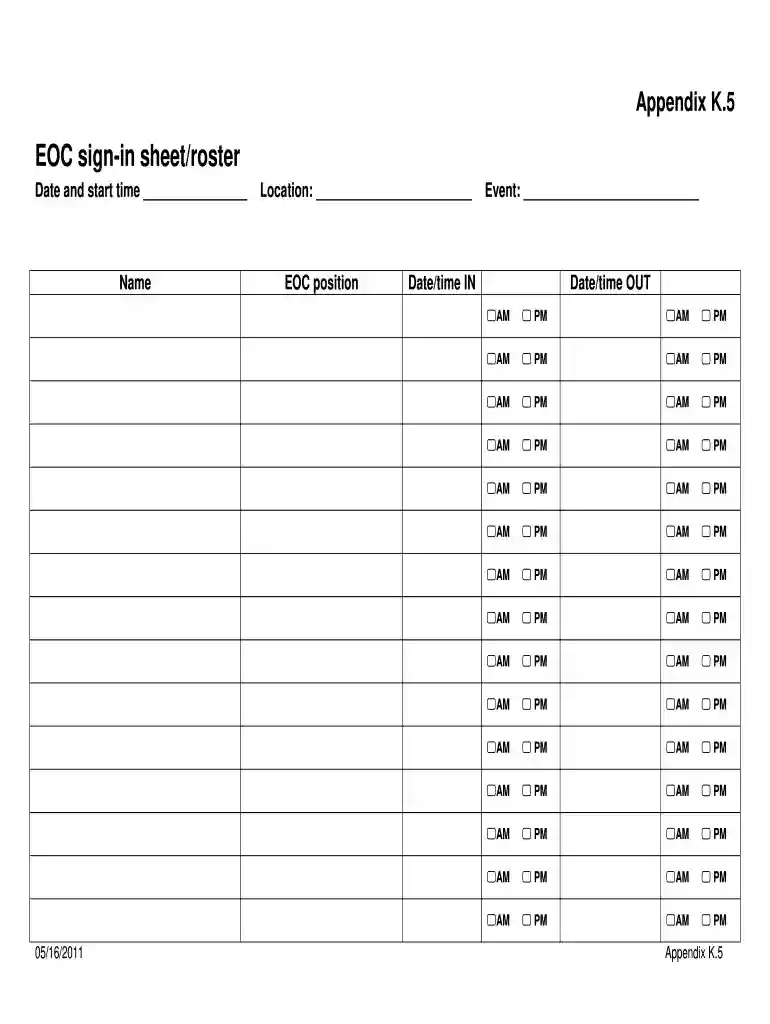
EOC Sign-In Sheet Roster Preview on Page 1

EOC Sign-In Sheet Roster 2026

Here's how it works

  • 01. Edit your form online

    Type text, add images, blackout confidential details, add comments, highlights and more.

  • 02. Sign it in a few clicks

    Draw your signature, type it, upload its image, or use your mobile device as a signature pad.

  • 03. Share your form with others

    Send it via email, link, or fax. You can also download it, export it or print it out.

Definition & Meaning

The "EOC Sign-In Sheet Roster" is a critical form used in Emergency Operations Centers (EOCs) to track the personas and roles of individuals entering or leaving the facility during an operational period. This form helps maintain an organized record for monitoring personnel assignments, ensuring accountability, and facilitating efficient communication. By documenting each participant's time of entry and exit, the roster aids in managing operational logistics and resource allocation in emergency management contexts.

Importance of Accurate Record-Keeping

  • Ensures accountability by tracking personnel presence.
  • Facilitates resource management and personnel allocation.
  • Enhances communication by documenting roles and assignments.

How to Use the EOC Sign-In Sheet Roster

The correct use of the EOC Sign-In Sheet Roster involves several key steps to ensure comprehensive record-keeping:

  1. Entry Information: Personnel must sign in with their full name, date, and time of arrival. It's crucial to capture exact times to coordinate operations effectively.
  2. Role Documentation: The form should include the individual’s role or assignment in the EOC to enable quick identification of responsibilities.
  3. Exit Recording: Upon leaving, individuals must record their departure time, completing the sign-out section.
  4. Verification: A designated officer should periodically verify entries to ensure accuracy and completeness.

Daily Management Practices

  • Conduct regular checks to verify the presence of necessary personnel.
  • Have a supervisor oversee the sign-in and sign-out process.
  • Ensure all sections, such as date, name, role, and time, are filled out correctly.

Steps to Complete the EOC Sign-In Sheet Roster

Proper completion of the EOC Sign-In Sheet Roster requires attention to detail:

  1. Prepare the Roster: Set up the sheet at the entry point of the EOC.
  2. Initiate Entry: Each participant writes their full name and precise entry time.
  3. Detail Assignments: Note the specific role or function they will perform.
  4. Record Exit: Before leaving, the participant enters the time of exit.
  5. Final Review: Ensure all fields are completed before closing the operation period.

Practical Example

  • Before a Meeting: Each entrant lists their name, stating the role they will play, such as logistics coordinator, and the exact time.
  • During an Operation: As shifts change, the incoming team signs in, and the departing team completes their exit logs.

Key Elements of the EOC Sign-In Sheet Roster

The EOC Sign-In Sheet Roster includes several critical sections:

  • Date and Location: Top section to identify the operational period and EOC location.
  • Name Column: For recording the full name of each participant.
  • Role/Assignment Field: To specify the operational task or responsibility.
  • Entry and Exit Times: Precise timestamps for entry and departure to maintain accurate records.

Role of Each Section

  • Date and Location: Helps orient the roster to a specific operation.
  • Name and Role: Facilitates clear communication and accountability during operations.
  • Time Records: Ensures a chronological log of activities and personnel movements.

Legal Use of the EOC Sign-In Sheet Roster

The EOC Sign-In Sheet Roster must be used in compliance with legal standards and data protection regulations. Here are some vital legal considerations:

  • Data Protection: Ensure that personal data is secured and accessed only by authorized personnel.
  • Record Retention: Maintain records as per jurisdictional guidelines for possible audits and reviews.
  • Authorized Access: Limit access to roster information to necessary personnel for operational security.

Who Typically Uses the EOC Sign-In Sheet Roster

The EOC Sign-In Sheet Roster is commonly utilized by various personnel involved in emergency management, including:

  • Incident Commanders: Oversee operations and require up-to-date personnel records.
  • Logistics Staff: Manage resources and personnel movements.
  • Safety Officers: Ensure safety and compliance with operational protocols.
  • Administrative Teams: Maintain documentation for future audits or reviews.
decoration imageratings of Dochub

Examples of Using the EOC Sign-In Sheet Roster

Several scenarios illustrate the practical use of the EOC Sign-In Sheet Roster:

  • Natural Disasters: Deployed during hurricanes to record staff shifts in emergency shelters.
  • Public Health Emergencies: Used in pop-up testing sites to track health professionals and volunteers.
  • Terrorist Threats: Implemented in urban incident response centers to manage law enforcement and first responders.

Real-World Implementation

  • Health Crisis Response: Staff at a temporary field hospital logs in using the roster to manage healthcare workers’ shifts efficiently.
  • Fire Evacuation Centers: The roster tracks firefighter assignments and resource usage during wildfire management efforts.

By adhering to these guidelines and examples, organizations can effectively leverage the EOC Sign-In Sheet Roster to manage emergency operations smoothly and efficiently.

be ready to get more

Complete this form in 5 minutes or less

Security and compliance

At DocHub, your data security is our priority. We follow HIPAA, SOC2, GDPR, and other standards, so you can work on your documents with confidence.

Related links

Washburn University Emergency Operations Plan

K.1-2 EOC Activation Form. K.3.1-4 EOC Action Plan form. K.4.1-2 EOC sign-in sheet/roster. L.1-3 iAlert emergency mass notification system. L.2 EmergencyRead more

Learn more
EMI - ICS Fillable Forms

The downloadable, fillable pdf forms available on this page have been modified to comply with the Section 508 requirement that website content be accessible toRead more

Learn more
THE COMPUTER DIRECTORY

In applications requiring more than 1 Form C contact, a multicontact relay may be used instead of 2, 3 or 4 of the standard type HG Mercury-Wetted ContactRead more

Learn more
If you believe that this page should be taken down, please follow our DMCA take down process here