Employee Availability Form 2026

Get Form
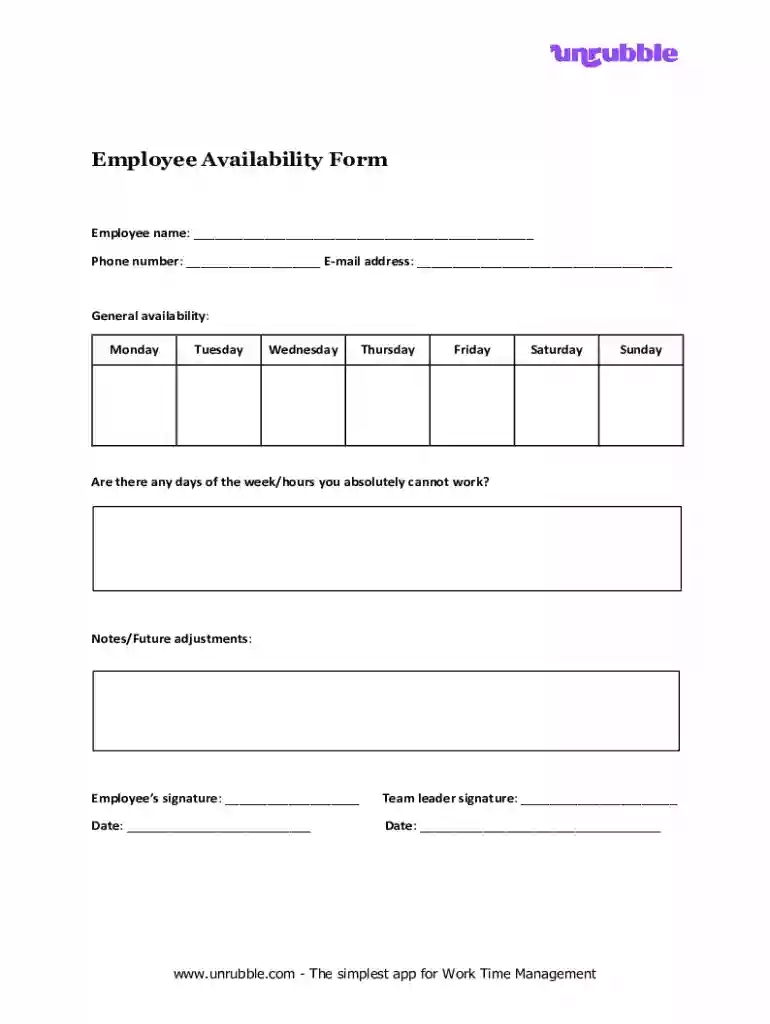
Employee Availability Form Preview on Page 1

Here's how it works

01. Edit your form online
Type text, add images, blackout confidential details, add comments, highlights and more.

02. Sign it in a few clicks
Draw your signature, type it, upload its image, or use your mobile device as a signature pad.

03. Share your form with others
Send it via email, link, or fax. You can also download it, export it or print it out.

Definition & Meaning

The Employee Availability Form is a tool used by organizations to capture the working availability of their employees. This essential document outlines when employees are available to work, helping manage schedules and plan work shifts effectively. It can be used in various industries to ensure that staffing levels meet operational demands and accommodate individual employee needs. The form typically includes sections where employees specify their available days and times, offering a clear picture of workforce capability at any given time.


Purpose and Functionality

  • Clarity in Scheduling: Provides a structured way for employees to communicate when they can work.
  • Workforce Management: Assists in aligning employee availability with business needs.
  • Flexibility and Accommodation: Supports flexible work arrangements by understanding individual preferences.

How to Use the Employee Availability Form

Step-by-Step Instructions

  1. Distribution: The form can be distributed via email, shared through an internal portal, or given as a paper copy.
  2. Completion by Employee: The employee fills out all sections, marking their available days and times for work.
  3. Submission: Once completed, the form is submitted to HR or the appropriate manager for review.
  4. Review and Adjustment: Managers use the information to create or adjust work schedules.
  5. Feedback Communication: Discuss any changes or conflicts in availability directly with the employee.

Real-World Examples

  • Retail Stores: Often use the form to ensure adequate staffing during peak hours, like weekends and holidays.
  • Healthcare Facilities: Critical for arranging shifts to meet patient care demands.

Key Elements of the Employee Availability Form

Essential Information Sections

  • Personal Details: Includes fields for the employee's name, contact information, and employee ID.
  • Availability Schedule: A weekly format for employees to indicate their availability across all days.
  • Restrictions or Preferences: Employees can note any days they are unavailable or preferred work times.
  • Signature Line: Ensures that the form is a verified declaration of the employee's availability.

Flexibility and Customization Options

  • Add Comments: Space for any additional notes or explanations about availability.
  • Design Options: Can be customized to fit specific departmental needs or unique shift patterns.

Steps to Complete the Employee Availability Form

Detailed Completion Steps

  1. Personal Information Entry: Begin by filling out your name, phone number, and email address.
  2. Mark Availability: Highlight or check the days and times available to work.
  3. Notes Section: Use the comments field for any special considerations or flexibility requests.
  4. Review and Sign: Double-check entries for accuracy before signing.
  5. Submit for Processing: Deliver to the designated department coordinator or HR manager.

Examples of Common Mistakes

  • Incomplete Sections: Skipping contact information or failing to mark all days can delay scheduling.
  • Incorrect Timing: Marking times without considering overlap with other commitments.

Who Typically Uses the Employee Availability Form

decoration image ratings of Dochub

Primary Users

  • Employees: Frontline workers, part-time staff, and any personnel with variable schedules.
  • HR Departments: Use the form to track and manage personnel schedules efficiently.
  • Managers: Utilize availability data for shift planning and workforce adjustments.

Industries with High Utilization

  • Hospitals: For organizing shifts around clock care requirements.
  • Hospitality and Food Services: Fundamental for scheduling servers, chefs, and custodial staff.

Important Terms Related to Employee Availability Form

Glossary of Key Terms

  • Shift: The scheduled period an employee is expected to work.
  • Flexible Hours: Arrangements that allow deviation from fixed work hours.
  • Time Off Requests: Formal applications submitted by employees for days they cannot work.

Explanation of Industry Jargon

  • Roster: A detailed plan showing which employees are scheduled to work at various times.
  • On-call: Times when employees need to be available to work if required.

State-Specific Rules for the Employee Availability Form

Differences Across States

  • California: Mandates strict adherence to employee request offs to avoid employment penalties.
  • New York: Requires clear documentation of available and non-available days upon employee's hire.

Compliance Requirements

  • State laws may oblige employers to respect submitted availability, especially in regions with strong labor protections.

Regional Best Practices

  • Engage with state labor offices to understand specific worker rights related to scheduling and availability.

Examples of Using the Employee Availability Form

Case Study 1: Retail Chain

  • Challenge: Fluctuating demand during holiday seasons.
  • Solution: Implemented an availability form to optimize staffing levels and improve coverage during peak periods.

Case Study 2: Small Business

  • Challenge: Part-time staff needed flexible hours.
  • Solution: Used the form to identify patterns in availability and created a dynamic schedule that maximized both employee happiness and company productivity.
be ready to get more

Complete this form in 5 minutes or less

Get form

Security and compliance

At DocHub, your data security is our priority. We follow HIPAA, SOC2, GDPR, and other standards, so you can work on your documents with confidence.

Learn more
ccpa2
pci-dss
gdpr-compliance
hipaa
soc-compliance
be ready to get more

Complete this form in 5 minutes or less

Get form