






Definition & Meaning
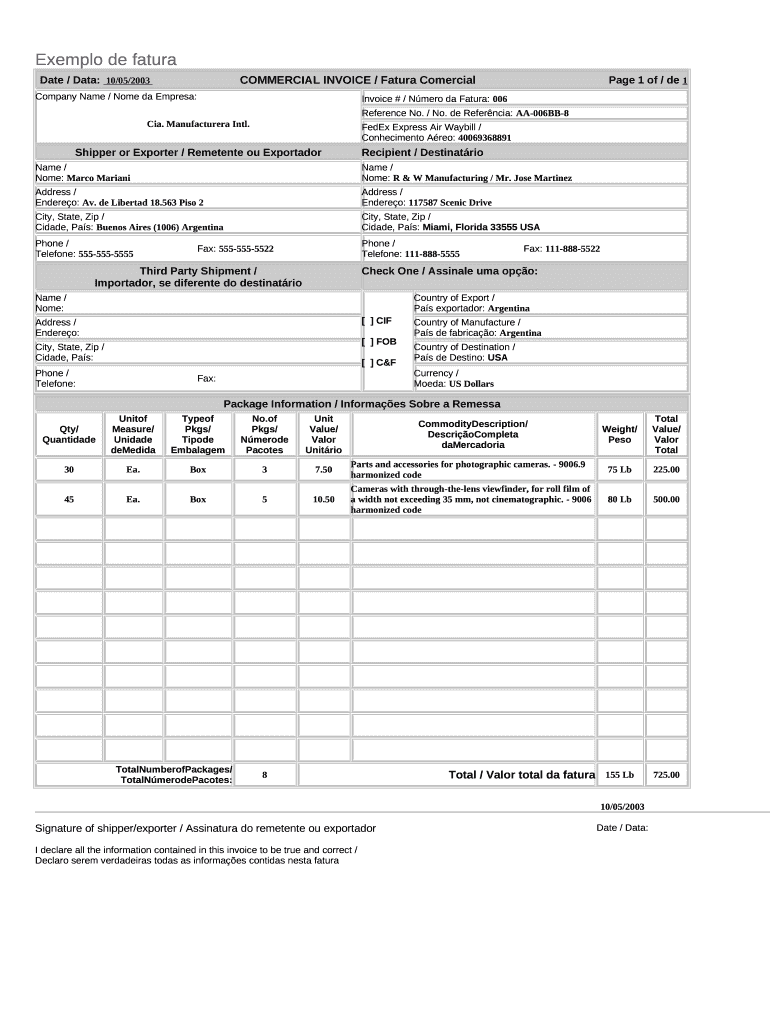
A Commercial Invoice Template is a document used for the purpose of detailing the sale of goods in international trade. It serves as a bill for the goods exported, transferred, or sold to a customer. This template encompasses critical transaction details such as the names and addresses of the seller and buyer, a description of the goods, and the terms of sale. The document’s primary role is to provide proof of the transaction’s legitimacy, facilitating smooth customs clearance by containing important data necessary for assessing taxes and duties.
Importance in International Trade
- Acts as a legal contract between buyer and seller.
- Provides clear evidence of terms agreed upon, reducing disputes.
- Essential for customs authorities to determine import tariffs and verifications.
How to Use the Commercial Invoice Template
Utilizing a Commercial Invoice Template efficiently is vital for ensuring compliance with international trade regulations. Here is a step-by-step guide on its use:
- Download and Select Format: Obtain the template in a compatible format, such as PDF or DOCX, ensuring you can edit it as per your needs.
- Enter Specific Details: Fill in the seller’s and buyer’s full names and addresses, ensuring accuracy to prevent any shipping issues.
- Describe the Goods: Provide a detailed description of each item, including weight, volume, and nature of items to ensure correct classification.
- Indicate the Sales Terms: Clearly specify the Incoterms, such as FOB (Free On Board) or CIF (Cost, Insurance, and Freight) to highlight who bears the various costs associated with the shipment.
- Set Payment Terms: Clearly define payment terms, possibly including currencies, deadlines, and preferred payment methods to establish clear buyer expectations.
- Review the Template: Double-check all details to avoid errors that could delay customs processing.
Ensuring Compliance
- Use standard terminology recognized internationally to avoid misunderstandings.
- Regularly update details to reflect any changes in tax rates or regulations.
Steps to Complete the Commercial Invoice Template
Before submitting, ensure the Commercial Invoice Template is thoroughly completed. Follow these detailed steps for optimal results:
- Gather Information: Collect all necessary details about the transaction, including buyer and seller addresses, item descriptions, and shipping information.
- Fill in Seller Information: Input your company name, address, and contact information as the seller making the goods available for sale.
- Complete Buyer Details: Enter the buyer’s information, ensuring no errors to expedite processing and improve communication.
- Document the Goods: List all the items sold in the shipment, including quantities, weights, and prices. Use universal measurement units when possible.
- Detail Pricing and Terms: Specify unit prices, total price, discounts, and terms of sale. Ensure clarity on who is responsible for any additional charges.
- Finalize and Sign: Once all fields are completed and reviewed, sign the document to confirm its authenticity. This step is crucial for customs and legal purposes.
Common Pitfalls to Avoid
- Avoiding incorrect product descriptions to prevent customs clearance delays.
- Ensuring total amounts and sums match across all related documents, such as sales orders and purchase orders.
Key Elements of the Commercial Invoice Template
The Commercial Invoice Template serves multiple functions, so its completeness and accuracy are of utmost importance. Below are the core elements typically included:
- Seller and Buyer Information: Complete name, address, and contact details.
- Invoice Number: A unique identifier for record-keeping and tracking.
- Date of Issue: The date when the invoice is created, relevant for payment terms and conditions.
- Description of Goods: Detailed listing with quantity, weight, unit price, and total price.
- Terms of Sale and Payment: Specification of the sale terms (Incoterms) and payment instructions.
- Taxes, Charges, and Duties: Breakdown of any applicable charges, ensuring all fiscal obligations are met.
- Total Invoice Value: The aggregate amount payable, factoring in all applicable discounts and charges.
Practical Scenarios
- For shipments involving multiple products, provide separate entries for each item type.
- Include special instructions for fragile or hazardous goods to ensure safe handling.
Legal Use of the Commercial Invoice Template
Compliance with legal and regulatory frameworks is imperative when using a Commercial Invoice Template in international trade. It helps mitigate risks and ensure smooth transaction completion.
Regulatory Compliance
- Ensure invoice data aligns with customs requirements to prevent delays.
- Provide consistent information across all trade documents (e.g., packing lists, certificates of origin).
Legal Disputes and Protections
- Serves as a binding legal document that can be used in dispute resolution.
- Supports legal claims on the accuracy and authenticity of the trade details provided.
Software Compatibility
A Commercial Invoice Template can be seamlessly integrated with various software platforms, enhancing efficiency and accuracy:
- DocHub Integration: Offers comprehensive document editing, signing, and sharing capabilities, simplifying the preparation and management of commercial invoices.
- QuickBooks and Other Accounting Software: Useful for linking invoice data to financial records for streamlined bookkeeping and report generation.
- Google Workspace: Facilitates cloud-based collaboration by integrating with Google Drive and Gmail, ensuring easy file management and communication.
Benefits of Integration
- Automates the calculation and updates of prices and taxes, reducing errors.
- Enables real-time updates and collaboration among global teams.
Examples of Using the Commercial Invoice Template
Understanding practical applications of the Commercial Invoice Template can ensure effective utilization across different scenarios:
- Small Businesses: Streamlines export procedures for small businesses venturing into international markets.
- Multinational Corporations: Ensures compliance with varying international trade regulations and simplifies trackability of large volumes of goods.
- Dropshipping Ventures: Facilitates transactions across distributed suppliers and customers, maintaining all necessary trade documentation.
Case Studies
- A U.S.-based electronics retailer efficiently used the template to manage its exports to Europe, resulting in reduced customs inquiries and expedited shipments.
- A food exporter adapted the form to include specific agricultural product compliances, avoiding potential trade blockages and achieving seamless international delivery.
Business Types that Benefit Most from the Commercial Invoice Template
Understanding which business types most commonly rely on this template can provide insight into its widespread applicability.
Ideal Users
- Export/Import Businesses: Vital for documentation and customs clearance in international trade.
- Manufacturers: Essential for documenting sales of finished goods overseas.
- Freight Forwarders: Frequently use the invoice to provide complete shipping solutions to their clients.
Optimization for Various Business Models
- Craft businesses can tailor the invoice template to showcase item specifics, ensuring buyer satisfaction upon delivery.
- Industrial manufacturers can use detailed sections for outlining part specifications, safeguarding shipment compliance with industry standards.