






Definition & Meaning
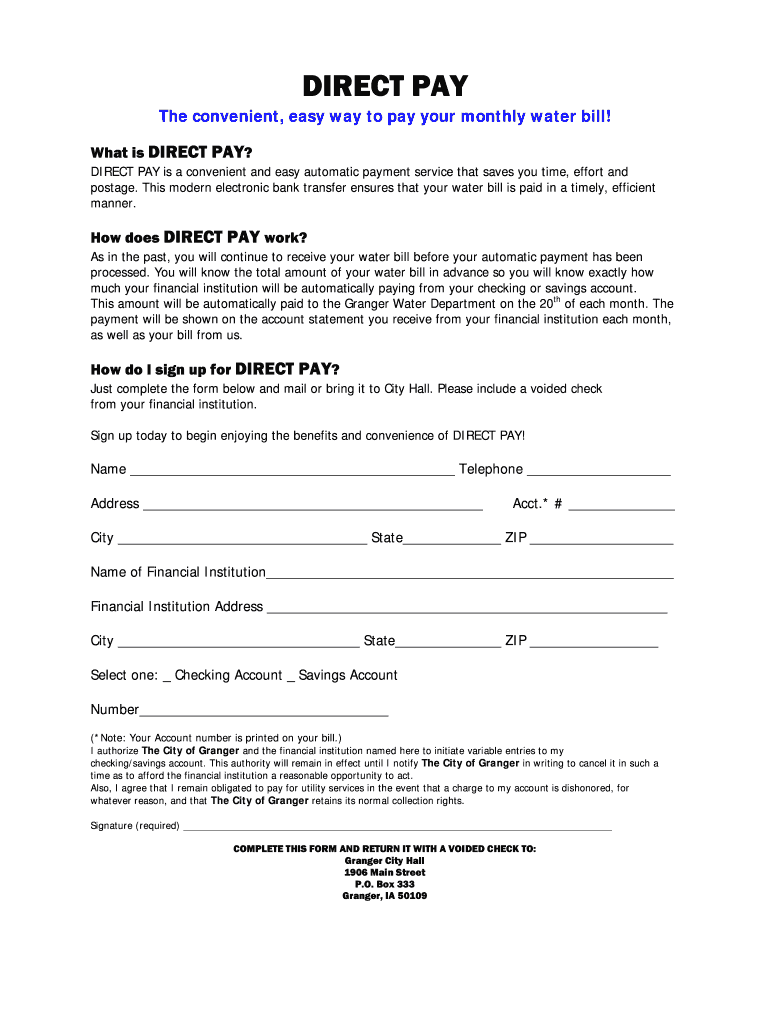
The "Direct Pay Water Bill Form" is utilized to authorize direct bank transfers for water bill payments. By completing this form, users allow the water service provider to deduct the bill amount directly from their bank accounts, ensuring timely payments without the need for manual monthly transactions. This process is designed to enhance convenience and financial management by automating recurring payments, thereby reducing the risk of missed deadlines or late fees.
How to Use the Direct Pay Water Bill Form
To effectively use the Direct Pay Water Bill Form, follow these steps:
- Gather Information: Ensure you have your water account number, bank details, and personal identification ready.
- Complete the Form: Fill in the necessary information, including your personal data, account information, and banking details for authorization.
- Review for Accuracy: Double-check all entries to avoid errors that could disrupt the payment process.
- Submit the Form: Depending on the service provider, submission can be done online, via mail, or in person.
How to Obtain the Direct Pay Water Bill Form
Obtaining the Direct Pay Water Bill Form is straightforward:
- Online Access: Visit your water utility’s website, where the form is often available for download in PDF format.
- In-Person: Request a physical copy at the customer service office of your water provider.
- By Mail: Some companies offer a mail service to send you the form upon request.
Steps to Complete the Direct Pay Water Bill Form
Completing this form is critical for ensuring correct and authorized payments:
- Enter Personal Details: Include your full name and address as registered with your water provider.
- Provide Banking Information: Accurately input your bank account number and routing number.
- Agree to Terms: Read through and consent to any terms and conditions specified.
- Sign and Date the Form: Authentication is completed through your signature and the date of completion.
- Submit as Directed: Follow instructions based on your chosen submission method.
Why Should You Use the Direct Pay Water Bill Form
There are several advantages to using the Direct Pay Water Bill Form:
- Convenience: Avoid the monthly hassle of remembering due dates.
- Reliability: Ensures consistent and on-time payments.
- Cost Efficiency: Eliminates the need to write checks or spend on postage.
- Environmental Considerations: Reduces paper use, contributing to a greener environment.
Who Typically Uses the Direct Pay Water Bill Form
This form is ideal for:
- Homeowners: Seeking ease in managing recurring payments.
- Busy Professionals: Who prefer automated financial tasks to free up time.
- Elderly or Disabled Individuals: Who might find online banking challenging.
- Landlords: Who manage multiple properties and want streamlined bill processing.


Important Terms Related to Direct Pay Water Bill Form
Understanding related terminology aids in the effective use of this form:
- Authorization: Your formal approval to permit direct bank withdrawals.
- Automatic Debit: The process by which funds are automatically deducted from your account.
- Account Number: A unique number identifying your water service billing account.
- Routing Number: A nine-digit number identifying your bank location for payments.
Key Elements of the Direct Pay Water Bill Form
The form consists of several critical components to facilitate a smooth setup:
- Personal Information Section: Collects name, address, and contact details.
- Payment Authorization Section: Includes bank account details and authorization for automatic payments.
- Terms and Conditions: Outlines the agreement details, such as cancellation policies and liability clauses.
- Signature Field: Required for completing the form and providing consent to the payment process.
Form Submission Methods (Online / Mail / In-Person)
Submitting the form can vary based on preference and provider capabilities:
- Online: Fastest method, often involves uploading the completed form through the provider's website portal.
- Mail: Send the form to the provided address for processing; ensure adequate postage and processing time.
- In-Person: Drop off the completed form at the provider’s customer service office for immediate assistance and confirmation.