Systems Survey Form 2026

Get Form
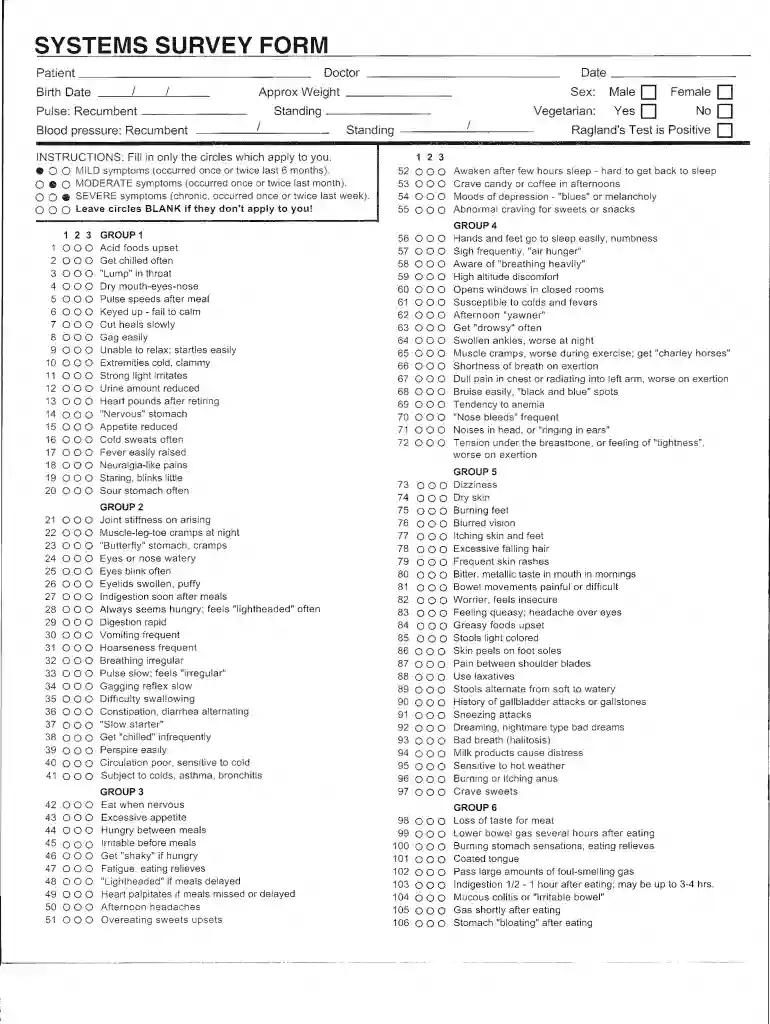
Systems Survey Form Preview on Page 1

Here's how it works

01. Edit your form online
Type text, add images, blackout confidential details, add comments, highlights and more.

02. Sign it in a few clicks
Draw your signature, type it, upload its image, or use your mobile device as a signature pad.

03. Share your form with others
Send it via email, link, or fax. You can also download it, export it or print it out.

Definition & Meaning

The Systems Survey Form is a critical document used to gather comprehensive data on specific systems, often within the context of health, technology, or organizational processes. It serves as a structured tool for assessing and documenting various components and parameters of a system to facilitate analysis and decision-making. The form is generally standardized to ensure consistency and accuracy in data collection, enabling efficient comparison and evaluation.

  • Purpose: The primary objective of the Systems Survey Form is to systematically collect input that can be used for performance evaluation, compliance checks, or system improvements.
  • Components: Typically includes sections for demographics, operational data, system performance metrics, and user feedback.
  • Usage Context: Employed by organizations across various sectors, including healthcare for patient assessments, technology for evaluating software systems, and business for process audits.

This form is invaluable for stakeholders seeking a holistic view of system performance and areas for enhancement.

How to Use the Systems Survey Form

Utilizing the Systems Survey Form effectively involves a step-by-step approach to ensure all relevant information is captured accurately. Here are detailed procedures for using this form:

  1. Identify Objectives: Clarify the goals of the survey to ensure that the form is used effectively.
  2. Select Respondents: Determine who will complete the form - this could be internal team members, end-users, or system administrators.
  3. Form Distribution: Distribute the form digitally or physically, depending on access and convenience for respondents.
  4. Data Collection: Gather responses, ensuring that all required sections are completed to facilitate thorough analysis.
  5. Analyze Results: Review the collected data to identify patterns, anomalies, and areas needing attention.
  6. Action Plan: Develop strategies based on insights gained from the form to enhance system efficiency or address identified issues.

Tools: Use platforms like DocHub to create fillable digital versions of the form, allowing for easy distribution and collection.

Key Elements of the Systems Survey Form

The Systems Survey Form is composed of several critical sections, each designed to capture specific data points essential for a comprehensive analysis. These elements include:

  • Demographic Information: Collects details about the respondent, such as name, position, and contact details, which help in contextualizing responses.
  • System Metrics: Includes fields for operational data, such as system uptime, response times, and error rates for technical assessments.
  • User Experience: Sections where respondents can provide feedback on usability, satisfaction, and suggested improvements.
  • Compliance and Standards: Fields to verify adherence to industry-specific regulations or benchmarks.

The form's design is intended to be user-friendly, ensuring ease of completion while maintaining data integrity.

Steps to Complete the Systems Survey Form

Completing the Systems Survey Form requires attention to detail to ensure accuracy and completeness. Here is a guide for completing the form:

  1. Review Instructions: Begin by understanding the guidelines provided with the form to avoid mistakes.
  2. Fill in Personal Information: Enter accurate demographic and identification details.
  3. Provide Operational Data: Record relevant system operation data, ensuring precision in metrics.
  4. Feedback Section: Articulate experiences and insights related to the system, mentioning both strengths and areas for improvement.
  5. Validate Entries: Double-check all entries for completeness and accuracy before submission.

Following these steps helps ensure that the data collected is reliable and actionable.

Legal Use of the Systems Survey Form

The legal use of the Systems Survey Form encompasses compliance with various regulations that govern data collection and usage. Key legal considerations include:

  • Privacy Regulations: Adherence to data protection laws such as the GDPR and CCPA, which dictate consent and data handling practices.
  • Confidentiality: Ensuring that sensitive information collected through the form is stored and managed securely.
  • Regulatory Compliance: For industry-specific forms, ensure that all legal compliance checks are integrated into the form process.

Understanding these legal aspects is crucial for organizations to avoid penalties and maintain trust with respondents.

Who Typically Uses the Systems Survey Form

The Systems Survey Form is utilized by a diverse range of professionals and organizations across sectors. Typical users include:

  • Healthcare Professionals: For collecting patient data and evaluating healthcare systems.
  • IT Departments: To monitor and assess software or hardware systems.
  • Business Managers: For auditing processes and systems within the organization.

Each user employs the form to gather insights that are critical for performance improvement and strategic decision-making within their respective domains.


decoration image ratings of Dochub

Digital vs. Paper Version

The choice between using a digital or paper version of the Systems Survey Form can influence the ease and efficiency of data collection:

  • Digital Version: Offers benefits such as easier distribution, quicker data entry, automatic validation, and efficient storage and analysis capabilities. Platforms like DocHub provide tools for creating fillable and interactive forms.
  • Paper Version: Useful in environments where digital access is limited or where a physical signature is necessary. It necessitates manual data entry for analysis, which can be time-consuming.

Organizations often choose the digital option for its convenience and ability to integrate seamlessly with other tools and systems.

Examples of Using the Systems Survey Form

Real-world applications of the Systems Survey Form illustrate its utility across various contexts:

  • Healthcare: Used in clinics to assess patient health systems, gather feedback on treatment quality, and streamline care processes.
  • Corporate Training: Organizations employ the form to measure the effectiveness of training programs and capture employee feedback.
  • Tech Companies: Utilized for tracking the functionality and usability of software products, collecting bug reports, and gathering developer feedback.

These examples demonstrate the form's versatility and importance in improving operational efficiency and user satisfaction.

be ready to get more

Complete this form in 5 minutes or less

Get form

Security and compliance

At DocHub, your data security is our priority. We follow HIPAA, SOC2, GDPR, and other standards, so you can work on your documents with confidence.

Learn more
ccpa2
pci-dss
gdpr-compliance
hipaa
soc-compliance
be ready to get more

Complete this form in 5 minutes or less

Get form