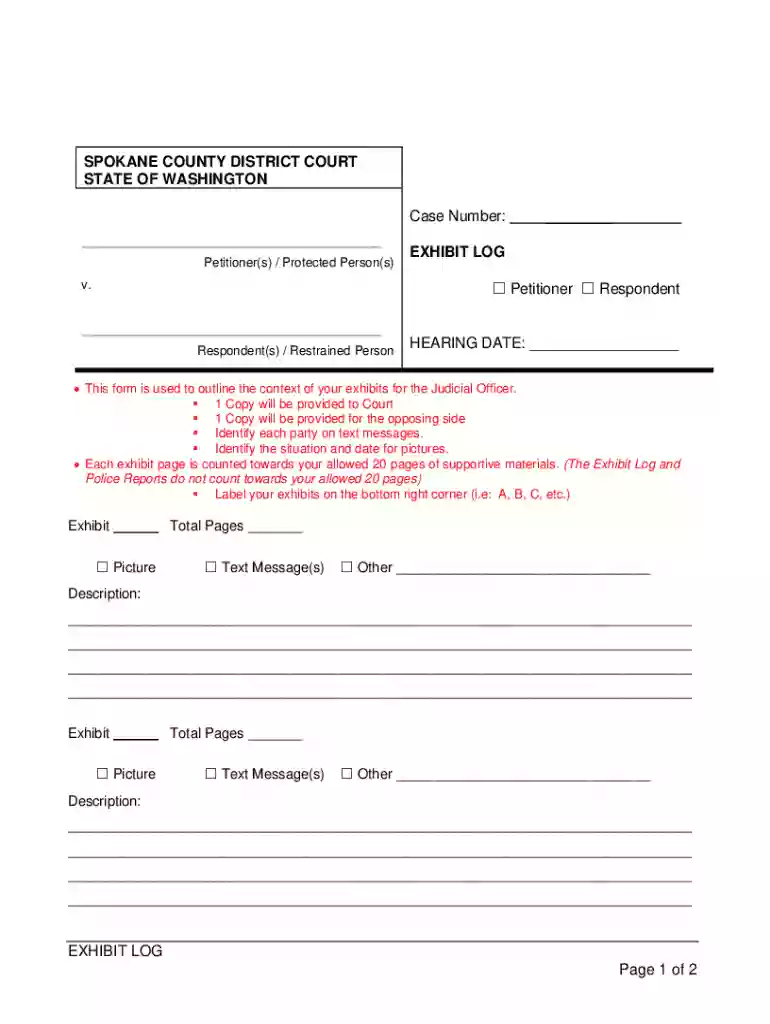
Exhibit Log Form 2026

Get Form
Exhibit Log Form Preview on Page 1

Here's how it works

01. Edit your form online
Type text, add images, blackout confidential details, add comments, highlights and more.

02. Sign it in a few clicks
Draw your signature, type it, upload its image, or use your mobile device as a signature pad.

03. Share your form with others
Send it via email, link, or fax. You can also download it, export it or print it out.

Definition & Meaning

The "Exhibit Log Form" is a critical legal document used to track exhibits presented in court cases. This form serves as an official record of all tangible evidence and documents presented during legal proceedings. It ensures an organized approach to managing complex data by providing a detailed account of each exhibit. The log enumerates all evidence to prevent any oversight or confusion, maintaining clarity throughout the trial process. This form contributes to a fair legal environment by offering a structured methodology for tracking evidence.

Purpose in Legal Proceedings

  • Evidence Tracking: Documenting all exhibits presented during a court case.
  • Organizational Tool: Provides a coherent structure for managing complex evidence.
  • Legal Reference: Acts as an official record for all parties involved.

How to Use the Exhibit Log Form

Utilizing the Exhibit Log Form requires attention to detail to ensure accurate documentation of all legal evidence. Follow these steps to effectively complete and maintain the form:

  1. Identification: Clearly identify each exhibit with a unique code or number.
  2. Description: Provide a brief description of the exhibit, including its nature and relevance to the case.
  3. Date of Entry: Note the date when the exhibit was introduced in the court proceedings.
  4. Source of Exhibit: Indicate the origin of the exhibit, whether it was submitted by the plaintiff, defendant, or a third party.
  5. Authentication Details: Record any authentication information necessary to verify the exhibit's legitimacy.

Step-by-Step Instructions

  • Step 1: Assign a unique identifier to each exhibit.
  • Step 2: Write a detailed description.
  • Step 3: Log the date of submission.
  • Step 4: Identify the origin of the exhibit.
  • Step 5: Confirm and note authentication details.

Steps to Complete the Exhibit Log Form

Completing the Exhibit Log Form requires a methodical approach to capture every essential detail. Here's a comprehensive guide:

  • Assemble Documentation: Gather all exhibits and supportive documentation.
  • Assign Numbers/Identifiers: Number each exhibit for easy reference.
  • Complete Entries: Fill out all required fields for each exhibit, ensuring no sections are left blank.
  • Review: Double-check for accuracy and completeness.
  • Obtain Signatures: Secure any necessary signatures or stamps for validation.

Key Elements of the Exhibit Log Form

The form comprises multiple critical components that collectively ensure precise documentation. These include:

  • Exhibit Number: Unique numeric or alphanumeric identifier for each piece of evidence.
  • Description of Exhibit: Detailed information regarding the nature and background of the exhibit.
  • Submitting Party Information: Details identifying who submitted the exhibit.
  • Date Submitted: Indicating the timeline of when exhibits are introduced.
  • Verification/Authentication: Any necessary validation checks to establish authenticity.

Example of Detailed Content

  • Example 1: An exhibit identified as "Exhibit 1A" could refer to a contract document submitted by the plaintiff on July 15, 2023.
  • Example 2: "Exhibit 2B" might pertain to video evidence authenticated by a security professional.

State-Specific Rules for the Exhibit Log Form

Exhibit Log Forms may slightly vary based on jurisdiction, as different states might have unique requirements or additional data fields.

  • California: May require additional information on digital evidence authenticity.
  • Texas: Could necessitate detailed chain-of-custody records.
  • New York: Might allow electronic submission under specified conditions.

Legal Use of the Exhibit Log Form

Legal compliance is paramount when handling exhibit logs. This form must adhere to local, state, and federal regulations to maintain its validity in legal contexts.

Key Legal Considerations

  • Chain of Custody: Maintaining an unbroken record of evidence transfer.
  • Authentication: Proper validation to ensure evidence integrity.
  • Confidentiality: Protecting sensitive information contained within exhibits.

Digital vs. Paper Version

Both digital and paper versions provide distinct advantages. Choose the format best suited to the needs of your legal operations.

Digital Version

  • Storage: Easier to store and retrieve.
  • Sharing: Simplifies collaboration and sharing among legal teams.
  • Modification: Allows for easy updates without physical reprinting.

Paper Version

  • Simplicity: Traditional and easy to understand without technological familiarity.
  • Signatures: Physical signatures can provide legal assurance without digital verification.

Compatibility with Other Software

Digital Exhibit Log Forms can be integrated with various legal software tools for enhanced functionality and seamless workflow management.

  • DocHub Compatibility: Integrates with cloud storage and document management platforms.
  • Software Tools: Compatible with legal management tools for secure and efficient data handling.

Each of these sections provides a comprehensive overview of the Exhibit Log Form and its application in legal processes, ensuring users have the necessary knowledge to leverage it effectively.

be ready to get more

Complete this form in 5 minutes or less

Get form

Security and compliance

At DocHub, your data security is our priority. We follow HIPAA, SOC2, GDPR, and other standards, so you can work on your documents with confidence.

Learn more
ccpa2
pci-dss
gdpr-compliance
hipaa
soc-compliance
be ready to get more

Complete this form in 5 minutes or less

Get form