






Definition & Meaning
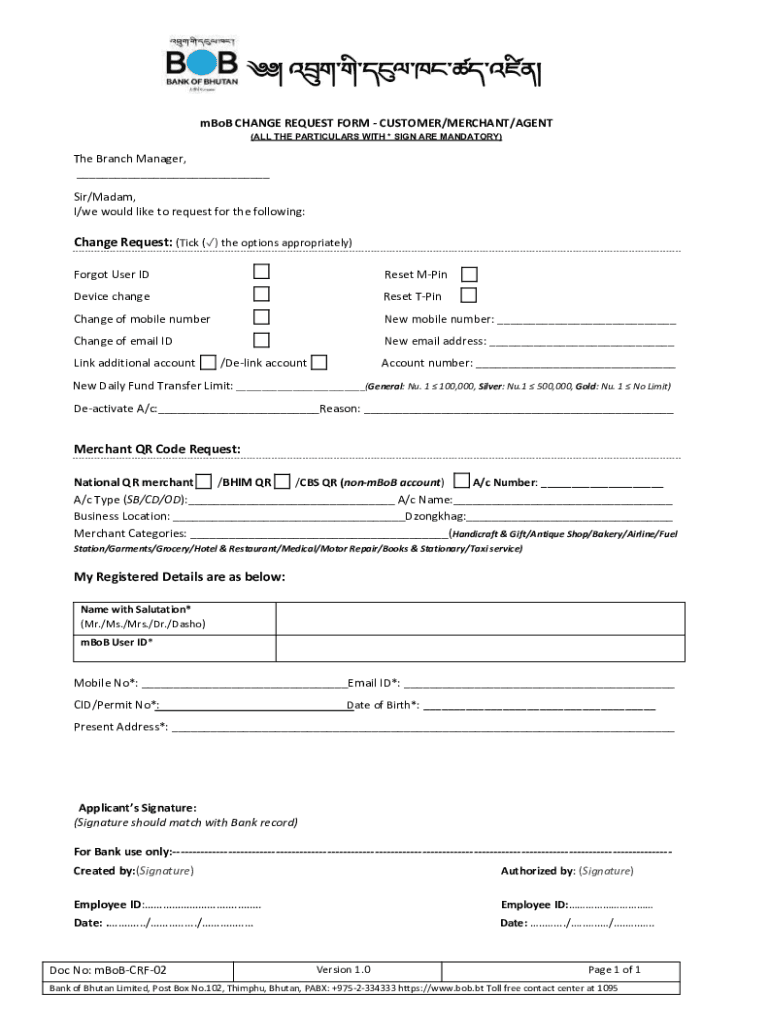
The "mBoB Change Request Form" is a standardized document used to request modifications or updates related to customer, merchant, or agent information within the mBoB system. This form ensures that all requested changes are officially documented and processed accurately, maintaining the integrity of the information across the mBoB platform.
Key Components
- Requester Details: Includes names, contact information, and any identification numbers pertinent to the requestor.
- Change Request Details: Specifics about the nature of the change being requested, such as account details, personal information updates, or adjustment of terms.
- Authorization and Consent: Signatures or approvals required to validate the request and consent to the changes.
Purpose
The form is instrumental in maintaining up-to-date records and facilitates systematic updates, ensuring operations align with the latest user information.
Steps to Complete the mBoB Change Request Form
Filling out the mBoB Change Request Form accurately is crucial for the successful processing of your request.
-
Gather Required Information:
- Ensure you have all necessary personal or business details and any relevant account numbers readily available.
-
Complete Personal Information Section:
- Input your full name, contact information, and identification numbers.
-
Specify the Change Required:
- Clearly indicate the specific change needed. This could include updates to addresses, contact details, or service preferences.
-
Provide Supporting Documents:
- Attach any necessary documentation that supports your request, such as proof of residency or identification.
-
Review and Sign:
- Check for accuracy and sign the form in the designated area to authorize the amendment.
-
Submit the Form:
- Follow the indicated method of submission, whether it's by mail, online, or in person.
Tips for Accuracy
- Double-check all entries for spelling and number accuracy.
- Ensure that all required fields are thoroughly completed before submission.
How to Obtain the mBoB Change Request Form
Accessing the form is straightforward and can be done through multiple channels.
- Online Download: Visit the official mBoB service website to download the form as a PDF.
- In-Person Pickup: Obtain a physical copy from an authorized mBoB branch or office.
- Customer Service Request: Contact mBoB customer support to have the form sent via email or mail.
Digital Availability
The form is often available in a fillable PDF format that can be completed and submitted electronically for faster processing.
Who Typically Uses the mBoB Change Request Form
This form is utilized by a variety of users who need to update their information in the mBoB system.
- Individual Customers: Those needing to change personal details such as address, phone number, or email.
- Merchants: Businesses that require updates to their transaction or account information.
- Agents: Representatives who need to modify their registration details or client information.


Important Terms Related to mBoB Change Request Form
Understanding the key terminology is essential for correctly using the form.
- Account Holder: The individual or entity whose information is being updated.
- Amendment: The change or correction being requested.
- Verification: The process of confirming the authenticity of the request and any supporting documents.
Common Terminology
- "Requester": The person or entity submitting the change request.
- "Authorized Signature": Required signature confirming consent for the changes.
Examples of Using the mBoB Change Request Form
Real-world scenarios illustrate how this form might be applied.
- Address Change: A customer relocates to a new address and submits the form to have all pertinent correspondence directed to the new location.
- Merchant Account Update: A business updates its bank account information for transaction processing purposes.
- Agent Name Correction: An agent notices a typo in their registration details and uses the form to correct this.
Legal Use of the mBoB Change Request Form
The form complies with legal standards, ensuring changes are authenticated and documented.
Compliance Assurance
- Verification Requirements: Each request must include necessary supporting documentation to comply with legal standards.
- Audit Trails: Documented changes are logged to provide an audit trail, ensuring accountability and transparency.
Submission Methods for the mBoB Change Request Form
Multiple submission methods cater to various needs and preferences.
- Online Submission: Use secure portals to submit completed forms electronically.
- Mailing: Send the form through postal mail to the designated address.
- In-Person Drop-off: Deliver the form at a registered mBoB location or office.
Preferences and Considerations
Selecting the right submission method depends on urgency, convenience, and personal preference for confirmation of receipt.