



01. Edit your fillable w 4 form no download needed online
Type text, add images, blackout confidential details, add comments, highlights and more.

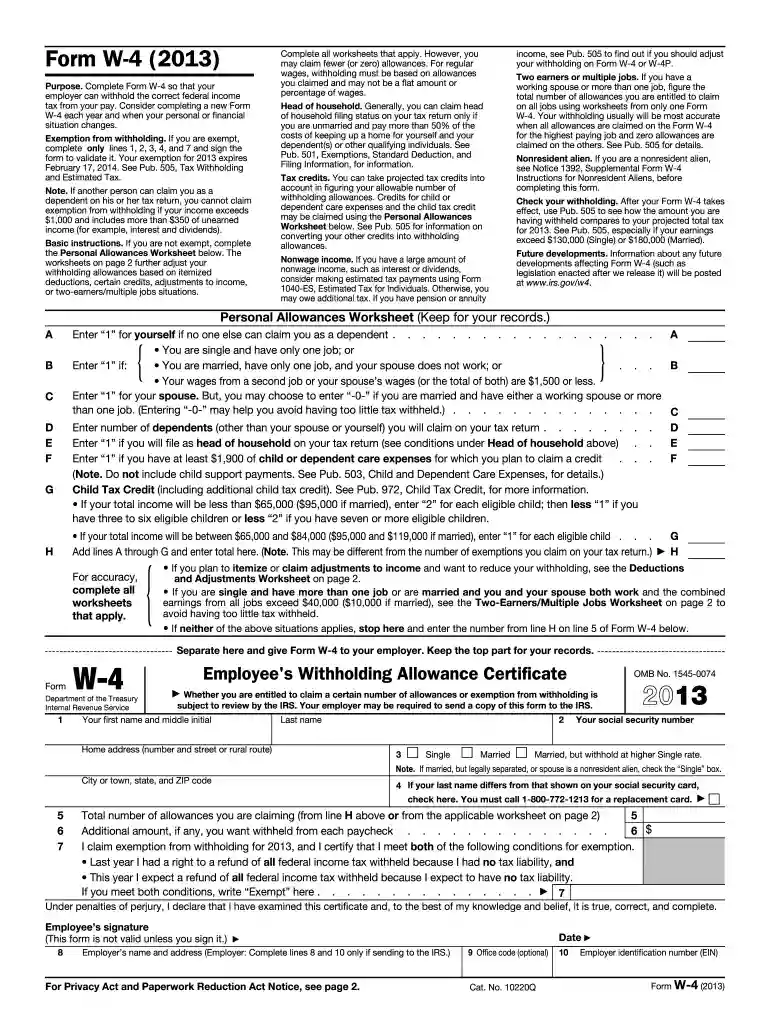
Type text, add images, blackout confidential details, add comments, highlights and more.

Draw your signature, type it, upload its image, or use your mobile device as a signature pad.

Send it via email, link, or fax. You can also download it, export it or print it out.
The Form W-4, officially known as the Employee's Withholding Allowance Certificate, is a critical document in the United States tax system. This form instructs an employer on how much federal income tax to withhold from an employee's paycheck. The fillable version allows employees to complete it online without any downloads.
The flexibility of a fillable W-4 form without the need for download ensures that changes in employment status, marital status, or financial responsibilities are quickly communicated to employers, ensuring accurate withholding amounts.
The fillable W-4 form is readily available for download and use directly through an online platform, which negates the need for downloading it onto your device.
This online accessibility ensures that employees have the flexibility to complete and submit the form from any location with an internet connection.
Filling out a W-4 form can appear complex, but breaking it down into systematic steps can simplify the process:
Personal Information:
Multiple Jobs or Spouse Works:
Claim Dependents:
Adjustments (other income, deductions, and extra withholding):
Sign and Date:
Each section is designed to collect specific information to ensure precise withholding amounts, minimizing surprises at tax time.
The fillable W-4 form that doesn't require downloading is pivotal in modern work environments. This flexibility caters to diverse working arrangements and preferences.
Employees benefit primarily from the ease of access and the ability to make prompt updates as their personal circumstances evolve.
This form is principally used by employees beginning a new job or those who need to revise their existing tax withholding instructions due to changes in financial life circumstances.
Having an online version without download requirements ensures that these individuals can manage their tax affairs seamlessly.

Understanding terms related to tax documentation can aid in accurate form completion.
Familiarity with these terms ensures clarity and accuracy when completing the form.
For electronic submissions of the fillable W-4 form, understanding the electronic signature process ensures compliance and authenticity.
Creating Electronic Signatures:
Validating the Signature:
Submitting:
Electronic signatures facilitate quick, paperless completion, aligning with remote or hybrid work environments.
The Internal Revenue Service provides guidelines to assist employees in filling out the W-4 form accurately to reflect financial situations.
Adhering to IRS guidelines ensures compliance and reduces errors in tax withholdings.
Understanding the components of the W-4 is crucial for effective completion and submission.
Grasping each element's functionality augments the accuracy and usefulness of the form.
At DocHub, your data security is our priority. We follow HIPAA, SOC2, GDPR, and other standards, so you can work on your documents with confidence.
Dec 8, 2025 Complete Form W-4 so that your employer can withhold the correct federal income tax from your pay. Give Form W-4 to your employer. YourRead more
The Motor Vehicle Accident Report Form is now available in fillable PDF format. PART 4: Fill in the driver, owner, and vehicle information for allRead more


