






Definition & Meaning
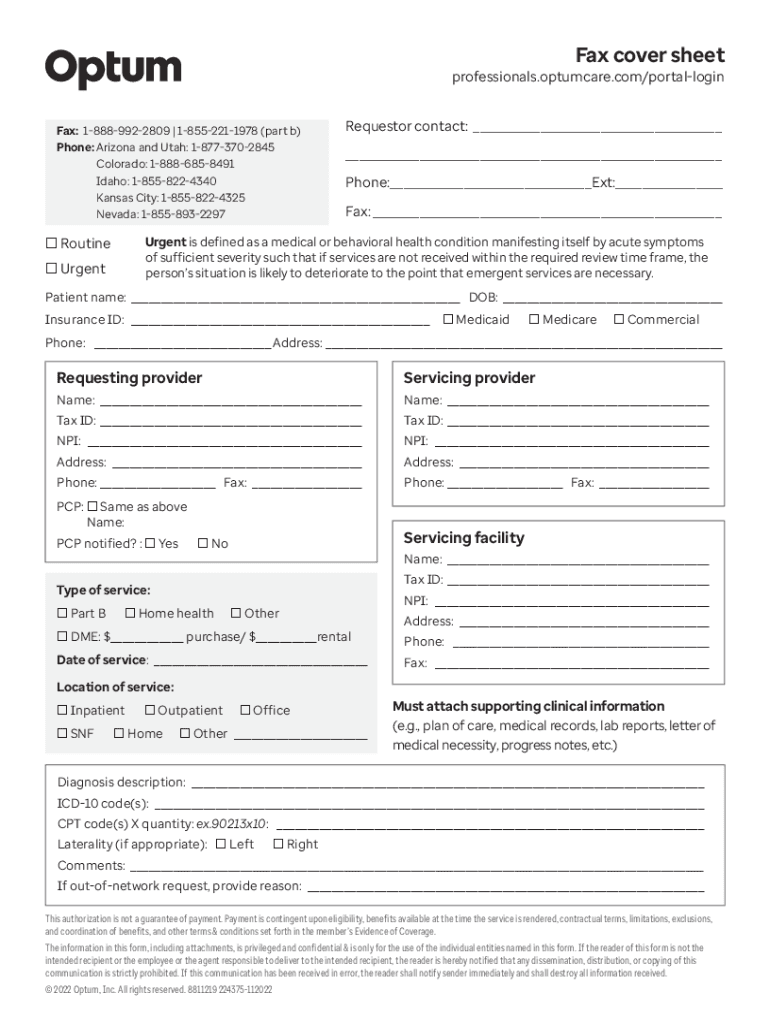
The "Fax cover sheet - Optum" provides a standardized method to ensure effective communication when sending documents via fax to Optum. This cover sheet is essential for organizing and categorizing the information sent, allowing for a seamless document transaction. It's typically used to specify sender and recipient details, subject matter, and any particular instructions or notes that need to accompany the primary document. By clearly identifying the context and content of the fax, the cover sheet helps reduce errors and ensures that the right documents reach the right people efficiently. In healthcare settings, such as those handled by Optum, it plays a critical role in maintaining the confidentiality and integrity of patient information during transmission.
Key Elements of the Fax cover sheet - Optum
The "Fax cover sheet - Optum" includes several critical components to ensure proper document transmission:
-
Sender Information: This section typically requires the full name, contact number, and organization (if applicable) of the person sending the fax.
-
Recipient Details: Includes the recipient's name, fax number, and department or title to ensure the document reaches the correct individual.
-
Date and Time: Clearly indicated to assist in record-keeping and verification of the time documents were sent.
-
Subject/Reference: A concise description of the document's purpose or reference number for easy identification.
-
Comments or Instructions: Space for additional notes or special instructions regarding the transmission or processing of the documents.
These elements are essential for maintaining communication clarity and ensuring the successful delivery and handling of sensitive information.
Steps to Complete the Fax cover sheet - Optum
Filling out the "Fax cover sheet - Optum" requires attention to detail to ensure all necessary information is communicated:
-
Gather Necessary Information: Obtain all relevant details, such as sender and recipient names, contact information, and any specific instructions or subject details that need to accompany the fax.
-
Fill in Sender Details: Input the sender's name, contact number, and organization if applicable. This ensures the recipient knows who to contact in case of questions or discrepancies.
-
Complete Recipient Section: Enter the recipient's full name, department, and fax number. This section is crucial for the document's correct delivery.
-
Add Date and Time: Accurately record the date and time when the fax is sent to create a reliable log for tracking purposes.
-
Specify Subject or Reference: Clearly define the purpose of the fax. This helps in sorting and prioritizing the document on the recipient's end.
-
Include Comments or Instructions: Add any specific notes or instructions pertinent to the handling of the faxed documents.
-
Review and Send: Double-check all filled-in details for accuracy before sending to prevent delivery errors or miscommunication.
These steps ensure that the fax cover sheet effectively supports the transmission process.
How to Obtain the Fax cover sheet - Optum
The "Fax cover sheet - Optum" can usually be acquired through several channels, primarily aiming to facilitate easy access for users:
-
Optum Official Website: Access and download the form directly from the Optum website. Often listed under resources or forms, ensuring it’s up-to-date.
-
Healthcare Provider’s Portal: Many healthcare providers associated with Optum might have a direct link to the cover sheet on their internal systems or patient portals.
-
Contact Optum Support: Inquire about obtaining the form via Optum's customer support, ensuring you get the correct format for your specific needs.
-
Healthcare Administrator: Often, administrators in a healthcare setting will have copies or templates of frequently used forms, including fax cover sheets.
These sources provide convenient access to the necessary documents, aiding in efficient communication with Optum.
Legal Use of the Fax cover sheet - Optum
The "Fax cover sheet - Optum" ensures the used communication complies with legal standards, especially important in healthcare contexts:
-
HIPAA Compliance: Essential in maintaining patient privacy, the cover sheet assists in safeguarding sensitive information transmitted via fax.
-
Authorization and Consent: Forms accompanying the cover sheet might require prior authorization or consent, indicating that the content and transmission comply with legal requirements.
-
Record Keeping: Provides an official record of correspondence, crucial for audits and legal compliance, documenting who sent what and when.
This makes using a fax cover sheet a critical step in not just operational efficiency but also legal security and protecting patient rights.
Examples of Using the Fax cover sheet - Optum
Practical scenarios underline the fax cover sheet's importance:
-
Medical Reports: When sending a diagnostic report to a specialist, the cover sheet clarifies patient details, ensuring quick and accurate follow-up.
-
Insurance Claims: Transmitting documents to process insurance claims where clarity and comprehensiveness are crucial to avoid delays.
-
Patient Referrals: Sending referral notes that require detailed patient information to speed up the subsequent treatment or consultation process.
These examples portray the fax cover sheet's utility in facilitating effective communication in pressing healthcare scenarios.
Software Compatibility
For efficient processing, ensure software compatibility for managing the "Fax cover sheet - Optum":
-
Adobe Acrobat: Effective for filling and saving the document in a PDF format which is widely accepted for fax communications.
-
Google Docs: For users within the Google ecosystem, enabling the easy creation and modification of a fax cover sheet template.
-
Microsoft Word: Commonly used for drafting and printing fax cover sheets, offering diverse formatting features for customizing forms.
-
Document Management Platforms: Solutions like DocHub can enrich user experience by offering editing, signing, and secure sending capabilities.
This compatibility ensures that documents are processed smoothly across different platforms, minimizing technical barriers.
Who Typically Uses the Fax cover sheet - Optum
Various professionals and entities often utilize this form for effective communication:
-
Healthcare Providers: Doctors, nurses, and administrative staff use the sheet to transmit medical records securely.
-
Insurance Companies: For handling claims and policy details where every detail is crucial for the processing.
-
Medical Laboratories: Sending test results where accuracy in recipient information ensures timely follow-ups.
-
Legal and Compliance Teams: Ensure all document transmissions adhere to regulatory requirements, especially concerning medical data.
Understanding the typical use case helps tailor the cover sheet to specific needs, enhancing utility and compliance.