






Definition & Meaning of Bcbs Turning Point Prior Authorization Form Excel
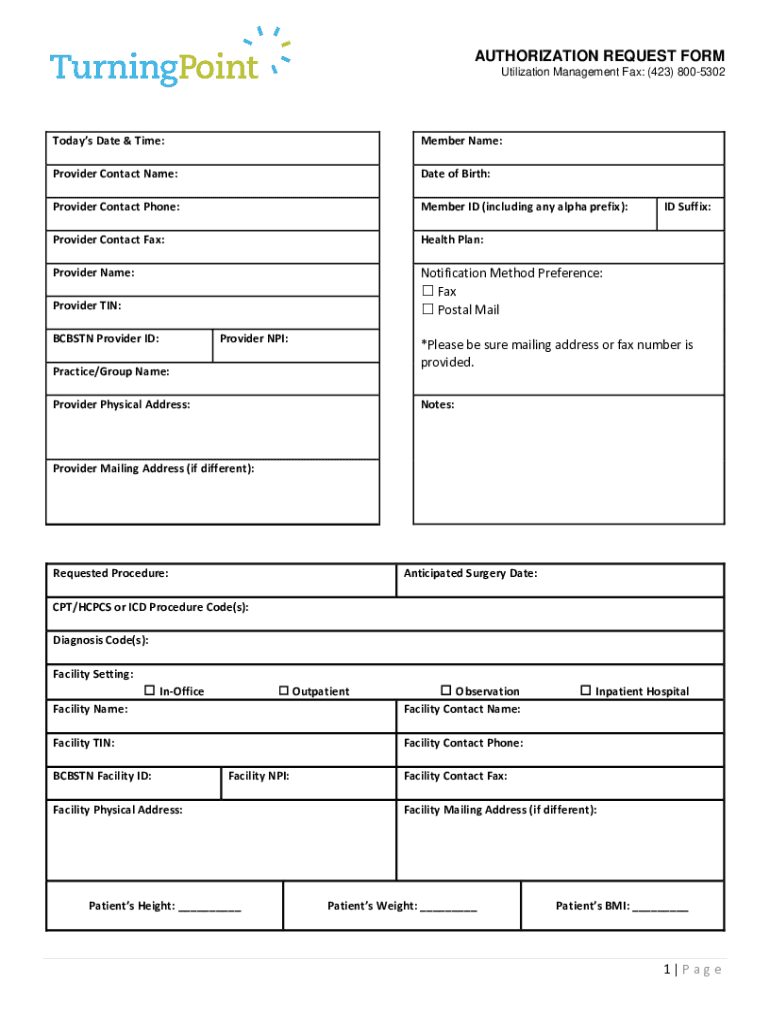
The "Bcbs Turning Point Prior Authorization Form Excel" is a vital document utilized primarily by healthcare providers to secure authorization from Blue Cross Blue Shield (BCBS) for specific medical procedures or services. The form, often available as an Excel file, is structured to streamline the authorization request process, ensuring that necessary details such as patient information, provider details, and service specifics are thoroughly captured. The use of an Excel format allows for easy data entry and efficient collection of the required information, facilitating smoother interaction with the insurance provider.
How to Use the Form
Filling Out the Form
To effectively use the form, healthcare providers should follow these steps:
- Download the Excel file from an authorized BCBS source.
- Open the file using compatible spreadsheet software.
- Input patient information, including full name, date of birth, and member ID.
- Enter the provider’s contact details, such as name and phone number.
- Specify the requested services or procedures needing authorization.
- Include any additional relevant information, such as diagnosis codes or past treatments.
Key Considerations
- Ensure all data fields are accurately completed to avoid delays.
- Double-check for any conditional formatting or specific data entry requirements within the Excel file.
How to Obtain the Form
Sources
The Bcbs Turning Point Prior Authorization Form Excel can be:
- Downloaded directly from the official BCBS website.
- Requested via email from BCBS customer service for registered providers.
Availability
Access to the Excel form may require authentication or verification of provider credentials to ensure sensitive data is protected.
Steps to Complete the Form
- Gather Information: Collect all necessary patient and provider details before opening the form.
- Access the Form: Download and open the Excel spreadsheet.
- Data Entry:
- Fill in patient demographic information.
- Input provider details and service codes.
- Review: Carefully check each section for accuracy.
- Submit: Follow submission instructions provided by BCBS, typically either through email or via the provider's online portal.
Key Elements of the Form
Sections of the Form
- Patient Information: Includes member ID, name, and date of birth.
- Provider Information: Contact name, phone number, and address.
- Service Details: Specific treatments or procedures needing approval.
- Authorization Codes: Pre-assigned codes for requested services.
Data Accuracy
Attention to detail in each section is essential, as inaccuracies can lead to processing delays or denials.
Who Typically Uses This Form
Primary Users
- Healthcare Providers: Doctors, clinics, and hospitals requesting prior authorization.
- Insurance Coordinators: Staff within healthcare facilities handling billing and insurance processes.
Use Cases
Providers use the form to ensure that proposed medical procedures are covered under the patient’s BCBS policy, minimizing out-of-pocket costs and ensuring service reimbursement.
Software Compatibility
The form is designed for use with standard spreadsheet applications, such as Microsoft Excel and Google Sheets, which allow for broad compatibility and ease of use. Users should ensure their software is updated to the latest version to avoid any technical issues when accessing the form.
State-Specific Rules and Differences
While the Bcbs Turning Point Prior Authorization Form is used nationwide, providers should be aware that specific states may have unique rules or additional requirements for prior authorizations. These could include:
- Variations in state insurance regulations.
- Additional state-specific documentation that must accompany the form.
- Potential differences in service coverage or provider network agreements.
Providers are advised to consult with state-specific BCBS representatives to ensure compliance with local regulations.