




01. Edit your form online
Type text, add images, blackout confidential details, add comments, highlights and more.

Type text, add images, blackout confidential details, add comments, highlights and more.

Draw your signature, type it, upload its image, or use your mobile device as a signature pad.

Send it via email, link, or fax. You can also download it, export it or print it out.
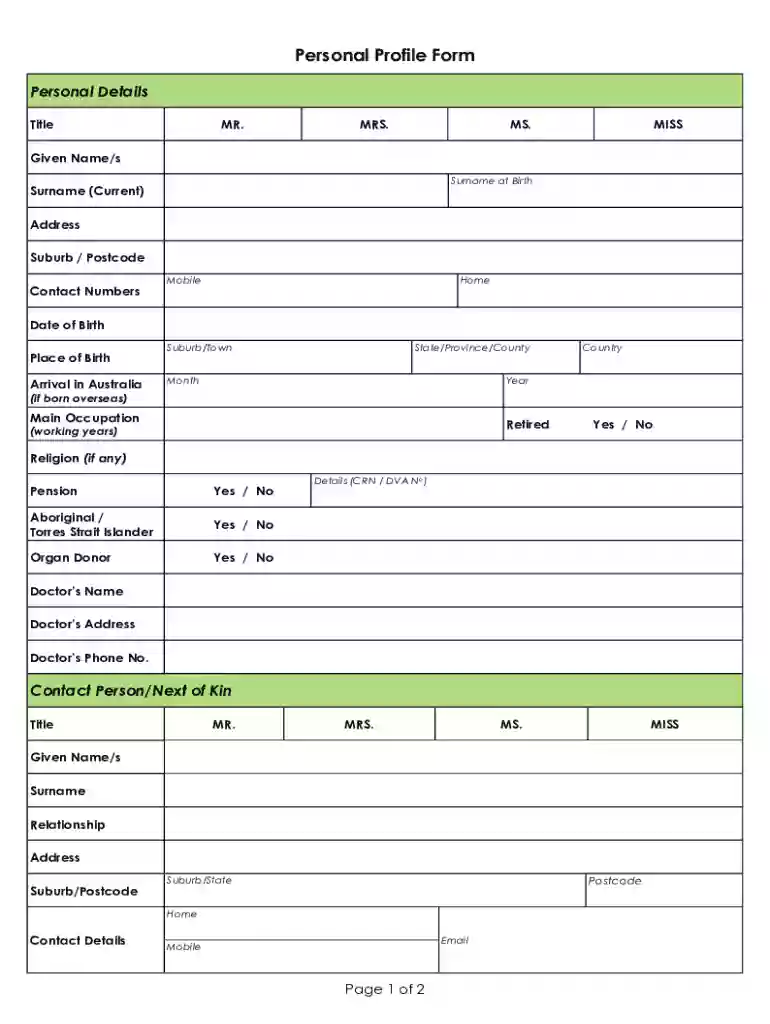
A Personal Profile Form, provided in DOCX format, is a comprehensive document used to collect detailed personal information about an individual. It serves as a repository of essential data, including personal identification, contact information, occupation, and family details. The form is structured to provide a complete profile of the individual, which can be utilized in various contexts, such as applications, records, or onboarding processes. Typically, it includes sections on marital status, children, and medical contacts to ensure a holistic view of the person's background and current situation.
When using the Personal Profile Form DOCX, it's essential to familiarize yourself with its sections and format. The form is designed to be user-friendly, allowing individuals to input their data directly into the document. Start by downloading the DOCX file, ensuring compatibility with your document editing software. Once opened, carefully read each section, entering the relevant information accurately. The form may contain fields such as text boxes for personal identification and contact details, checkboxes for marital status, and space for additional notes.
The primary aim is to provide comprehensive and truthful responses in each section to ensure that the form serves its intended purpose without the need for further clarification. Users can also utilize annotation tools to highlight areas of importance or add comments where necessary. Once completed, save the document and, if required, submit it via the designated submission method provided by the requesting entity.
Download and Open the Form: Save the Personal Profile Form DOCX to your device and open it using suitable document editing software that supports DOCX files.
Review Each Section: Start with a thorough review of each section to understand the type of information required.
Enter Personal Details: Fill in personal information such as name, contact address, phone number, and email in the dedicated fields.
Provide Family Information: Include details about family members, such as spouse and children, if applicable. This might include their names and contact details.
Detail Medical Contacts: List any emergency contacts or medical personnel relevant to the individual's healthcare needs.
Occupation and Employment: Indicate your current employment status, occupation, and any related professional details.
Review and Save: After completing all sections, review the form to ensure accuracy before saving the document. Make any necessary edits at this stage.
Personal Identification: Captures essential identity information, including name, date of birth, and social security number.
Contact Information: Encompasses all communication details such as permanent address, mobile numbers, and email addresses.
Family Details: Space for listing spouse, children, and other family members along with their contact information.
Occupation and Employment Info: Includes fields for current job role, employer's name, and employment history.
Medical Contacts: Information pertinent to medical emergencies, such as primary physician and emergency contact numbers.
These elements collectively provide a detailed insight into an individual's personal and professional life, ensuring that the information can be used effectively for its intended purpose, such as onboarding or official records.
Occupant: Refers to the individual completing and lodging the form.
Signature Fields: Sections where the form requires the person's signature to validate the provided information.
Interactive Templates: Used when forms are designed to be digitally filled, enhancing the ease of data processing and storage.
Understanding these terms is crucial for effectively completing and utilizing the Personal Profile Form DOCX. They ensure clarity and prevent misinterpretation during the form filling process, ultimately enhancing accuracy and consistency.
The Personal Profile Form DOCX must be used in accordance with privacy and data protection laws, especially given the sensitive nature of the information it collects. It is crucial to ensure the document adheres to regulations that govern personal data handling, such as the Health Insurance Portability and Accountability Act (HIPAA) for medical data or federal privacy laws for general personal information.
Entities using the form should clearly state the purpose for which the data is being collected and obtain explicit consent from the individual before collecting their personal information. Regular audits of data handling processes should be conducted to protect against unauthorized access or data breaches, ensuring that all information is securely managed and maintained.
This form is commonly employed by organizations and institutions that require a detailed profile of individuals. These include:
Onboarding Teams: Employers use this form during the recruitment process to gather employee details for records and identification.
Educational Institutions: Schools and universities use it to maintain personal records of students for administrative purposes.
Healthcare Providers: Used to collect patient information for use in medical records and emergency contact information.
The versatility of the Personal Profile Form DOCX makes it valuable across various sectors, where precise personal data is necessary for effective organizational functioning and record-keeping.


The Personal Profile Form DOCX is primarily designed for digital completion, offering several advantages over paper-based forms. The DOCX format supports easy modification using word processing software, facilitating corrections and updates without needing to print a new form.
Opting for the digital version enhances efficiency and provides better integration with document management systems, whereas paper forms are more prone to damage and errors during handling and storage.
At DocHub, your data security is our priority. We follow HIPAA, SOC2, GDPR, and other standards, so you can work on your documents with confidence.

May 4, 2018 Each contributors name will be linked to a special contributors profile page that provides the reader with a short bio, contact informationRead more
What is the person good at gifts, capacities and strengths? What is the persons personal identity, faith, family culture? What is important to the person?Read more
Personal Profile. IV. 4-H Resume (Seniors). V. Leadership Profile. VI. Citizenship/Community Service Profile. VII. Project Profiles. a. List projects includedRead more


