






Understanding the OCPS Record of Outside Food Form - Sun Blaze Es
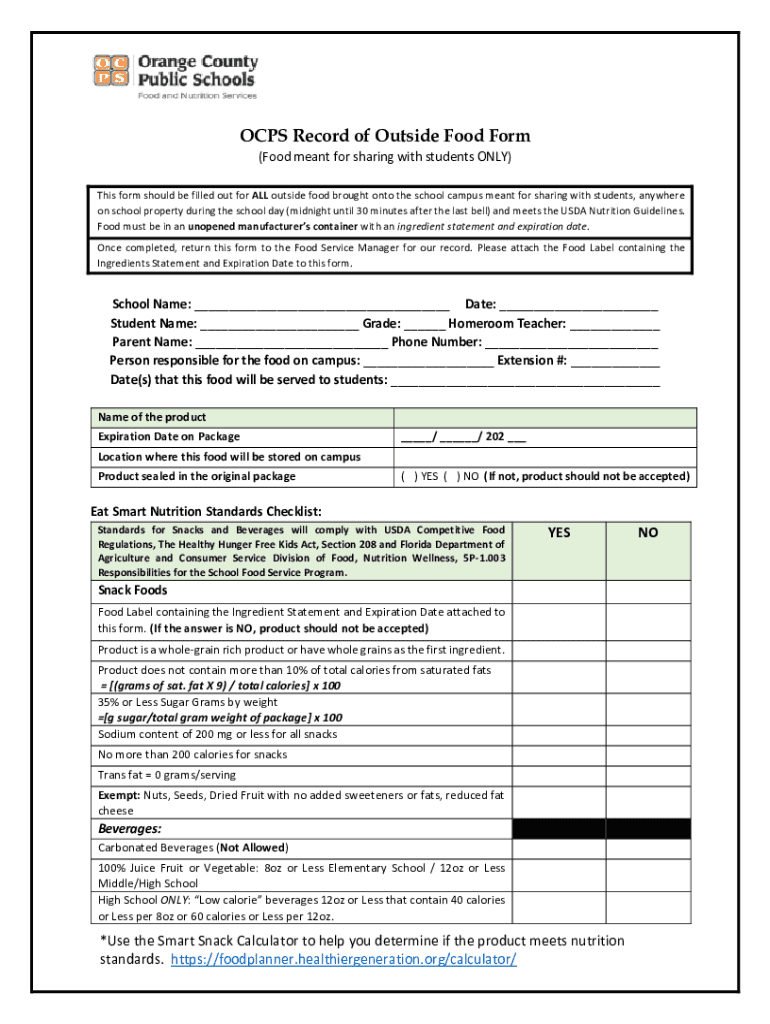
The OCPS Record of Outside Food Form is a vital document for Sun Blaze Elementary School, facilitating the procedure for introducing outside food on campus. It ensures that food brought for sharing complies with the USDA Nutrition guidelines. The form requires details about the food, including its manufacturer's packaging, an ingredient list, and an expiration date. Each entry is assessed by the Food Service Manager for compliance, aiding in maintaining student health and safety.
Steps to Complete the OCPS Record of Outside Food Form
-
Gather Information: Start by collecting necessary information about the food item, including its nutritional details and packaging.
-
Complete School Details: Fill in the school-specific sections with accurate details about Sun Blaze Elementary School.
-
Specify Responsible Persons: Identify the individuals responsible for bringing in and distributing the food.
-
Compliance Verification: Ensure all food items meet nutritional standards and fill out the compliance section before submission.
Key Elements of the OCPS Record of Outside Food Form
-
Food Details: Include comprehensive information about the food, such as the type, brand, and specifications like nutritional content.
-
Expiration and Packaging: Clearly state the expiration date and describe the unopened manufacturer's container with visible ingredient labels.
-
School and Event Information: Provide accurate information about the school and the occasion for which the food is intended.
Importance of the OCPS Record of Outside Food Form
The form plays a crucial role in regulating the quality and safety of food shared within the school. By adhering to USDA guidelines, it minimizes the risk of allergic reactions and ensures that all food items are safe for student consumption.
Who Typically Uses the OCPS Record of Outside Food Form
-
Teachers and Staff: They often fill out the form when organizing school events where shared food is involved.
-
Parents and Guardians: Parents use this form when contributing food for school parties or special events to ensure compliance with school policies.


Legal Use of the OCPS Record of Outside Food Form
The legal importance of this form is evident in its alignment with the USDA Nutrition Guidelines. This compliance not only adheres to federal standards but also promotes transparency and accountability in school food practices.
State-Specific Rules for the OCPS Record of Outside Food Form
While the form is primarily aligned with federal guidelines, some state-specific regulations may apply. Therefore, users should be aware of any additional state mandates that could influence the form's requirements or the type of food permitted.
Form Submission Methods
-
Online Portal: The form can be completed and submitted online for convenience.
-
In-Person Submission: Printed forms may be submitted directly to the school's administration office.
Penalties for Non-Compliance
Failing to fill out and submit the OCPS Record of Outside Food Form when required can result in restrictions on future contributions. The school may also engage in further actions to ensure compliance, prioritizing student safety.
Examples of Using the OCPS Record of Outside Food Form
Examples include parents filling out the form for a class birthday party or staff organizing a school-wide event. The form provides a structured approach to tracking and verifying food safety, thus, reducing health risks associated with unregulated food sharing.
Versions and Alternatives to the OCPS Record of Outside Food Form
While this specific form is tailored for Sun Blaze Elementary School, other schools within the OCPS district may use similar or slightly modified forms. Staying informed about these variants can help in maintaining uniform compliance across schools.
Digital vs. Paper Version
The form is accessible both digitally and in hard copy. The digital version offers ease of use and quicker submission, whereas the paper version may be preferred in certain situations or by those without immediate digital access.
Software Compatibility
While primarily intended for manual completion, the form can be managed digitally using various document handling software. DocHub, for example, offers compatibility for importing, editing, and signing the form without the need for extensive software installation.