Definition and Meaning
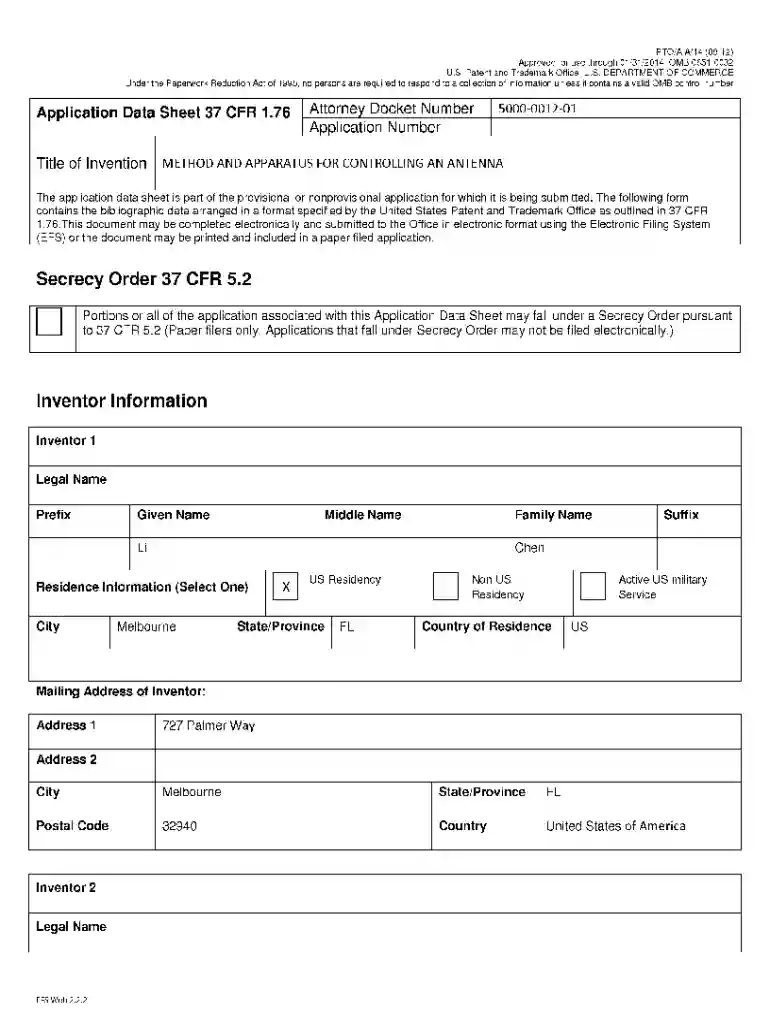
Forms for patent applications from the United States Patent and Trademark Office (USPTO) are indispensable tools in the process of securing patent rights in the U.S. A patent application is essentially a legal document submitted by an inventor or their representative, seeking protection for an invention. These forms capture essential details about the invention, such as its functionality, features, proposed claims, and the inventor's particulars. The structured format ensures that all key elements are included and provides a consistent framework for evaluating applications.
Types of Forms
- Provisional Application for Patent (Form SB/16): Allows inventors to establish an early filing date without a formal patent claim.
- Non-Provisional Application for Patent (Form SB/101): Required for formal examination and grant of a patent with detailed claims and descriptions.
- Design Patent Application (Form SB/102): Used to protect the ornamental design of a functional item.
- Plant Patent Application (Form SB/103): Secures rights for new and distinctive varieties of plants.
Uses and Significance
Forms facilitate communication between inventors and the USPTO. They ensure that all necessary details are presented in a uniform manner, resulting in a smoother examination process. Patents not only protect intellectual property but also encourage innovation by granting inventors exclusive rights, thereby providing incentives for further creativity and development.
How to Use the Forms for Patent Applications
Completing the forms involves multiple steps, which require careful attention to detail. Proper completion ensures that the application is not delayed or rejected due to errors or omissions.
Detailed Instructions
- Identify the Applicable Form: Verify whether a provisional, non-provisional, design, or plant patent form is needed based on the invention's specifics.
- Complete the Required Sections: Fill out details such as inventor information, invention title, and abstract. The non-provisional form, for example, requires detailed claims and an oath or declaration.
- Include Supplementary Documents: Attach any necessary drawings, a specification, and any references to prior technologies or studies.
- Review and Proofread: Check for accuracy and completeness. Even minor errors can cause significant delays.
Common Mistakes
- Omitting required sections, such as the disclosure of prior art.
- Failing to include drawings or diagrams in design or non-provisional applications.
- Incorrectly completing the inventor’s declaration.
How to Obtain the Forms for Patent Applications
Access to the correct forms is the first step toward initiating the patent application process. USPTO provides various channels through which these forms can be accessed by potential applicants.
Available Channels
- USPTO Website: The most reliable source to download both the latest versions and instructions.
- Local Patent Offices: Physical copies or guidance may be obtained at regional offices.
- Registered Patent Attorneys and Agents: They can provide forms, along with legal advice tailored to specific inventions.
Online Accessibility
The USPTO’s digital portal is a user-friendly interface where forms are available for download. Searching by the form number or patent type can expedite the process. Moreover, electronic submissions through the USPTO's Electronic Filing System (EFS) are encouraged due to their efficiency and speed.
Steps to Complete the Forms for Patent Applications - USPTO
Completing a patent application is a detailed process, meant to preserve the applicant's intellectual rights while aligning with legal standards. Each step is critical for ensuring completeness and compliance.
Step-by-Step Process
- Determine Patent Type: Evaluate whether the invention fits within utility, design, or plant patent categories.
- Gather Necessary Information: Collect all detailed invention data, including drawings, specifications, and prior art disclosures.
- Draft Technical Descriptions: These should be comprehensive and illustrative of the invention’s uniqueness.
- Compile Claims: Clearly define the scope of protection being sought for the invention.
- Prepare Drawings: Where applicable, provide detailed illustrations accompanied by reference numbers.
- Submit Required Fees: Ensure all fees are paid according to the schedule provided by the USPTO.
- Final Review and Submission: Double-check for errors, follow the EFS submission guidelines for an electronic application, or prepare a printed packet for mailing.
Supporting Documentation
- Statements of Inventor Ownership: If applicable, submit documentation transferring ownership interests.
- Foreign Priority Claims: Include if claiming priority from an overseas application.
Key Elements of the Forms for Patent Applications - USPTO
Understanding the key sections of the forms helps ensure that the application is robust and admissible.
Important Sections to Complete
- Bibliographic Data: Inventor details, filing date, and application type.
- Claims Section: Defines what aspects of the invention are protected.
- Abstract: A concise summary of the invention.
- Specification: A thorough description of the invention, detailing how it works and how it’s made.
Critical Considerations
- Unique Claims: Ensure that claims are distinct and non-obvious.
- Detailed Drawings: Required for design and utility patents, enhancing the comprehension of the claims.
Legally Binding Nature of the Forms
The principal objective of these forms is to legally document and substantiate the invention. Once filed, the USPTO examines the information meticulously.
Legal Compliance and Accountability
- Error and Fraud Checks: Any fraudulent claim or inaccurate information can invalidate the patent or lead to legal repercussions.
- Data Consistency: Ensure all submitted data aligns throughout the application and with existing records or filings for other patents.
Protection Scope
Once granted, patent rights prevent others from making, using, or selling the invention without permission, providing the inventor a period of exclusivity to commercialize or further develop the innovation.
Software Compatibility
Today's digital environment allows for simplified preparation and submission of patent forms using various software tools.
Compatible Software for Preparation
- Patent-Specific Software: Tools like PatSnap or IPfolio that provide templates and guides.
- Document Editing Tools: Common applications like Microsoft Word or Google Docs enable form formatting and editing before submission.
- Drawing Software: Tools such as AutoCAD or Adobe Illustrator for detailed design sketches and schematics.
Submission Software
Using the USPTO’s EFS-Web can facilitate digital submissions, ensuring authenticity and tracking through each step of the examination process.
Form Submission Methods (Online / Mail / In-Person)
Submitting the patent application marks the culmination of the preparation process. The chosen method can influence the speed of processing.
Submission Options
- Online Submission via EFS-Web: The most efficient and preferred method, providing instant confirmations.
- Mail Submission: For those who prefer traditional methods, physical forms can be sent to the USPTO’s mailing address.
- In-person at USPTO Office: Possible but less common, given the convenience of digital methods.
Considerations for Each Method
- Online Submissions: Often faster processing and reduced risk of form loss.
- Mail Submissions: Include all necessary materials plus extra copies of important sections.
- In-person Visits: Allow for immediate clarification of doubts but may incur travel costs.