






Definition and Purpose of the FireSmart Rebate Work Hours Estimate Form
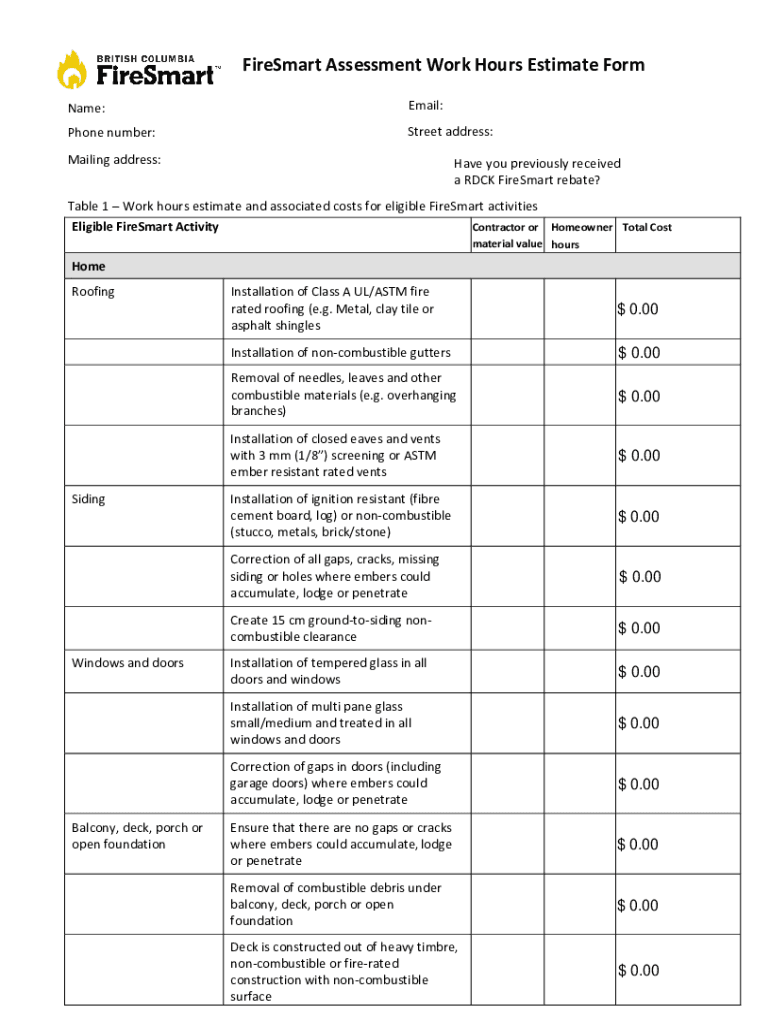
The FireSmart Rebate Work Hours Estimate Form is a specialized document designed to help homeowners track and estimate the work hours dedicated to FireSmart activities. These activities are aimed at reducing wildfire risks around homes and properties. By accurately completing this form, homeowners can apply for a rebate, supported by the Community Resiliency Investment program, which compensates them for their efforts in wildfire prevention.
Key Elements of the Form
- Homeowner Information: Includes sections for personal details like name, contact information, and address.
- Project Description: Homeowners detail the specific FireSmart activities undertaken.
- Work Hours Log: A comprehensive log of all hours spent on activities, specifying dates and nature of tasks performed.
- Certification: A section for the homeowner's signature to affirm the accuracy of the reported information.
How to Use the FireSmart Rebate Work Hours Estimate Form
Using the FireSmart Rebate Work Hours Estimate Form requires attention to detail to ensure all work hours are meticulously recorded.
- Prepare in Advance: Before you begin any FireSmart activities, obtain the form and review all required sections.
- Document Every Activity: As you perform each activity, note the date, duration, type of activity, and any equipment used.
- Review and Sign: Once all activities are complete, carefully review the form for accuracy. Sign the certification section to validate your entries.
Tips for Accurate Usage
- Use a Dedicated Notebook: Jot down work hours in a notebook during the activities; later transfer this information to the form.
- Verify Consistency: Ensure that the documented activities align with the guidelines provided by the FireSmart program.
Steps to Complete the FireSmart Rebate Work Hours Estimate Form
Completing the FireSmart Rebate Work Hours Estimate Form involves several structured steps:
-
Gather Personal and Project Information:
- Fill in your personal details in the designated sections.
- Provide a brief description of your FireSmart project.
-
Record Work Hours:
- Log each activity's date, description, and hours worked in the provided table.
-
Attach Supporting Evidence:
- Include photographs, receipts, or any other documentation that substantiates your activities.
-
Finalize and Submit the Form:
- Review your entries for completeness. Sign the declaration section and choose a submission method.
Examples of Submission Methods
- Online: Submit via designated government portals.
- Mail: Send to the specified address noted on the form.
- In-Person: Deliver to a local government office handling FireSmart initiatives.
Eligibility Criteria for FireSmart Rebates
Eligibility for rebates through the FireSmart program is contingent on several factors, ensuring applicants are rightfully compensated for their efforts in wildfire risk reduction.


Basic Eligibility Requirements
- Residency: Applicants must be homeowners within participating communities.
- Activity Type: Only activities outlined in the FireSmart guidelines are eligible.
- Documentation: Complete and transparent documentation of work hours and activities is required.
Variations in Eligibility
- Some states may have unique criteria or additional requirements, which can influence eligibility. Always check local guidelines.
Legal Use and Compliance with the FireSmart Rebate Work Hours Estimate Form
The FireSmart Rebate Work Hours Estimate Form functions under strict compliance standards to uphold the integrity of the rebate process.
Legal Obligations
- Accurate Reporting: Misrepresentation of work hours can lead to penalties and disqualification from future rebates.
- Confidentiality: Personal information provided is protected under privacy laws. Ensure data is accurately entered and securely stored.
Important Terms Related to the FireSmart Rebate Work Hours Estimate Form
Understanding specific terminology related to the form is essential for accurate completion and compliance.
Common Terms
- FireSmart Activities: Actions taken to reduce wildfire hazards, such as clearing brush and maintaining defensible space.
- Work Hours Log: A detailed record of labor hours, necessary for calculating rebates.
- Certification: A sworn statement by the applicant confirming the truthfulness of the information provided.
Examples of Using the FireSmart Rebate Work Hours Estimate Form
Real-life examples can illuminate the practical application of the FireSmart Rebate Work Hours Estimate Form:
- Homeowner A in California: Carla uses the form to track her hours spent clearing five acres of brush. She provides photos and a work log, securing a rebate of $800.
- Homeowner B in Oregon: John integrates additional wildfire-resistant landscaping projects into his application, ensuring all activities meet FireSmart criteria and submitting plans along with his form.
Application Process and Approval Time
Understanding the application process and expected timeline is critical for smooth rebate acquisition.
Step-by-Step Application Process
- Complete the Form: Accurately fill out all sections with necessary details.
- Gather Evidence: Collect all supporting documentation to submit as proof.
- Submit and Track: Once submitted, track the progress via phone or online portal.
Typical Approval Timeline
- Processing Time: Average application processing time varies from four to six weeks.
- Notification: Applicants will receive notification via mail or email regarding approval status.