






Definition and Meaning
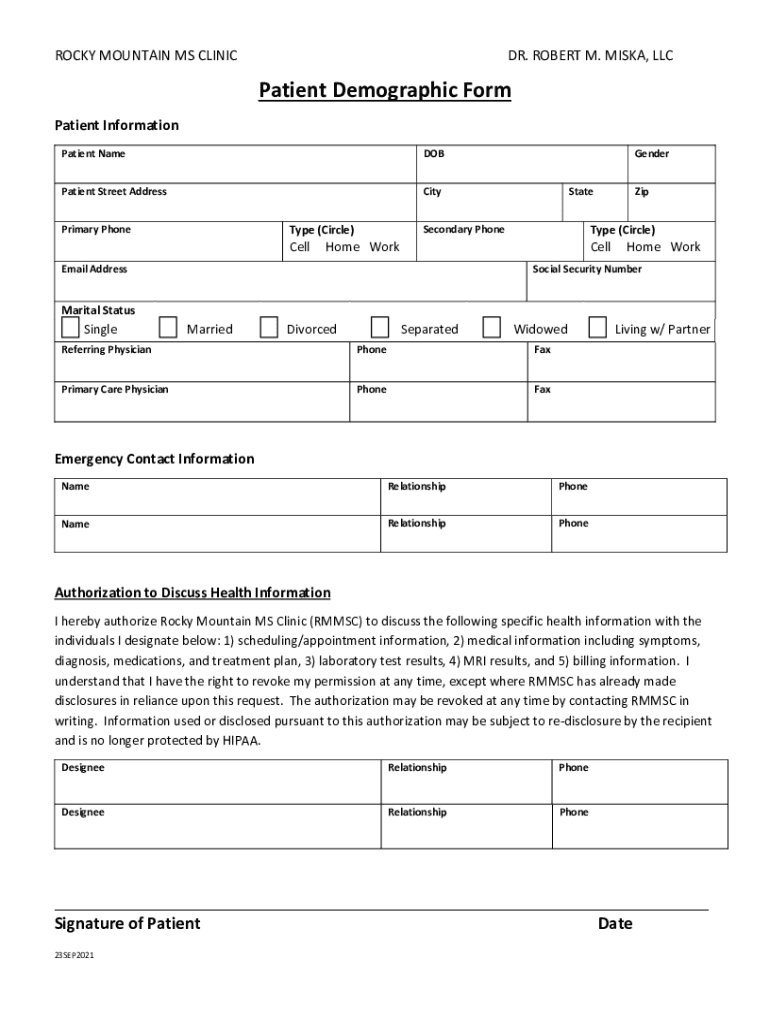
The Patient Demographic Form is a vital document used within healthcare settings to collect a variety of personal information from patients. This form captures essential details such as the patient's name, address, contact information, and date of birth. It also gathers important information about emergency contacts, insurance providers, and primary healthcare providers. The data aids medical staff in providing personalized care and ensures that all necessary details are available in a single, organized document. Beyond serving the direct needs of healthcare professionals, the form contributes to efficient administrative processes and improves patient experiences by streamlining the intake process.
Key Elements of the Patient Demographic Form
The Patient Demographic Form typically includes several key sections designed to comprehensively capture a patient's information. These sections often comprise:
- Personal Information: Full name, date of birth, gender, and marital status.
- Contact Details: Current residential address, phone numbers, and email address.
- Emergency Contacts: Names and contact details of individuals to be contacted in case of an emergency.
- Insurance Information: Details about the patient's health insurance provider, policy numbers, and coverage specifics.
- Medical History: General health information, including known allergies, chronic conditions, and current medications.
This organized collection of data ensures that healthcare providers have access to essential information, facilitating effective and personalized care.
Steps to Complete the Patient Demographic Form
Filling out a Patient Demographic Form can be simple when you follow these steps:
-
Personal Information:
- Begin by filling in basic personal details such as your full name, date of birth, and social security number.
-
Contact Information:
- Provide your current residential address, phone number, and email address for future communications.
-
Emergency Contacts:
- List at least two emergency contacts, including their names, relationship to you, and current phone numbers.
-
Insurance Details:
- Detail your insurance provider's name, policy number, and the plan type, ensuring accuracy to avoid future billing issues.
-
Medical History:
- Include information about any ongoing medical conditions, medications, allergies, or past surgeries.
Ensure all sections are thoroughly completed and verified for accuracy to facilitate a smooth data handling process by the healthcare provider.
Legal Use of the Patient Demographic Form
The Patient Demographic Form is fundamental from a legal perspective, as it helps adhere to regulations regarding patient privacy and data protection. In the U.S., compliance with the Health Insurance Portability and Accountability Act (HIPAA) is mandatory, ensuring that the information provided by patients is securely managed and utilized responsibly. This form also serves as a patient’s consent in cases of sharing medical records or health information with other entities, contributing to transparency in healthcare operations. Healthcare providers must ensure that all demographic information is handled in accordance with these regulations to maintain trust and legal standing.
Who Typically Uses the Patient Demographic Form
The Patient Demographic Form is primarily used by healthcare providers such as doctors, nurses, administrative staff, and insurance companies. Hospitals and clinics utilize this form at the time of patient registration to facilitate effective communication and care management. Moreover, medical billing professionals rely on this information to process insurance claims accurately. Pharmacies may also use demographic data to verify prescriptions and medication histories. Ultimately, this form acts as a crucial tool for anyone involved in the patient care continuum, providing a backbone for efficient operations across various healthcare departments.


Digital vs. Paper Version
The transition from paper to digital forms has significantly improved the management of Patient Demographic Forms. Digital versions offer enhanced accessibility as they can be filled out online, stored electronically, and easily retrieved. Filling out forms digitally reduces errors and speeds up the processing time, as electronic submissions eliminate the need for manual data entry. Additionally, digital forms integrate seamlessly with electronic health records (EHR) systems, allowing for real-time updates and secure sharing of data among healthcare providers involved in the patient’s care. In contrast, paper forms, while still used in some facilities, require careful handling and secure physical storage to prevent data loss.
State-Specific Rules for the Patient Demographic Form
While the core structure of the Patient Demographic Form remains consistent across the United States, certain state-specific regulations may influence its content or usage. For instance:
-
Privacy Laws: Some states may have additional privacy laws complementing HIPAA, requiring specific consent for releasing patient information.
-
Insurance Information: Insurance requirements can vary by state, affecting how insurance details must be documented on the form.
Healthcare providers must remain informed about the local regulations to ensure compliance and maintain the validity of the demographic information collected.
Form Submission Methods
Submissions of Patient Demographic Forms can be done through various methods, each catering to different preferences and technological capabilities:
-
Online Submission: Most healthcare providers offer secure portals for electronic submission, providing an efficient and eco-friendly method that allows for instant updates and confirmations.
-
Mail Submission: Some patients may prefer to receive and return paper forms via mail, particularly where technology access is limited.
-
In-Person Submission: Forms can be completed during a visit to a healthcare facility, ensuring support from staff to address any questions.
Each method offers unique benefits, and the choice often depends on the patient’s access to technology and personal preference.
How to Use the Patient Demographic Form
Using the Patient Demographic Form effectively ensures that all necessary information is organized and accessible. Here’s a guide on utilizing this form:
-
Ensuring Accuracy: Review the form thoroughly to make sure all entered information is accurate and up-to-date to avoid processing delays.
-
Updating Information: Periodically review and update the demographic information, particularly changes in medical conditions, insurance, or contact details.
-
Facilitating Transfers: Use the form to clearly outline patient information when transferring to another healthcare provider to ensure continuity of care.
The effective use of this form strengthens the healthcare provider-patient relationship, allowing practitioners to deliver care confidently and efficiently.