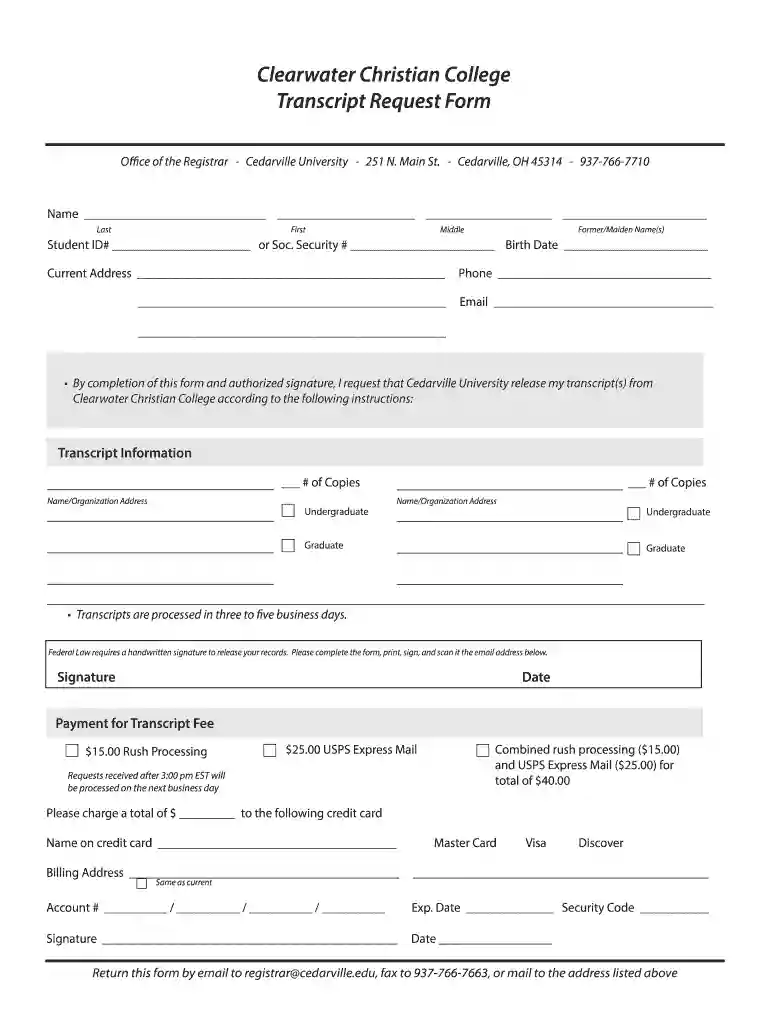
cedarville out Preview on Page 1

Clearwater Christian College Transcript Request Form - cedarville 2026

Here's how it works

  • 01. Edit your cedarville out online

    Type text, add images, blackout confidential details, add comments, highlights and more.

  • 02. Sign it in a few clicks

    Draw your signature, type it, upload its image, or use your mobile device as a signature pad.

  • 03. Share your form with others

    Send cedarville university transcript request via email, link, or fax. You can also download it, export it or print it out.

How to use or fill out Clearwater Christian College Transcript Request Form - cedarville with our platform

Form edit decoration
9.5
Ease of Setup
DocHub User Ratings on G2
9.0
Ease of Use
DocHub User Ratings on G2
  1. Click ‘Get Form’ to open the Clearwater Christian College Transcript Request Form in the editor.
  2. Begin by filling in your personal information. Enter your last name, first name, middle name, and any former or maiden names in the designated fields.
  3. Provide your Student ID number or Social Security number, along with your birth date for identification purposes.
  4. Fill in your current address and contact details, including phone number and email address, ensuring all information is accurate for correspondence.
  5. Specify the transcript information by indicating the number of copies needed and providing the names and addresses of the recipients.
  6. Sign and date the form where indicated. Remember that a handwritten signature is required to authorize the release of your records.
  7. Complete the payment section by selecting your preferred processing options and entering credit card details if applicable.
  8. Once completed, save your document. You can then print it, sign it, and scan it back into our platform for submission via email or fax as instructed.

Start using our platform today to streamline your transcript request process effortlessly!

be ready to get more

Complete this form in 5 minutes or less

Security and compliance

At DocHub, your data security is our priority. We follow HIPAA, SOC2, GDPR, and other standards, so you can work on your documents with confidence.

Related links

Transcript Request - Clearwater Christian

To request your transcript, enter and submit all required information and payment through the Parchment request form. Use your Parchment account to log inRead more

Learn more
Preparing and Credentialing the Nations Teachers - ERIC

by P Rico Cited by 3 Requests for alternate format documents such as Braille or large print should be submitted to the Alternate Format Center by calling 202-260-0852 or by.Read more

Learn more
If you believe that this page should be taken down, please follow our DMCA take down process here