




01. Edit your camera report template online
Type text, add images, blackout confidential details, add comments, highlights and more.

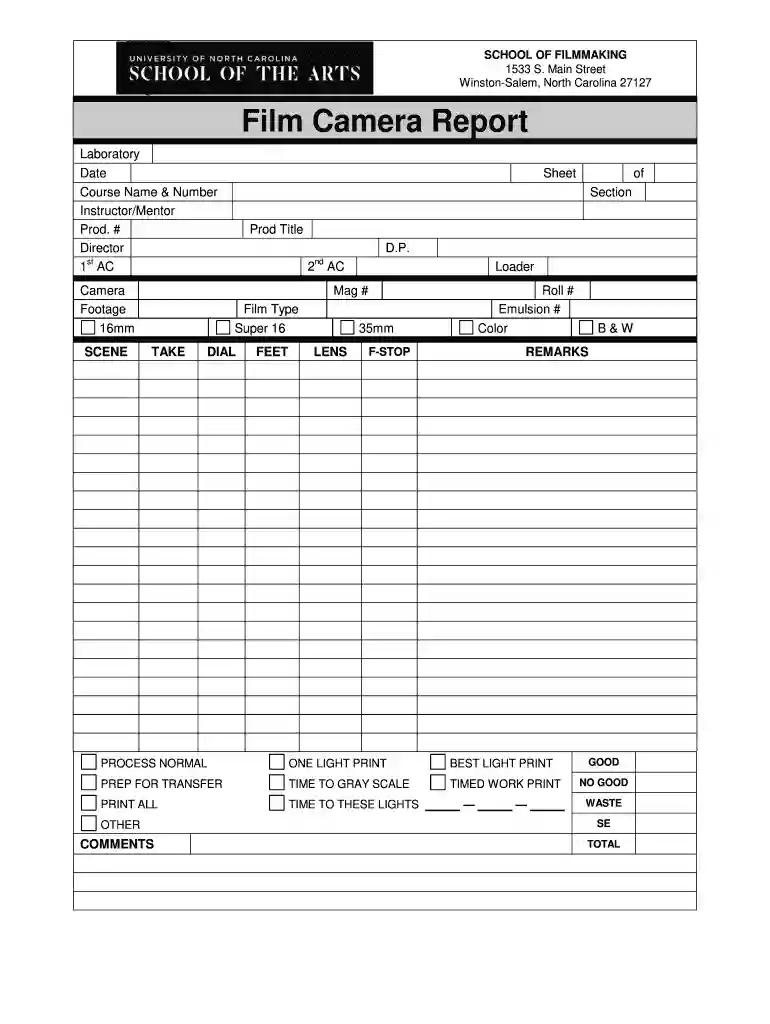
Type text, add images, blackout confidential details, add comments, highlights and more.

Draw your signature, type it, upload its image, or use your mobile device as a signature pad.

Send camera log template via email, link, or fax. You can also download it, export it or print it out.
A camera report template serves as a structured document that captures essential information during filming. This tool is crucial for filmmakers, allowing them to track settings, footage details, and production notes efficiently. It serves as an organized log that helps ensure that every aspect of filming is recorded, thus enhancing the quality and consistency of the final product.
Camera Settings: Documenting specific settings such as aperture, shutter speed, ISO, and lens information is vital for replicating or adjusting shots. This section can ensure technical consistency across multiple setups.
Footage Details: Tracking details about each scene filmed, including scene number, take number, duration, and shot type (e.g., wide, close-up) is essential for post-production. This information can help editors when selecting the best takes during the editing process.
Processing Instructions: Providing precise instructions regarding the film processing for various types of media, such as digital vs. physical film, ensures that team members follow the correct procedures for delivering the footage for editing.
Filling Out the Template: Start by entering all necessary information at the beginning of each shooting day. Ensure that all fields, such as scene descriptions and shot details, are filled out comprehensively to avoid confusion later.
Regular Updates: Maintain real-time updates during filming sessions. This can involve adding notes on any discrepancies, challenges faced, or changes in the original plan, which can be invaluable during the editing phase.
Collaboration: Utilize the camera report template collaboratively by ensuring that multiple crew members, such as the director of photography and camera operators, contribute to its completion. This collaborative effort can help ensure accuracy and completeness.
Documenting Filming Conditions: In a narrative project, if a director decides to adjust the lighting midway through shooting, noting this change on the camera report can inform the editing team about the filming conditions, helping them achieve continuity in the final cut.
Tracking Equipment Changes: Using different lenses can alter the look of shots, which should be documented in the camera report. This way, if a scene needs to be reshot, the exact lens used can be identified easily, maintaining visual consistency.
Digital tools for camera reports can streamline the filmmaking process significantly. They offer features such as:
Ease of Modification: Digital templates allow for quick adjustments without needing to redraft documents entirely. Templates can be customized, ensuring that they meet the unique needs of production.
Cloud Compatibility: Cloud integration means that team members can access the camera report from various devices, making it easier to update from different locations on set.
Automated Reminders: Some camera report apps offer notifications and reminders for entries - ensuring that nothing is overlooked during the hectic filming schedule.
While using a camera report template, it’s beneficial to understand some legal aspects. For example, having accurate log records can help in disputing claims related to copyright infringement or usage rights in post-production. Keeping thorough documentation ensures that all necessary permissions and procedures are adhered to according to industry standards.
By incorporating a camera report template into the filmmaking process, filmmakers can enhance their efficiency and clarity, paving the way for a smoother production cycle and a more polished final product.
At DocHub, your data security is our priority. We follow HIPAA, SOC2, GDPR, and other standards, so you can work on your documents with confidence.
CAMERA REPORT. Project Title. Director. Date. # aremaC .pO aremaC. Emulsion #. Film Stock. PROCESSING INSTRUCTIONS: Page # of . ROLL SCENE TAKE F/STOPRead more
The Scorecard assesses the comprehensiveness of an agencys BWC policy, captures local issues that influence policy (e.g., specific state regulations), andRead more
Detection is a core stealth mechanic in Operators. Various actions, objects, and equipment can raise suspicion, potentially leading to NPCs or cameras spottingRead more


