
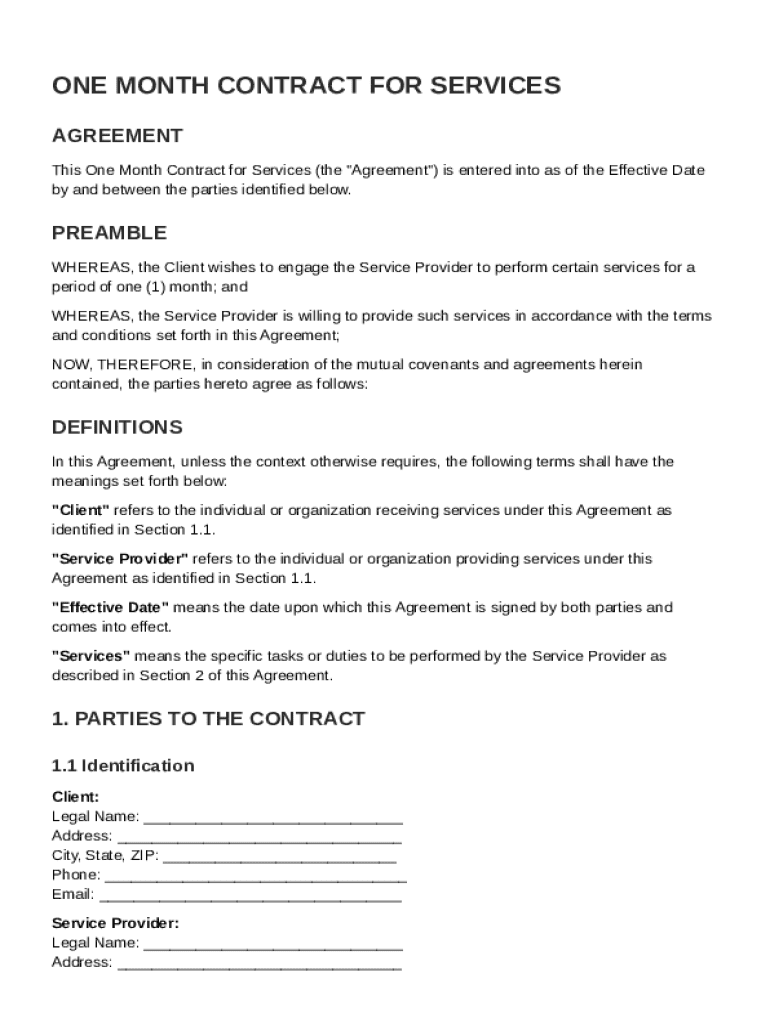







Definition and Meaning of One Month Contract Template
A One Month Contract Template is a standardized document that outlines the terms and conditions for services agreed between a client and a service provider for a duration of one month. It serves as a crucial tool to establish clear expectations and obligations for both parties involved. The contract typically includes sections covering:
- Parties Involved: Clearly identifies both the client and the service provider, along with their respective roles.
- Service Description: Details the specific services to be performed during the contract period.
- Payment Terms: Outlines the compensation structure, including payment schedules and any potential penalties for late payments.
- Confidentiality Obligations: Defines how sensitive information should be handled and preserved.
- Liability Limitations: Sets boundaries on the extent of liability each party is willing to accept for potential issues arising during the contract execution.
- Termination Conditions: Includes the scenarios under which the contract can be terminated before the end of the one-month period, along with the required notice period.
Understanding these components ensures that both parties are aware of their rights and responsibilities, minimizing the risk of disputes.
How to Use the One Month Contract Template
Utilizing the One Month Contract Template involves a systematic approach to ensure all critical elements are addressed adequately. The following steps provide a guide:
- Customization: Adapt the template to suit the specifics of the engagement by filling out the relevant sections such as names, dates, and services involved.
- Review of Terms and Conditions: Carefully go through each section to ensure clarity and mutual agreement with the set conditions.
- Input from Legal Advisers: If necessary, consult with legal advisers to confirm that the terms comply with applicable laws and regulations.
- Final Adjustments: Make any final modifications needed for clarity or compliance.
- Signatures: Both parties must sign the contract to render it legally binding.
By following these steps, parties can utilize the One Month Contract Template effectively to facilitate a smooth contractual relationship.
Key Elements of the One Month Contract Template
The One Month Contract Template comprises several fundamental components that ensure a comprehensive and enforceable agreement. Key elements generally include:
- Definitions Section: Clarifies specific terms used within the contract to avoid ambiguity.
- Scope of Work: Provides an explicit description of the services to be provided, including limitations and exclusions where applicable.
- Compensation Details: Establishes the amount payable for services rendered, along with any related terms such as bonuses or penalties.
- Confidentiality: Institutes guidelines for the handling of proprietary or confidential information during and after the contract period.
- Amendments Clause: Details how any changes to the contract should be agreed upon and documented, ensuring flexibility.
- Dispute Resolution: Outlines mechanisms for resolving any disagreements, which may include arbitration or mediation.
These components are integral to drafting a robust and clear contract that aligns with both parties' expectations and goals.
Who Typically Uses the One Month Contract Template
The One Month Contract Template is widely employed by various entities and individuals requiring short-term services. Typical users include:
- Freelancers and Consultants: Individuals offering specialized services on a short-term contract basis.
- Small Businesses: Entities that require temporary services without committing to long-term contracts.
- Corporations: Larger firms engaging in month-long projects or partnerships with other businesses.
- Event Planners: Individuals or companies coordinating specific events that need temporary services.
These users often find the template valuable due to its concise nature and ability to adapt quickly to various scenarios.


Steps to Complete the One Month Contract Template
Finalizing a One Month Contract Template requires thorough attention to detail. The following steps can guide users through the completion process:
- Fill Out Basic Information: Enter the names, addresses, and contact information of both the client and service provider.
- Define the Scope of Services: Clearly articulate the services to be provided, including deliverables, timelines, and responsibilities.
- Set Payment Terms: Specify the compensation amount, payment method, and schedule.
- Include Confidentiality Clauses: Detail any requirements for protecting confidential information exchanged between parties.
- Outline Termination Conditions: State the conditions under which the contract can be terminated and the required notice period.
- Review and Edit: Carefully review the document for accuracy, completeness, and adherence to legal standards.
- Sign and Execute: Once agreed upon, each party should sign and retain a copy of the contract.
Completing these steps ensures that the contract addresses all relevant aspects of the agreement, providing a clear framework for the working relationship.
Legal Considerations for the One Month Contract Template
Understanding the legal context of the One Month Contract Template is essential for its enforceability. Key legal considerations include:
- Compliance with Laws: Ensure alignment with federal, state, and local laws governing contractual agreements.
- Legally Binding Signatures: Require authorized signatures from both parties to affirm the contract's validity.
- Termination and Breach Clauses: Define scenarios constituting a breach and the legal remedies available.
- Governing Law: Specify which jurisdiction's laws will govern the contract, typically based on the location of the service provider or client.
Addressing these legal aspects reinforces the contract’s integrity and minimizes potential legal disputes.
State-Specific Rules for the One Month Contract Template
Different states may have unique regulations influencing contracts of this nature. Factors to consider include:
- Contractual Limitations: Variations in what can be legally contracted within different jurisdictions.
- State-Specific Disclosure Requirements: Necessary disclosures that might apply, particularly relating to service standards or consumer rights.
- Regulatory Compliances: Adherence to industry-specific regulations that differ by state.
Acknowledging these state-specific rules ensures that the contract is compliant with varying jurisdictional requirements, fortifying its enforceability across state lines.
Software Compatibility for the One Month Contract Template
For enhanced workflow and document management, the One Month Contract Template is designed to integrate with various software systems. Important compatibility features include:
- Cloud-Based Platforms: Supports major cloud storage services like Google Drive, Dropbox, and OneDrive for easy document access and sharing.
- Editing Tools: Compatible with standard word processors such as Microsoft Word and Google Docs, and specialized PDF editors.
- E-Signature Software: Works seamlessly with electronic signature services like DocHub, facilitating expedited signing processes.
Using compatible software ensures that the contract template can be efficiently managed, shared, and executed digitally, promoting ease of use and increased productivity.




