
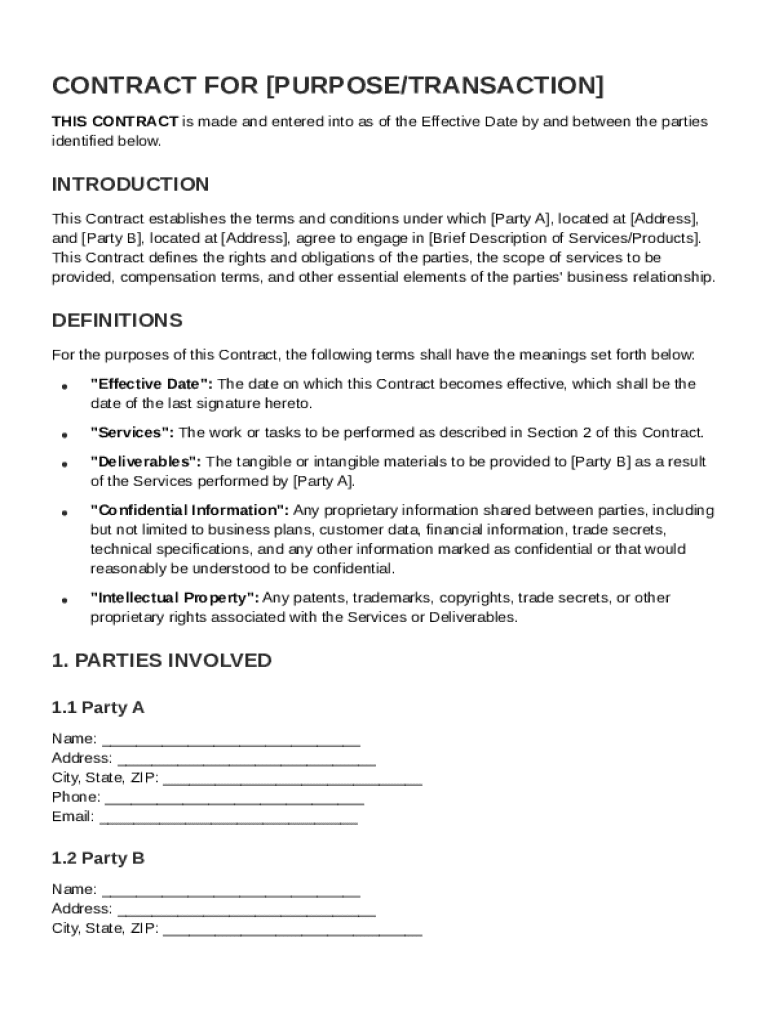







Definition & Meaning
The "Sheets Contract Template" is a standardized document designed to outline the terms and conditions of an agreement between two parties, often referred to as Party A and Party B. This template typically includes sections detailing the scope of services, payment terms, and confidentiality obligations. It is used to establish clear expectations and responsibilities, reducing misunderstandings and disputes. By providing a structured format, the template ensures that all necessary legal components are addressed, making it a useful tool for both individuals and businesses engaging in transactions or partnerships.
Key Components of a Contract
- Definitions: Clarifies the terminology used within the document to ensure mutual understanding.
- Scope of Services: Describes the specific duties and services each party is expected to perform.
- Payment Terms: Details how and when payments will be made, including penalties for late payments.
- Confidentiality Obligations: Outlines the measures that parties must take to protect sensitive information.
- Intellectual Property Rights: Specifies ownership and usage rights over any intellectual property shared or created during the agreement.
Steps to Complete the Sheets Contract Template
Completing a Sheets Contract Template requires attention to detail to ensure all necessary information is included. Here is a step-by-step process:
- Identify the Parties: Enter the names and roles of the entities involved in the contract.
- Define the Terms: Clearly state the services or products involved, along with the responsibilities of each party.
- Set Payment Details: Specify the payment amount, schedule, and acceptable methods.
- Outline Confidentiality Measures: Include provisions for the protection of proprietary information.
- Address Termination Conditions: Describe how the contract can be terminated by either party, including notice periods and penalties.
- Review and Sign: Both parties should carefully review the contract, making amendments if necessary, before signing.
Common Mistakes to Avoid
- Vague Terms: Ensure all terms are precisely defined to prevent future disputes.
- Incomplete Sections: Double-check that no section is left unintentionally blank.
- Failure to Incorporate Amendments: Keep a record of all changes agreed upon during negotiations.
Legal Use of the Sheets Contract Template
The Sheets Contract Template is legally binding once executed by both parties, provided it adheres to the applicable laws and regulations. It is particularly effective for:
- Simple Agreements: Suitable for straightforward transactions or partnerships that do not involve complex legal requirements.
- Documentation for Record-Keeping: Useful for maintaining a record of terms agreed upon, which can be referred to in case of disputes.
Legal Considerations
- Jurisdiction: The contract should specify the legal jurisdiction governing the agreement.
- Compliance with Laws: Parties must ensure that the contract abides by federal and state laws relevant to the agreement.
Examples of Using the Sheets Contract Template
The Sheets Contract Template can be applied in a variety of scenarios, showcasing its versatility:
- Freelance Work Agreement: Clearly outlines the scope of work, deadlines, and payment terms for freelance projects.
- Business Partnerships: Specifies roles, responsibilities, and profit-sharing arrangements between partners.
- Service Agreements: Used for detailing terms between a service provider and a client, such as maintenance or consulting services.
Real-World Scenarios
- Event Planning: Details the responsibilities of an event planner and the client, including deadlines and payment structures.
- Software Development Projects: Outlines deliverables and intellectual property rights between a software developer and a client.
Key Elements of the Sheets Contract Template
Certain elements are crucial for the effectiveness and legality of the Sheets Contract Template:
- Effective Date: Specifies when the contract becomes active.
- Duration: States the length of time the contract will be in force.
- Conflict Resolution: Offers methods for resolving disputes, such as mediation or arbitration.
- Liabilities and Indemnities: Details each party's liabilities and the indemnification process.
- Amendment Procedures: Explains how modifications to the contract can be enacted.
Who Typically Uses the Sheets Contract Template
This template is used by a diverse range of individuals and organizations, including:
- Small Business Owners: Ideal for managing supplier and client relationships.
- Freelancers: Helps in outlining project terms and securing payments.
- Legal Professionals: Utilized in drafting preliminary agreements before a comprehensive contract is drawn.
- Non-Profit Organizations: Used to structure agreements with donors and volunteers for projects and events.


Software Compatibility
The Sheets Contract Template is compatible with several software platforms, ensuring flexibility and ease of use:
- Google Sheets: Allows for collaborative editing and sharing within the Google Workspace environment.
- Microsoft Excel: Suitable for users preferring a Microsoft ecosystem.
- PDF Editors: Use tools like Adobe Acrobat for sharing finalized, non-editable versions of the contract.
Integration with Other Software
- Cloud Services: The template can be integrated with cloud storage platforms like Google Drive and Dropbox for secure access and sharing.
- CRM Software: Incorporate the contract into customer relationship management systems to streamline business operations and communications.
State-Specific Rules for the Sheets Contract Template
While the Sheets Contract Template offers a general framework, certain state-specific rules might apply:
- Governing Law Clauses: Contracts must specify applicable state laws that govern the terms.
- Specific Clauses Required by States: Some states may mandate inclusion of certain clauses, such as non-compete agreements.
Considerations for U.S. Jurisdictions
- State Taxes and Levies: Depending on the location, agreements may need to account for regional taxes.
- Regulatory Compliance: Align contracts with state-specific regulations such as business licenses and operational permits.




