






Definition & Meaning
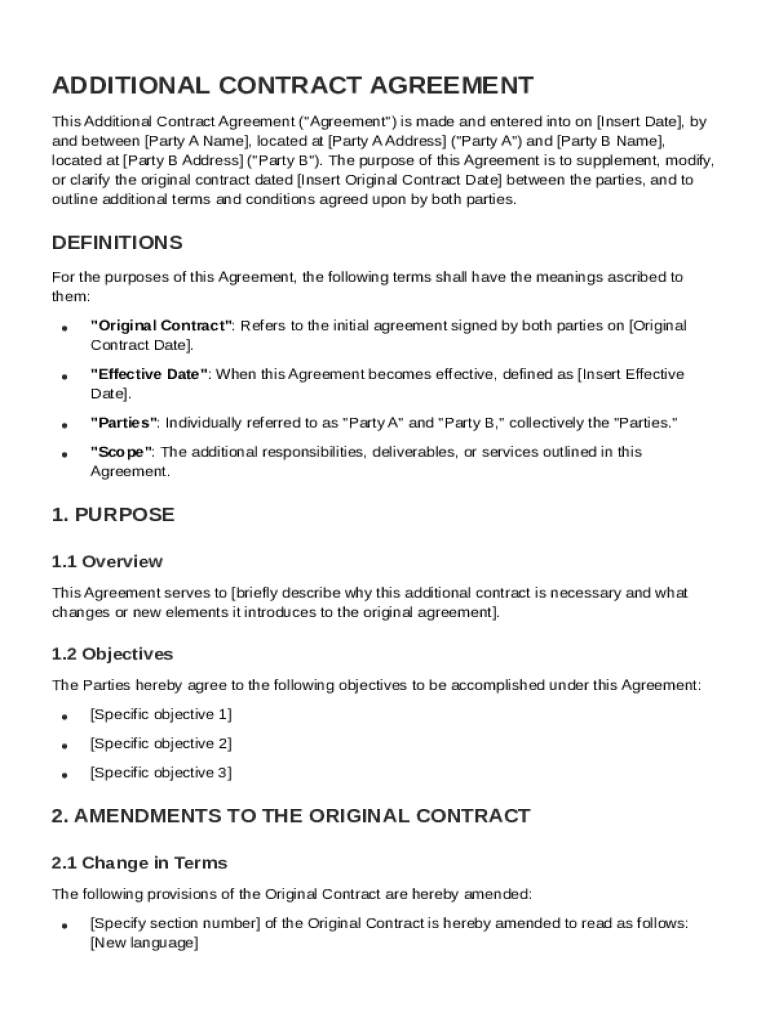
The Additional Contract Template is a legal document utilized to supplement an existing contract between two parties. It is designed to formally outline any new terms, responsibilities, and objectives that go beyond those specified in the original agreement. Typically, it includes amendments to essential elements such as payment schedules and deliverable timelines and addresses provisions like confidentiality, compliance with laws, and dispute resolution processes. This template serves as an essential tool to ensure all modifications are documented and legally binding, reinforcing that alongside the original contract, it constitutes the entirety of the agreement between parties involved.
Key Elements of the Additional Contract Template
Each Additional Contract Template incorporates several critical components to ensure comprehensive legal coverage:
- Amendments to Initial Terms: Clearly defined changes to initial agreements regarding project scope, deadlines, or obligations.
- Payment Schedules and Deliverables: Adjustments in payment terms and timelines for deliverables to accommodate new agreements.
- Confidentiality Clauses: Additional confidentiality provisions to protect sensitive information exchanged between parties.
- Compliance and Regulatory Considerations: Statements ensuring adherence to relevant laws and regulations, tailored to the specifics of the new terms.
- Dispute Resolution: Updated mechanisms for resolving any disagreements arising under the amended terms.
- Governing Law: Identification of the jurisdiction whose laws will govern the revised agreement.
Steps to Complete the Additional Contract Template
-
Review the Existing Contract: Before completing the template, thoroughly review the original contract to understand existing terms and obligations.
-
Identify Amendments: Clearly outline any changes or additions to the original agreement, ensuring alignment with both parties' current expectations.
-
Draft New Terms: Use precise language to draft the new terms and conditions, including any modifications to payment structures or timelines.
-
Consult Legal Counsel: It may be beneficial to consult with a lawyer to ensure all legal aspects are adequately covered.
-
Obtain Agreement from Both Parties: Both parties should review the completed template, making sure all sections accurately reflect agreed-upon changes.
-
Sign and Date: The final step involves both parties signing and dating the document to make it legally binding. This may also be done electronically using platforms like DocHub.
Who Typically Uses the Additional Contract Template
The Additional Contract Template is commonly used by:
- Businesses and Corporations: Companies often use it to make adjustments to partnerships, vendor agreements, or client contracts due to evolving business needs.
- Freelancers and Consultants: To update scope of work or fee arrangements as projects develop.
- Legal and Compliance Professionals: Ensures all procedural updates remain compliant with legal standards.
- Real Estate Agents: To modify terms in leasing agreements based on tenant or market changes.
- Project Managers: To update project contracts as they adapt to new requirements throughout the project lifecycle.


Legal Use of the Additional Contract Template
Utilizing the Additional Contract Template ensures that any changes to an existing contract are legally recognized. For legal validity:
- Clear and Concise Language: Legal jargon should be minimal, but necessary technical terms must be included for precision.
- Signatory Authority: Ensure all signatories have the authority to bind their respective parties to the revised terms.
- Compliance with Relevant Laws: Modifications should adhere to applicable local, state, or federal regulations to avoid potential legal challenges.
- Integrity of Initial Contract Maintained: While adding new terms, the fundamental nature of the original agreement should remain intact.
Important Terms Related to Additional Contract Template
- Amendment: A formal change or addition to an existing contract.
- Confidentiality Agreement: A clause or document ensuring sensitive information remains private.
- Governing Law: The jurisdiction that decides how the contract is interpreted.
- Indemnification Clause: A provision where one party agrees to protect the other from legal liability.
- Breach of Contract: A violation of any of the terms agreed upon in the contract.
Software Compatibility
The Additional Contract Template can be integrated and used with various software tools to streamline the documentation process:
- DocHub: Offers functionalities for editing and electronically signing documents, directly adaptable for contract templates.
- Google Workspace: Allows seamless importing and exporting of documents, simplifying collaboration.
- Microsoft Office: Compatible with DOC and PDF formats for easy integration and editing.
- Dropbox and OneDrive: Supports secure sharing and storage of completed templates.
Digital vs. Paper Version
Choosing between digital and paper versions of the Additional Contract Template depends on the needs and preferences of the user:
- Digital Version:
- Advantages include easy editing, quicker distribution via email, and cost savings on printing.
- Platforms like DocHub offer electronic signatures, making the digital version legally binding.
- Paper Version:
- Preferred by traditionalists or when local regulations require hard copies.
- Offers a tactile review process, which some parties favor for contracts.
Exploring both options allows users to determine the best fit for their specific workflow and legal needs.